Marketing Channel Rule for "Social Traffic" | Adobe Higher Education
Skip to main content
felixa86813896
Level 2
August 23, 2018
Respondido

Marketing Channel Rule for "Social Traffic"

  • August 23, 2018
  • 6 respostas
  • 4884 Visualizações

Hi There,

We have currently set a marketing channel rule for "Social Traffic" to be as
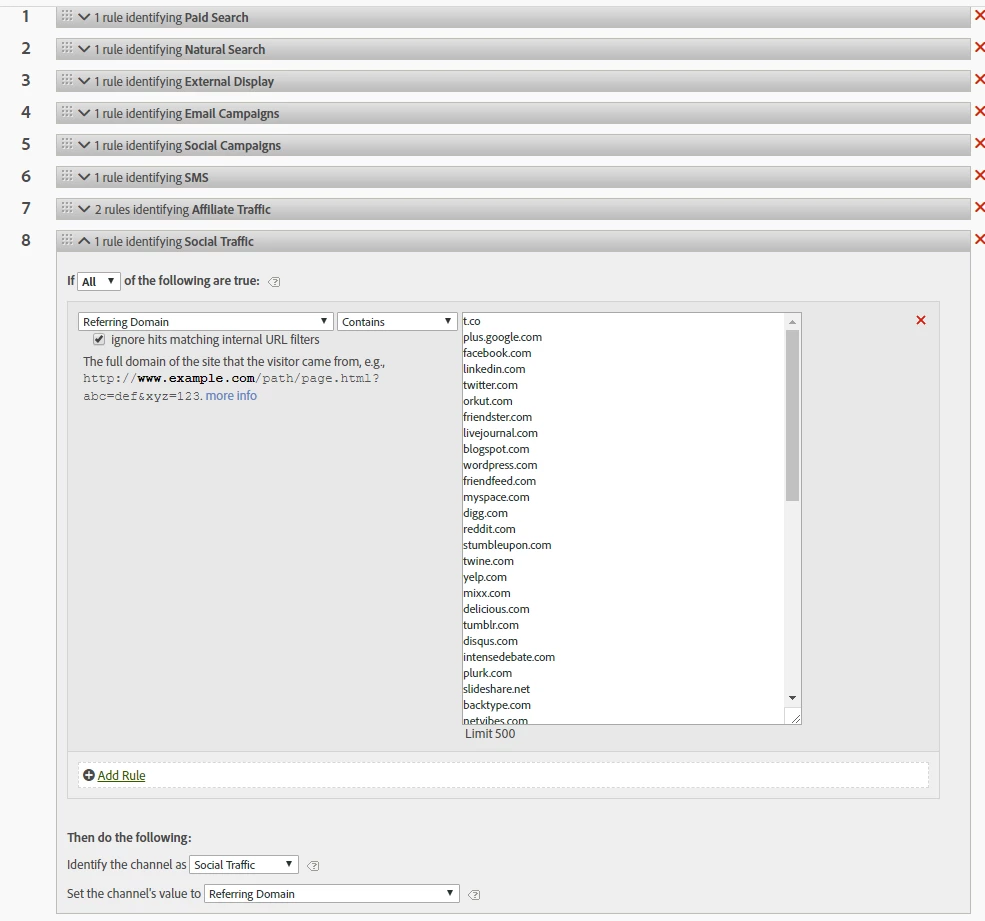
This is I assume the very generic rule for identifying social traffic,

Problem is, when we are trying to look at "Last Touch Channel" Dimension inside workspace, for some reason it picks up the public URL as social traffic?

e.g. (instead of showing "facebook.com" or "linkedin.com" it shows "www.homepage.com" or "www.secondhomepage.com")

I tried to break it down by entry page but it still showing the same homepage URL. And also the volume for those public URL is actually quite high and wondering if there is any fix to this?

In addition, we have also even add www.homepage.com and www.secondhomepage.com to s.linkInternalFilters ​setting inside scode library.

Regards,

Felix

Este tópico foi fechado para respostas.
Melhor resposta por aliskink1

Hey Felix, just checking, have you also set your own site domain(s) in the Internal URL Filters settings (Admin > Report Suites > General > Internal URL Filters)? 

Or is there any chance that your website domain matches one of the 'social' site strings? e.g. a website called www.camplurk.com contains 'plurk.com' so would satisfy the condition. 

6 Respostas

aliskink1Resposta
Level 2
August 24, 2018

Hey Felix, just checking, have you also set your own site domain(s) in the Internal URL Filters settings (Admin > Report Suites > General > Internal URL Filters)? 

Or is there any chance that your website domain matches one of the 'social' site strings? e.g. a website called www.camplurk.com contains 'plurk.com' so would satisfy the condition. 

felixa86813896
Level 2
August 27, 2018

Hi aliskink2

That is really interesting, the url actually hasn't been added yet, the reason why it hasn't been added there yet I believe is because we thought that it would be sufficient to include the url inside the scode library on s.linkInternalFilter setting.

If that is not the case, would you be able to help me clarify what is the difference between these 2 setup?

does s.linkInternalFilter exclusively for recognising exit rates whilst the one in UI is for marketing channel processing rule?

Thank you again for the the reply.

Level 2
August 28, 2018

Hi felixa86813896​ yes, the Internal URL Filters was more of a 'belt & braces' idea.  I think it only affects the Referrers reports, but I suspect the Marketing Channels processing rules might also use the same information.   It would certainly be a good idea to add your domain(s) to the Internal URL Filters anyway - it would do no harm, and it might fix the Marketing Channels issue.   - Let us know if it helps.

felixa86813896
Level 2
August 31, 2018

Hi aliskink2​,

Sorry for the long reply, I had to test if the Internal URL Filters solution by setting at least 2 days and see the reporting again, when I checked it today it seems like its still picking up public website as the last touch channel "social traffic" section.

Any thoughts on this?

PratheepArunRaj
Community Advisor and Adobe Champion
August 31, 2018

Dear Felixa,

If you have added the domains in Internal URL Filters, you should not see the traffic from the domains under Last Touch Channel.

I guess the secondary dimension you are adding is 'Referring Domain'. Kindly do not use it, Marketing Channel works way different than Referring Domain by itself.

Your secondary dimension should be 'Last Touch Channel Details'. Let me know if you still see your added domains there!

If not, bang, you are on your own.

Thank You

Arun

Thank You, Pratheep Arun Raj B (Arun) | Xerago | Terryn Winter Analytics
felixa86813896
Level 2
September 4, 2018

Thank you guys,

It seems like the Internal URL Filters is the problem