Marketing Channel Processing Rule Setup - Please Verify | Community
Skip to main content
Level 3
May 4, 2018
Solved

Marketing Channel Processing Rule Setup - Please Verify

  • May 4, 2018
  • 32 replies
  • 19458 views

Hi Guys,

I've followed the below steps for Marketing Channel Processing Rules setup.

Kindly review the below steps.

  1. Click on Admin --> Report Suites
  2. Selected the 'report suite id' for creating marketing channel
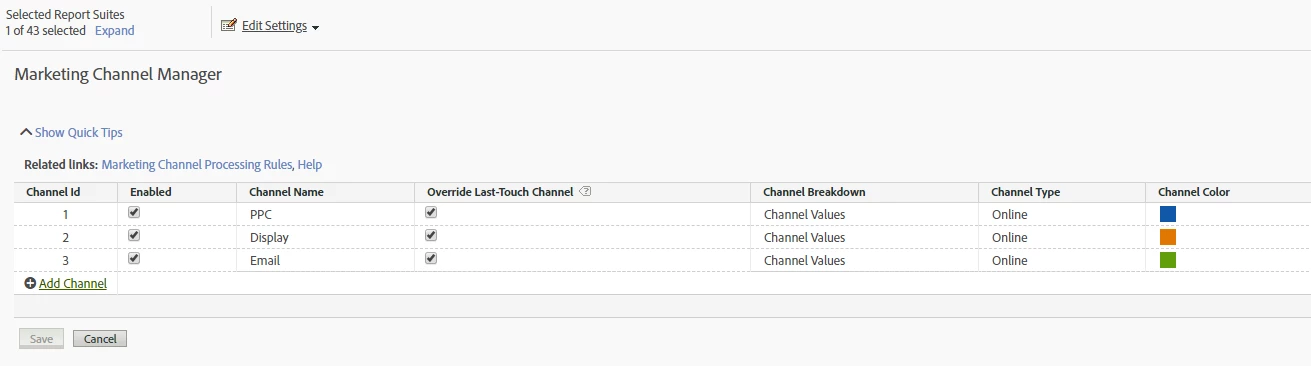
  3. Edit Settings --> Marketing Channels --> Marketing Channel Manager
  4. Name the channel as below

5. Clicked on Related Links and configured rules for the below URLs as:

http://www.mysite.com/?utm_source=google&utm_medium=ppc&utm_campaign=motor_2018

http://www.mysite.com/?utm_source=RTB&utm_medium=display&utm_campaign=motor_remarketing&utm_content=add_2

http://www.mysite.com/?utm_source=CRM&utm_medium=email&utm_campaign=motor&utm_content=winback

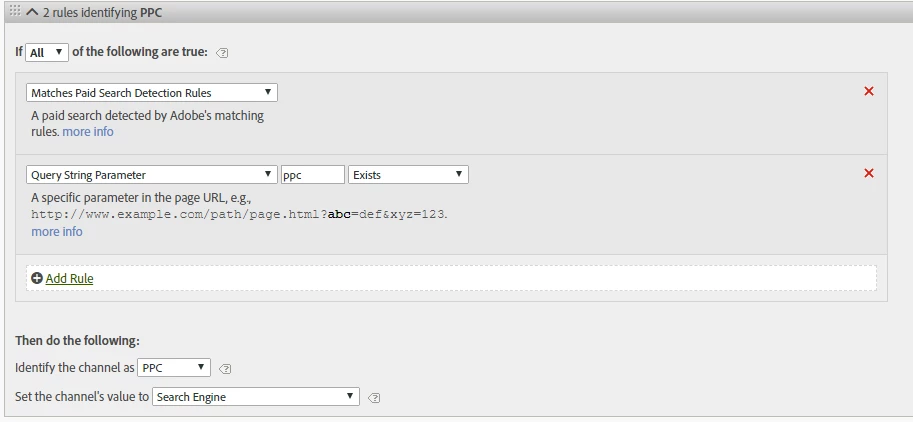
PPC - Processing Rules:
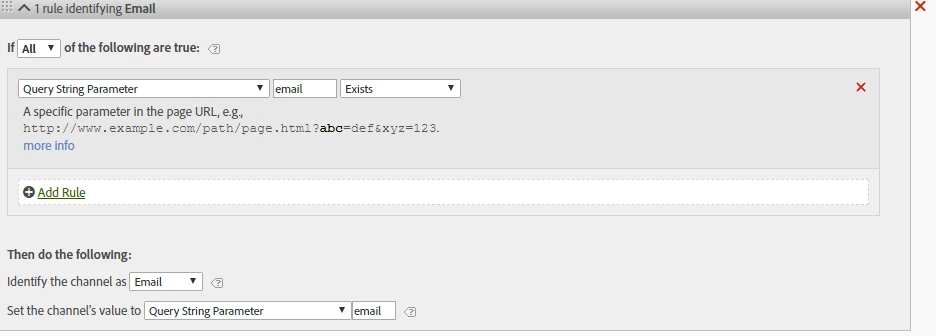
Email - Processing Rules:
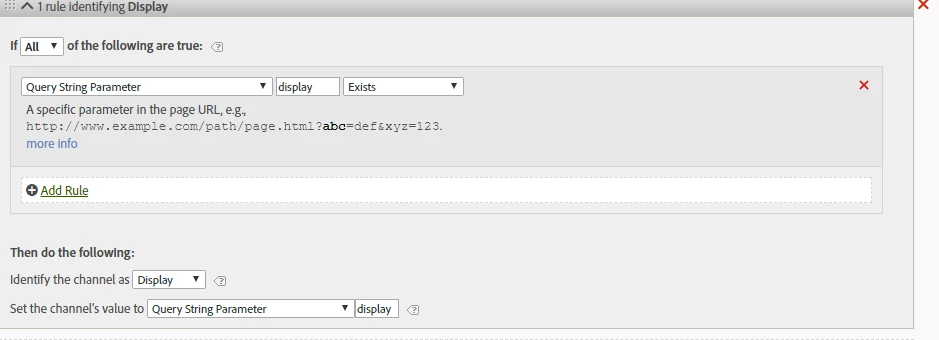
Display - Processing Rules:
This post is no longer active and is closed to new replies. Need help? Start a new post to ask your question.
Best answer by Urs_Boller
  • the main problem with the rules provided as screenshots are: you mixed up „query string parameter“ and „value of the parameter“

let me explain: given the url

mysite.com/landingpage.html?utm_source=google&utm_medium=ppc&utm_campaign=motor_2018

your parameters is eg. „utm_source“ and the value is „google“ (i marked the parameters)

in your rules, you need to check for the „parameters“ (not the values). looking at the pcc-rule you need to change the following:

  • conditions: change it to „query string parameter (utm_medium) equals (ppc)“ (change from „exists“ to „contains“
  • set channel value: change to „query string parameter (utm_medium)“

the same needs to be done with the other rules in a similar way...

i hope that helps

32 replies

Rydal_Williams
Level 4
May 17, 2018

Are you trying to figure out if this is working or are you having issues?

prathiv23Author
Level 3
May 17, 2018

Hi Rawsoft​ - Yes,can you please let me know if this is correct order for setting up processing rules ie. PPC followed by Email & Display

Also, please review the setup followed in the 3 screenshots.

Thanks

PV

Urs_Boller
Community Advisor
Community Advisor
May 17, 2018

i think the steps are ok, but your processing rules might not trigger. you need to change the conditions to identify the utm_medium!

condition:

“query string parameter“ „utm_medium“ equals „ppc“ (or “email“/„display“)

and you need to set the channels vlaue to „utm_medium“ (i would even use something else like the full query string or a concatenated value of the parameters...)

prathiv23Author
Level 3
May 21, 2018

Hi urs.boller​ - Thanks for your help.

I'm sorry, not able to follow you.

Rule doesn't have the option to set something like "utm_medium equals"

PLEASE HELP.

Thanks,

PV

Gigazelle
Adobe Employee
Adobe Employee
May 30, 2018

Rule order only comes into effect if you have hits that could match multiple processing rules. With your rules, the only way that could happen is if the end user has more than one query string parameter.

Urs_Boller
Community Advisor
Urs_BollerCommunity AdvisorAccepted solution
Community Advisor
May 31, 2018
  • the main problem with the rules provided as screenshots are: you mixed up „query string parameter“ and „value of the parameter“

let me explain: given the url

mysite.com/landingpage.html?utm_source=google&utm_medium=ppc&utm_campaign=motor_2018

your parameters is eg. „utm_source“ and the value is „google“ (i marked the parameters)

in your rules, you need to check for the „parameters“ (not the values). looking at the pcc-rule you need to change the following:

  • conditions: change it to „query string parameter (utm_medium) equals (ppc)“ (change from „exists“ to „contains“
  • set channel value: change to „query string parameter (utm_medium)“

the same needs to be done with the other rules in a similar way...

i hope that helps

prathi4023
June 7, 2018

Thanks urs.boller​ - I have configured Marketing Channel Processing Rules

Just one query - how to test this lower environment (DEV / QA )

Regards

PV

jeff_bloomer
Community Advisor and Adobe Champion
June 7, 2018

This is the correct answer.  I will have to admit, though, both Marketing Channel Processing Rules and traditional Processing Rules can definitely create some confusion when you're first starting out.

prathiv23Author
Level 3
June 8, 2018

Hi @jeff_bloomer, urs.boller​, Gigazelle

We are noticing some numbers in the 'Marketing Channel Overview' report

Please let us know which metrics will be suitable for display, email and ppc campaigns.

At present, we have used Click-Through  metrics. (refer screenshot attached)

And what does  '300' meant in the Click-Through metrics ? (refer screenshot attached)

- PV

Urs_Boller
Community Advisor
Community Advisor
June 8, 2018

there is a good blog article about marketing channels, maxbe that helps: Refresher on Adobe Analytics' Marketing Channels Reports: Part I | Adobe Blog