Marketing channel populated incorrectly | Community
Skip to main content
Level 3
July 23, 2021
Solved

Marketing channel populated incorrectly

  • July 23, 2021
  • 4 replies
  • 3835 views

Hi to all,


I have a problem and I don't know the cause.


I have this setup where marketing channel "offline" is populated if in query string there is the word "offline"
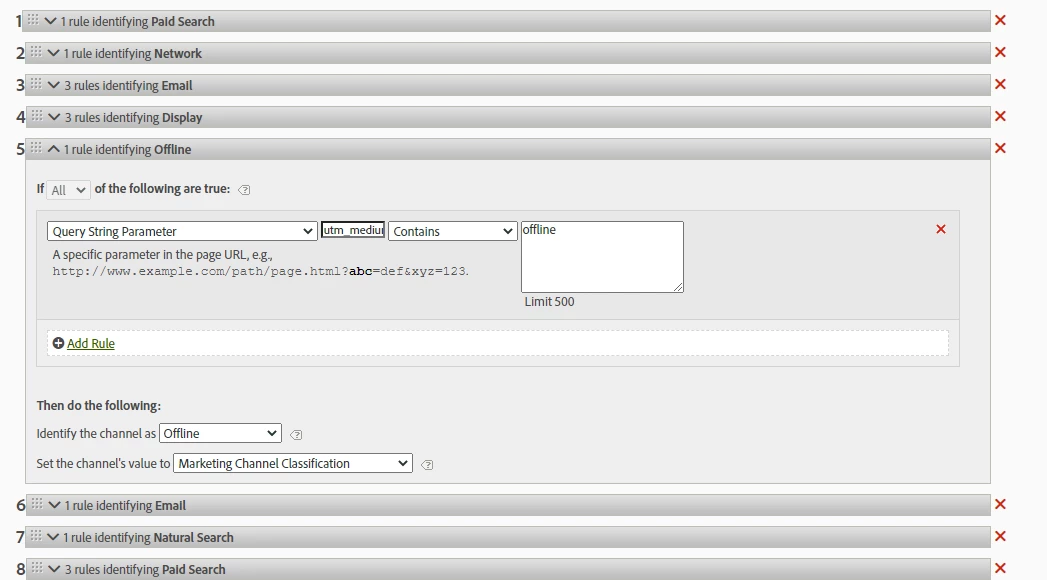


But in the marketing channel report i saw that this traffic goes to "direct" channel.
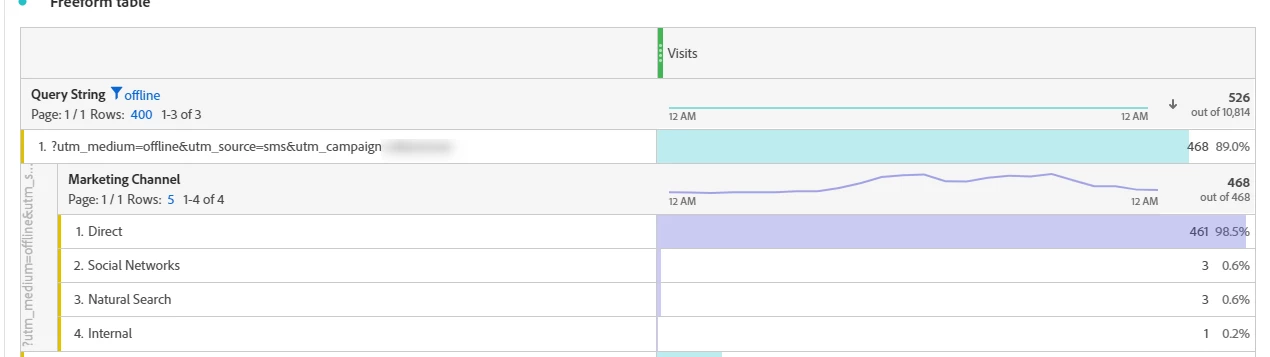


how is it possibile? do you have any ideas?


thk,

francesco


This post is no longer active and is closed to new replies. Need help? Start a new post to ask your question.
Best answer by yuhuisg

Instead of using the Visits metric, what does the table show when you use the Marketing Channel Instances metric?

4 replies

yuhuisg
Community Advisor
yuhuisgCommunity AdvisorAccepted solution
Community Advisor
July 24, 2021

Instead of using the Visits metric, what does the table show when you use the Marketing Channel Instances metric?

Level 3
July 26, 2021

Hi @yuhuisgm

thk for reply, event with Marketing Channel Instances metric I see the problem 😞 


do you have any ideas?

Level 2
July 26, 2021

As I can see in the workspace you are using "Visit" metric in Marketing channel report.If we are looking into a marketing channel report in Adobe Analytics, the Adobe recommends using only the "Marketing channels instances" metric.


This metric measures the number of times a marketing channel was defined in an image request, including standard page views and custom link calls. Does not include persisted values.

https://docs.adobe.com/content/help/en/analytics/components/marketing-channels/analyze-mc.html


Instances show the total number of times that a user clicked to your website and the Marketing Channel changed. Similar to its use in other analytic tools, the Marketing Channel persists beyond the initial click-through until the user clicks through from another campaign or referring domain. Visits here means the total number of visits where the most recent Marketing Channel was, such as email. Therefore, Marketing Channel Instances here gives the total number of clicks from email.

Level 2
July 26, 2021

Have you ensured you've typed in "utm_medium" rather than "utm_medium=" ?

Level 3
July 26, 2021
yes, i checked 😞 I typed "utm_medium"
July 28, 2021

We don't see your direct rule but I take it, it is below this one looking at your screenshot. Are you looking at a date range that is post the change/creation of the rule?

Level 3
July 28, 2021
Hi tom and thk for reply 🙂 I never change the rule so I don't know why this happen now. The expiration is visit and allocation "most recent". BTW I fixed changing the processing rule using "tracking code" instead "query string" 🙂