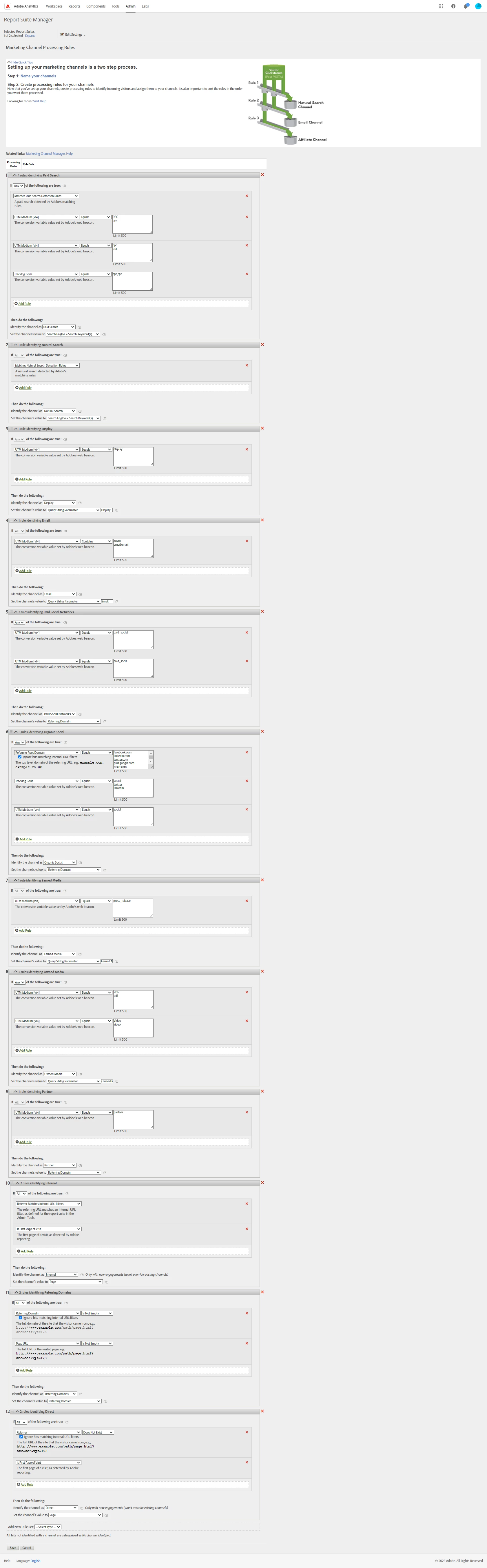
Depending on your Marketing Channel expiry (could be 30 days, could be 7 days, could be 6 months...), you will have a period where the existing tracking will still be there for users already sorted... (for instance, if a user is funneled into Paid Search, then comes back direct, the paid search will take precedence until your expiry period has elapsed - well assuming that you have the default setting on Direct to not override the last touch channel.. )
If it were me, I would leave the three rules as separate rules, so that I could still set the "Channel Value" per rule.. either using your "Display" param, or maybe your UTM Medium, etc.... (I really wish there were more controls around setting the channel value)
By creating a new Channel, you can let the other channels just sort of gradually fade (no new data should be added to them, but they will be there for Historical purposes).
You can create a new channel by going into Marketing Channel Manager and adding a new Channel here ("Paid Media").. then in the processing rules, change the three rules to Identify the Channel as "Paid Media", If you want, you can also change around the processing order to make sure that all paid media is processed around the same time in the execution. After making these changes, you will see a warning symbol next to the three channels that no longer have rules, but this is expected... since you explicitly removed the rules in favour of a new Channel; and if you ever want or need to go back to having them split up, the channels are there and waiting for you... and you will have the separate rules that can be set back as well without a lot of re-work.
Anyway, just my two cents...
Update: Oh, I forgot to address your last question...
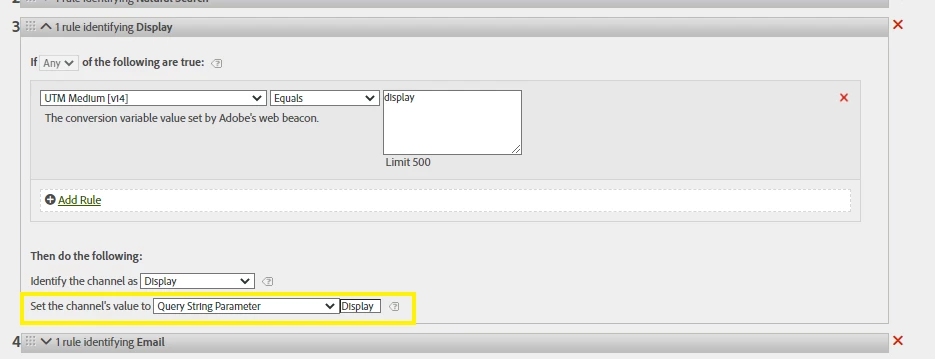
Right now, "Set the Channel's value to Query String Parameter Display" mean that this is looking for a query string called "Display" as in:
domain.com/page?domain=something
"Something" will be the value that is set....
It looks like your UTM Medium is being set with a value of "display" since that is what your rule is looking for, or for UTM Medium being set to "cpc" for instance in other rules:
domain.com/page?utm_medium=display
domain.com/page?utm_medium=cpc
domain.com/page?utm_medium=ppc
If you use:
"Set the Channel's value to Query String Parameter utm_medium"
This will get the values of "display" or "cpc" or "ppc" etc... I think this is really what you are looking for....
Also, I noticed (by squinting, the image was rather large and kind of blurry when I zoomed in - likely how Experience League handled the image), it looks like you may be using:
"Set the Channel's value to Search Engine + Search Keyword(s)"
Adobe hasn't been able to get keywords reliably since search engines went to SSL certificates... so this will result in a lot of results that look like:
n:Google:::empty::
You might as well change these to something better.. you may just want to use "Search Engine", or your UTM Medium, etc....