Mapping for iOS context data | Community
Skip to main content
Level 2
July 7, 2025
Question

Mapping for iOS context data

  • July 7, 2025
  • 3 replies
  • 1432 views

Hi all,

We’re experiencing an issue in our production environment where iOS orders are not being correctly tracked under the Platform (eVarX) dimension in Adobe Analytics. Instead, the data is falling under Unspecified. However, android traffic is being tracked correctly.

Here's our existing setup:

We’re using Processing Rules to map platform context data to eVarX. Here's the screenshot for your reference.
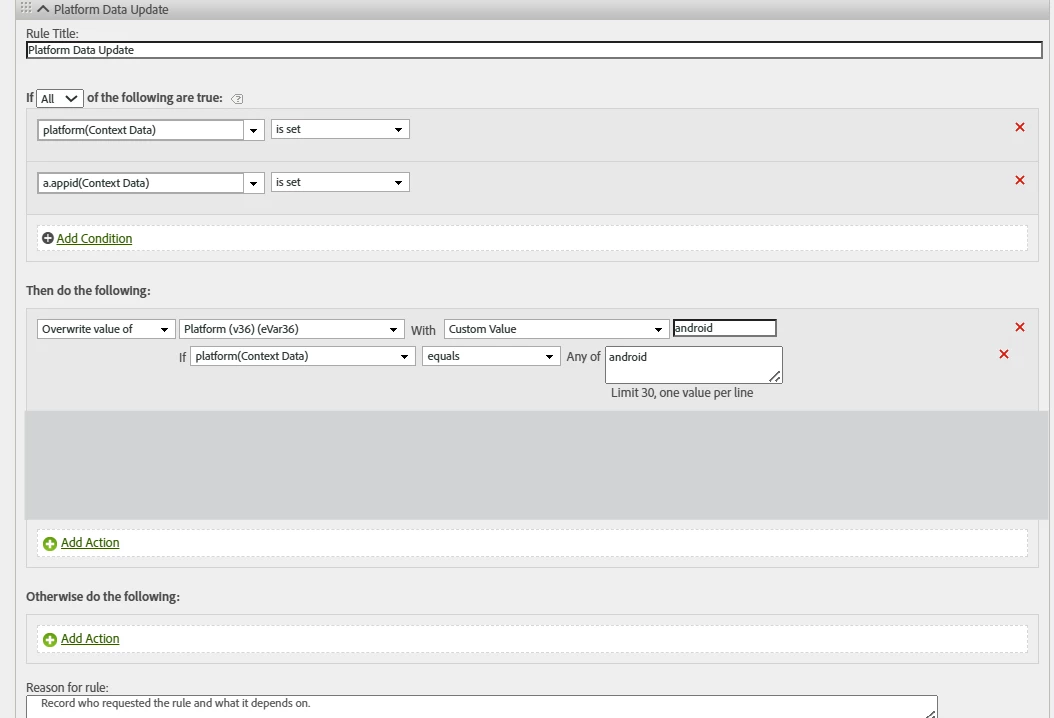


Despite this configuration, iOS traffic does not get mapped and appears under "Unspecified", while Android works as expected. We do not have a staging environment, so this is directly affecting our production reporting.

Has anyone else faced this issue with iOS mapping in processing rules?

Are there any debugging best practices you'd recommend to validate the exact context data values received?


Appreciate any insights or suggestions.
Thank you in advance!


3 replies

purnimajena
Level 3
July 7, 2025

Hi @gav_r ,

Add a separate condition in the same rule to handle platform == ios, or use the context data value directly without conditions:

Example:
Set eVar36 = %platform% using "Value from Context Data" to capture both Android and iOS automatically.

Also, verify in Adobe Experience Platform Debugger or Charles Proxy that iOS hits are sending the platform context data

Hope It helps!


Gav_RAuthor
Level 2
July 7, 2025

Hello @purnimajena,

Thanks for your input.

I’ve made the changes and added a condition to handle iOS. I placed an order from an iOS device, but it's still showing under "Unspecified."


purnimajena
Level 3
July 7, 2025

Okay , In this case can you check Both platform and a.appid must be present in the same hit for the rule to apply. If either is missing, the rule won’t fire.
Also processing rules are case sensitive , If the app sends iOS or IOS, but your rule checks for ios, it won’t match.

try changing the rule for example platform contains "ios"/platform contains "iOS"/
platform contains "IOS"

and test if it resolves the issue .
unspecified generally comes when the eVar is not set on the hit where it is expected .


KumarRishii
Level 5
July 7, 2025

You can Update the rule to include a second condition:

If platform equals "ios" → set eVarX = "ios"

Debugging Tips:

Use Adobe Experience Platform Debugger to verify if the platform context data is being sent correctly.
Use Charles Proxy to inspect the beacon data on mobile.
Temporarily map platform directly to a test eVar to capture raw values.

Also Checks:

Ensure case sensitivity (e.g., "ios" vs "iOS").
Make sure the SDK is sending the platform variable.
Confirm no earlier rule is overwriting eVarX.

Let me know if you'd like help rewriting the rule or validating a beacon payload.

Gav_RAuthor
Level 2
July 7, 2025

Hi @kumarrishii.,

The second condition has been set to the rule for ios and i have also verified with the App Logs for the case sensitivity - it is "ios".

Could you please help us rewriting the rule? Let me know if you need any further info from my end.

Thanks much!

KumarRishii
Level 5
July 7, 2025

@gav_r  Add a Separate Processing Rule for iOS

IF platform (context data) equals "ios"
THEN set eVarX to "ios"

Processing rules are case-sensitive — make sure the value from the iOS app is exactly "ios" (not "iOS" or "IOS").

Let me know if this works.

Jennifer_Dungan
Community Advisor and Adobe Champion
July 7, 2025

Do you have AEP Assurance (aka Griffon) installed in your app? This would make it a lot easier to see what is happening in real-time while testing your apps.


Not only will it show you all the data points (including context variables) that are being sent to Adobe, it will show you the results of the Post Processing...


This way you can check the status of the "app id" and if it's on each call, and also what is being sent in your platform context variable, and if the case sensitive rules are covering your needs.. or if there is a difference between how Android and iOS are sending data... 


In many cases, your Android and iOS apps can be build as completely separate builds, so what works in one may not work in the other...  the exception to this would be things like apps built in React Native that use the same fundamental code with bridges to Android and iOS behaviours... these are more likely to work the same... but the specific bridge code can still cause differences.


I agree with the others, I am glad to see that you have added a rule for iOS (and as others specified, because of the case sensitivity, you might need to add multiple variants in your contains logic)... but there may be other things at play, and the best way to determine that is using testing tools like AEP Assurance... if you don't have that, then at least testing with a proxy tool like Charles, Fiddler, or HTTP Toolkit so you can at least see what info is sent to Adobe (even if you can't see the Post Processed results)

Gav_RAuthor
Level 2
July 8, 2025

Hi @jennifer_dungan,


I’ve made the changes by removing the a.appid condition from the processing rules. After that, I placed a few test orders on the iOS app, Android app, Android web, and iOS web.

And found that orders from all platforms are being captured correctly in Adobe, except for iOS app orders, which are appearing under "unspecified."

If a.appid needs to be set manually in AEP Core, it raises the question: why are the other platforms, under the same condition, producing the expected results while the iOS app is not?


I have attached screenshots for your reference.


Looking forward to your thoughts on this.

Jennifer_Dungan
Community Advisor and Adobe Champion
July 8, 2025

Hmm... I really don't think you should need to remove a.appid... I have that on ALL my app rules to ensure they only trigger for the app. And since removing it still isn't working for you, I really think that your iOS app has an issue with your Platform Context variable... 


As I mentioned in another message, app id should be set by the SDK... it shouldn't need to be set or specifically added to each call by your developers....


However, when something goes wrong, it doesn't hurt to check everything.


What testing tools do you have at your disposal? Do you have a proxy testers (like Charles, Fiddler, HTTP Toolkit) or do you have AEP Assurance?


I think we need to look at the calls coming from iOS to figure out what is happening.