Ok, going to go through this piece by piece... it's strange that a.action isn't available to you... there should be based on that code...
What about plain old "actionname"? a.action and actionname are both set for us (maybe it's a difference in code bases? We use React Native)

Do you happen to know what your apps are coded with, I don't see any samples in the Adobe SDK documentation that look exactly like that... perhaps this is some sort of custom extension code that your developers are using, and there is a global function that connects with this...
Looking at your processing rule start... you are looking specifically for a context variable with a value of "log_addToWallet_pressed" but right now, that doesn't look like it should be a context variable... (again, unless this code is a custom
extension that is actually setting that as a value.... )
Context Data should be key/value pairs, something like:
var contextData = new Dictionary<string, string>();
contextData.Add("key", "value");
contextData.Add("key2", "value2");
contextData.Add("key3", "value3");
ACPCore.TrackAction("action name", contextData);
This should result in your a.action / actionname being set to "action name" and on that same call, three context variables are sent (key, key2 and key3) and the values of those keys are the values... etc.
It might actually help to see what the actual analytics call looks like.
For instance, in my raw analytics call, I see something like:
"payload": {
    "ACPExtensionEventUniqueIdentifier": "...",
    "ACPExtensionEventNumber": 66,
    "ACPExtensionEventData": {
      "contextdata": {
        "site.Context1": "value1",
        "site.Context2": "value2",
        "site.Context3": "value3"
      },
      "action": "some action"
    },
...
So I can actually see the separation between the action name and context variables. By seeing the raw data, it does help understand how to build your rules.
So back to your specific question around your rule... IF you do have a context variable called "addToWallet" and the value is "log_addToWallet_pressed" then it should work... but just be sure that this context variable and value is only set on actual actions...
Basically think of the conditions as simple identification that will trigger the corresponding actions...
Now the Actions or "Then do the following"
This is where you want to set your dimensions and events that correspond to the identified action.
So I'm going to come up with some really silly examples here... but let's say when "log_addToWallet_pressed" happens (assuming this is only set when that button is pressed), you want to trigger event1, event2, and set eVar1 to "yay money" and prop1 to "wallet"
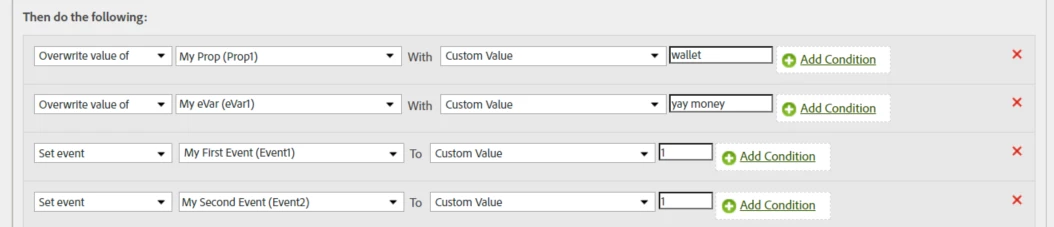
This is assuming you are setting everything directly...
Normally you would also map context variables into your dimensions.. or even add additional Action level conditions (only ONE condition can be added in this context); such as:

With Mobile Apps you don't use Data Elements... Web and App Launch Properties are so different, you don't structure them remotely the same.
In a web property, you create a Data Element.. and that uses Javascript to get some value (either pull it from a value on the page, or pull from a cookie, or you have some custom JS code that you set, etc...) then you have a tracking rule where you add the Data Element to your direct eVar or prop, etc..
You don't do this on Mobile Apps... the context data is set in the app, and you use processing rules to set them to your eVars and props after Adobe receives the call; or you can set specific values (without a context variable) based on specific mappings like I showed above with "Custom Value"
The control you have in a Mobile App Property is a fraction of the functionality that you have in a Web property.
Yes, there are "Data Elements" in a Mobile App Property... but what you can do with them is severely limited.. the only thing I managed to do was concatenate some context variables.. which I can do in Processing Rules.. but since I had no "condition" logic in Launch for this, I ultimately gave up trying to use it....
I suppose if you wanted to set a hard-coded prop or eVar such with a value of "mobile app" (to distinguish all mobile app calls from web calls, I supposed you could.. but you might was well do that will processing rules and keep everything in one place....)
The main point is.. there are web specific extensions.. there are mobile app specific extensions.. you can not mix them in one Launch Property... and how you tag a site vs an app (technology wise) is completely different...
What you can keep the same is the suite (pass web and app data into the same suite), and you can control the values, naming syntax, events that fire per action, etc consistent....
As I mentioned in my first post, since I am also using a "Global Suite" that contains web and app traffic into one suite; I use the a.appid condition to ensure that my web traffic goes to Adobe as it was set in launch (no processing)... only my apps should be running the processing rules (with the exception of a few old sites that are not going through Launch that have some issues - I use some processing rules to fix those until the site itself can be fixed).
I have multiple Launch Properties, I have one for my Core Websites that run React, I have another for the Core Sites that run on .net, I have properties for each of the white label "extended sites" that we use, then I have another one for Mobile Apps.
Keeping the code bases separate means that yes, I have to go and add rules or dimensions multiple times for each variant.. but it also means that I can keep the different code bases clean and separate from one another (which is worth it for me)