Manually order dimension items in a freeform table? | Community
Skip to main content
Level 4
March 7, 2019
Solved

Manually order dimension items in a freeform table?

  • March 7, 2019
  • 9 replies
  • 8873 views

Hello,

I have 3rd party data coming into Analytics through a connector, into a dimension. I'm working on visualizing that information in a Workspace project.

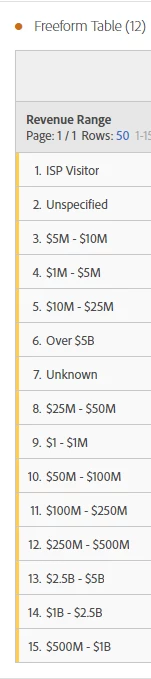
I'd like to force an order to the dimension items. Instead of ordering the dimension items by the metric, I'd like to force my own order. Is this possible?

In the screenshot below, I'd like to order the revenue range groups by ascending/descending order, which I can do manually if available.

Thanks!
This post is no longer active and is closed to new replies. Need help? Start a new post to ask your question.
Best answer by Urs_Boller

a "manual sorting" is not possible right now - upvote Custom Sorting

I you have just a few items (or too much time for more dimensions) you could add a "fake metric column" used for sorting: create a calculated metric with a bunch of "if ... then ... else" formulas and output the desired position. then prder by this row and make is as small as possible (just before it dissapears

the formula would look something like

{

if (dimension1) "occurencies" greater than 1

then 1 (as static number)

else {

  if (dimension2) "occurencies" greater than 1

  then 2

  else {

     ...

  }

}

while (dimension1-X) are just "dimension filters" (drop dimension in metric an select desired value)

if you add this metric to your table it will output a "1" for (dimension1), a "2" for (dimension2) ... and allows you to sort as desired

I know, not the best .... but you asked about a solution

9 replies

Alexis_Cazes_
Level 10
March 8, 2019

I believe the only solution would be to drop the dimensions one by one. For the moment it is not possible to oder alphabetically or freeze the order of the dimensions.

Gigazelle​ can you please confirm ?

evan9Author
Level 4
March 8, 2019

That would be useful if I could manually drop them in, but when I try that, the metric sorting still takes precedence.

I tried dropping in dimension items one at a time; selecting in order, then dropping in all together; and doing that all with and without metrics present. I can't get the order to hold any way I do it.

Let me know if I'm doing something wrong, details if you can.

Thanks!

Urs_Boller
Community Advisor
Community Advisor
March 8, 2019

when you drop just single items, do you have an option on the header row (of the dimension) to manually sort? in your screenshot next to "Revenue Range" there should appear a sort arrow after the first few items (maybe only appears when you hover over the header field)

evan9Author
Level 4
March 11, 2019

Yes, I do! I didn't know that was there, that's helpful for other analyses, thanks.

However, that just sorts alphabetically, which isn't what I'm after in this example. This example would still require a full manual sorting option, which could be as simple as the order I drop dimension items into the table.

Urs_Boller
Community Advisor
Urs_BollerCommunity AdvisorAccepted solution
Community Advisor
March 11, 2019

a "manual sorting" is not possible right now - upvote Custom Sorting

I you have just a few items (or too much time for more dimensions) you could add a "fake metric column" used for sorting: create a calculated metric with a bunch of "if ... then ... else" formulas and output the desired position. then prder by this row and make is as small as possible (just before it dissapears

the formula would look something like

{

if (dimension1) "occurencies" greater than 1

then 1 (as static number)

else {

  if (dimension2) "occurencies" greater than 1

  then 2

  else {

     ...

  }

}

while (dimension1-X) are just "dimension filters" (drop dimension in metric an select desired value)

if you add this metric to your table it will output a "1" for (dimension1), a "2" for (dimension2) ... and allows you to sort as desired

I know, not the best .... but you asked about a solution

evan9Author
Level 4
March 11, 2019

This sounds like quality, remedial Friday afternoon work. Thanks for the idea and the link to the Idea.

evan9Author
Level 4
March 13, 2019

Huh. If you add a new free form table and add dimension items one at a time, they seem appear at the bottom of the list each time. Could obviously use that for manual ordering. However, once you add a metric other than Occurrences, the manual order gets reordered by the metric. So close but so far.

Urs_Boller
Community Advisor
Community Advisor
March 14, 2019

you mean, if you have manuel sorting on the dimension items the new metric "overrides" the sorting? might just be the "default" ... sorry I couldn't help...

July 22, 2022

If you hold Ctrl and Shift while you drag/drop each item, they seem to remain in the manually sorted order for me.