Log a filter dimension inside Page dimension | Community
Skip to main content
Level 2
April 22, 2023
Solved

Log a filter dimension inside Page dimension

  • April 22, 2023
  • 2 replies
  • 839 views

For my application, I want to log Page Name as well as Filter Name, Filter Name will be a sub set of a Page Name
For e.g., I have a Reports Page where a user can run different reports. When a user lands on the Reports page, I want to log Run Reports.
And when a user selects any Report to Run, I want to log the specific Report Name as filter.
So, when I view the page metric on dashboard, I can drag and drop the filter dimension to view what all Reports are run by the user.


To achieve the above behaviour, this is what I did so far,

1. When a user lands on Reports page, I am setting Run Reports as pageName in my local storage, and in Adobe Data Collection, I set up event as Core-Direct Call and then actions as Set Variables, where I am setting an eVar against a Data Element of pageName, and then Send Beacon(Custom Link). At this point I am setting Filter as NA in Data Collection.

2. When a user selects any Report, I am setting ReportName as filter in my local storage, and in Adobe Data Collection, I set up event as Core-Direct Call and then actions as Set Variables, where I am setting an eVar against a Data Element of filter, and then Send Beacon(Custom Link).


I tried debugging it via Adobe Experience Platform Debugger, and it looks like below.  

The debugger shows exactly what I need.


But when I view it in Analytics Dashboard under Occurrences Metric, I am seeing the page name correctly as Run Reports, but when I drag and drop the Filter dimension, it just gives me NA, and not Customer Maps - 5823, Metro Summary - 5823, Competition Summary - 5823 and Guzzler - 5823.
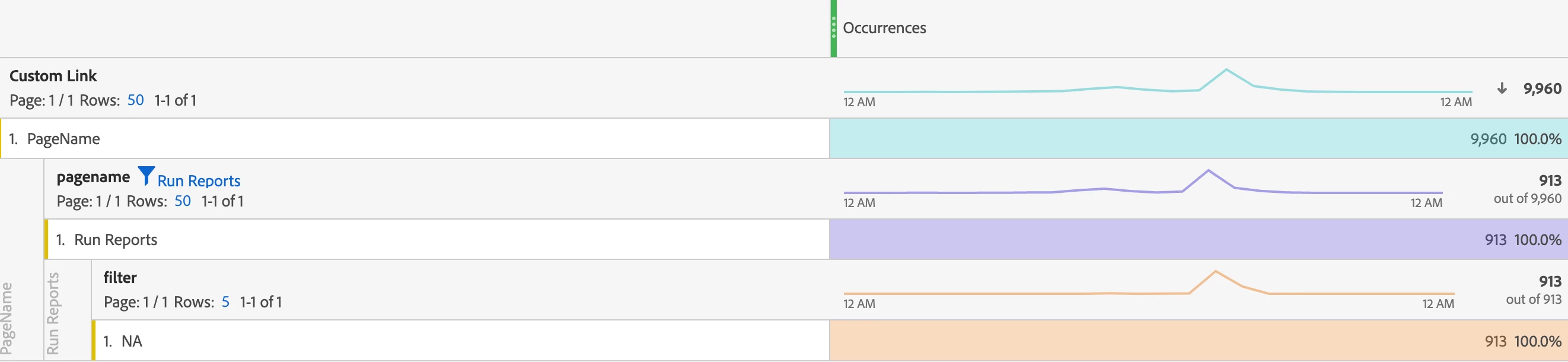


I am unable to understand why it's happening and how can I achieve my desired results. Could someone please help me out here? 

This post is no longer active and is closed to new replies. Need help? Start a new post to ask your question.
Best answer by Jennifer_Dungan

The pageName dimension (despite being part of the action call) is stripped out of the actual tracking during processing of the hit.


pageName can only ever be on page view beacons....


Most people, to get around this, create an eVar (set at a Hit Level expiry), and set this eVar on all hits (page views s.t() and actions s.tl()) to the same value as their pageName... so that it is available for all correlations.


Using an eVar also has the added bonus of being able to support up to 255 characters, as opposed to pageName's 100 character limit.


This can be done in multiple ways...


  1. You can set your eVar in Adobe Launch to use the same Data Element (directly passing the value into the eVar)
  2. You can use "dynamic variable notation"... i.e. in your eVar value use D=pageName as the value... what this will do is duplicate the value of pageName into your eVar (don't worry, duplication happens before pageName is removed from the action calls)
  3. Use a Processing Rule to set the value of you eVar to the same as "Page Name" (this should happen before the Page Name is removed - but double check... but I am sure I have used this in the past when I wanted to get a change up quickly without waiting for a deployment window)


This is something a known annoyance.. but since Adobe tracks every hit that has a "Page" (pageName) value, or a "Page URL" (g) as a page view, you can't force these to have values without inflating your page view metrics....


Hence why it's a common trick to use eVars to set both pageName and URLs for use in all our reports.

2 replies

Jennifer_Dungan
Community Advisor and Adobe Champion
Jennifer_DunganCommunity Advisor and Adobe ChampionAccepted solution
Community Advisor and Adobe Champion
April 22, 2023

The pageName dimension (despite being part of the action call) is stripped out of the actual tracking during processing of the hit.


pageName can only ever be on page view beacons....


Most people, to get around this, create an eVar (set at a Hit Level expiry), and set this eVar on all hits (page views s.t() and actions s.tl()) to the same value as their pageName... so that it is available for all correlations.


Using an eVar also has the added bonus of being able to support up to 255 characters, as opposed to pageName's 100 character limit.


This can be done in multiple ways...


  1. You can set your eVar in Adobe Launch to use the same Data Element (directly passing the value into the eVar)
  2. You can use "dynamic variable notation"... i.e. in your eVar value use D=pageName as the value... what this will do is duplicate the value of pageName into your eVar (don't worry, duplication happens before pageName is removed from the action calls)
  3. Use a Processing Rule to set the value of you eVar to the same as "Page Name" (this should happen before the Page Name is removed - but double check... but I am sure I have used this in the past when I wanted to get a change up quickly without waiting for a deployment window)


This is something a known annoyance.. but since Adobe tracks every hit that has a "Page" (pageName) value, or a "Page URL" (g) as a page view, you can't force these to have values without inflating your page view metrics....


Hence why it's a common trick to use eVars to set both pageName and URLs for use in all our reports.

Level 2
April 23, 2023

@jennifer_dungan  Thanks for the reply, it's really helpful.

Jennifer_Dungan
Community Advisor and Adobe Champion
April 23, 2023

You're very welcome... this is something it took some of us years to realize... so if I can save anyone this pain, I am glad to do so 🙂