Locking row order | Community
Skip to main content
Level 2
May 8, 2019
Solved

Locking row order

  • May 8, 2019
  • 3 replies
  • 2553 views

I have a report that has several time dimensions, among them are today and yesterday. The report is run automatically at midnight to catch the days totals. A summary number widget catches the visits for today, a summary change widget looks at the change from yesterday to today.

When I run the report manually I see this ordering
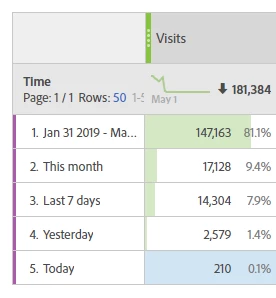
With the automated report I get this ordering
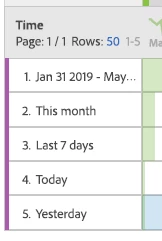
This causes the widgets to show yesterdays visits, and the difference from today to yesterday.

How can I lock the row position to ensure this doesn't happen?

This post is no longer active and is closed to new replies. Need help? Start a new post to ask your question.
Best answer by Urs_Boller

it is not possible to "lock" a certain order. either sort by the metric "visit" or the dimension "time".

if you want to keep a certain order for the line items, there is a little trick: give your items a name that allows for the right "asc" or "desc" order, eg. start the names by a), b), c) or I, II, III, ...

3 replies

ShamshulA
Adobe Employee
Adobe Employee
May 8, 2019

Log a ticket to clientcare@adobe.com that they can try to replicate this by sending automated report to their email ID.

jantzen_b
Adobe Employee
Adobe Employee
June 17, 2019

Hi Mark,

Did you end up finding a solution to this problem? If so, would you mind sharing it here incase others have this same issue?

Thanks,
Jantzen

Urs_Boller
Community Advisor
Urs_BollerCommunity AdvisorAccepted solution
Community Advisor
June 17, 2019

it is not possible to "lock" a certain order. either sort by the metric "visit" or the dimension "time".

if you want to keep a certain order for the line items, there is a little trick: give your items a name that allows for the right "asc" or "desc" order, eg. start the names by a), b), c) or I, II, III, ...