load time for page | Community
Skip to main content
Level 3
August 28, 2023
Solved

load time for page

  • August 28, 2023
  • 2 replies
  • 5420 views

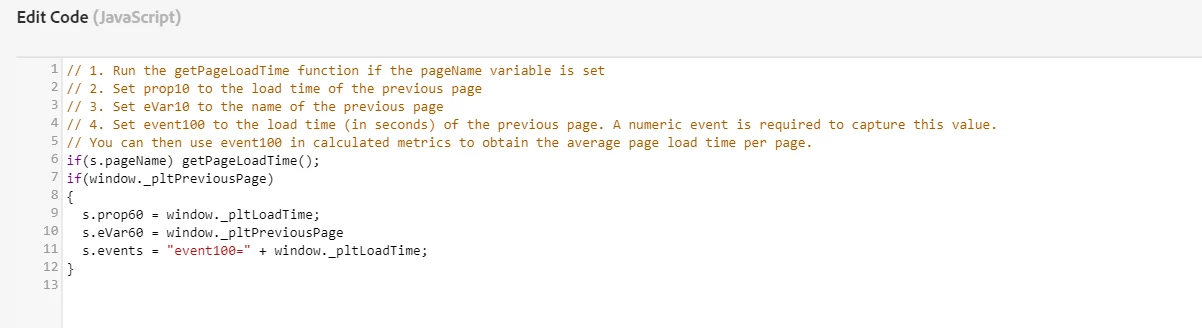
I have implemeted custom script as in picture below, how can i show page load time for each pagename in report?

all variables prop60, evar60 and event100 coming as undefined in report?
 

This post is no longer active and is closed to new replies. Need help? Start a new post to ask your question.
Best answer by Jennifer_Dungan

Where is this custom script implemented? 


I believe as this is part of a plugin, it should be added to the "doPlugins" section in the custom code of the extension.


If this is currently just a custom code block, it may not be reading the s object correctly and may be throwing a behind the scenes issue.


In your Extension, I believe the code should look like:


s.usePlugins = true; function s_doPlugins(s) { if(s.pageName) getPageLoadTime(); if(window._pltPreviousPage) { s.prop60 = window._pltLoadTime; s.eVar60 = window._pltPreviousPage s.events = "event100=" + window._pltLoadTime; } } /******************************************* BEGIN CODE TO DEPLOY *******************************************/ /* Adobe Consulting Plugin: getPageLoadTime v3.0 */ !function(){let e=globalThis.window||this;e.getPageLoadTime=function(t){let i=function(){if(e.s_c_il){for(let t in e.s_c_il)if("s_c"===e.s_c_il[t]._c)return e.s_c_il[t]}}();function n(){var i=performance.timing;i.loadEventEnd>0&&(clearInterval(e.pi),""===e.cookieRead("s_plt")&&e.cookieWrite("s_plt",function e(t,i){if(t>=0&&i>=0)return t-i<6e4&&t-i>=0?parseFloat((t-i)/1e3).toFixed(2):60}(i.loadEventEnd,i.navigationStart)+","+t)),e.ptc=i.loadEventEnd}if(i&&(i.contextData.getPageLoadTime="3.1"),t=t||i&&i.pageName||document.location.href,e.cookieWrite=e.cookieWrite||function(t,i,n){if("string"==typeof t){if(g=function(){var t=e.location.hostname,i=e.location.hostname.split(".").length-1;if(t&&!/^[0-9.]+$/.test(t)){i=2<i?i:2;var n=t.lastIndexOf(".");if(0<=n){for(;0<=n&&1<i;)n=t.lastIndexOf(".",n-1),i--;n=0<n?t.substring(n):t}}return n}(),i=void 0!==i?""+i:"",n||""===i){if(""===i&&(n=-60),"number"==typeof n){var o=new Date;o.setTime(o.getTime()+6e4*n)}else o=n}return!!t&&(document.cookie=encodeURIComponent(t)+"="+encodeURIComponent(i)+"; path=/;"+(n?" expires="+o.toUTCString()+";":"")+(g?" domain="+g+";":""),"undefined"!=typeof cookieRead)&&cookieRead(t)===i}},e.cookieRead=e.cookieRead||function(e){if("string"!=typeof e)return"";e=encodeURIComponent(e);var t=" "+document.cookie,i=t.indexOf(" "+e+"="),n=0>i?i:t.indexOf(";",i);return(e=0>i?"":decodeURIComponent(t.substring(i+2+e.length,0>n?t.length:n)))?e:""},e.p_fo=e.p_fo||function(t){return e.__fo||(e.__fo={}),!e.__fo[t]&&(e.__fo[t]={},!0)},performance&&e.p_fo("performance")){var o=performance;o.clearResourceTimings(),""!==e.cookieRead("s_plt")&&(o.timing.loadEventEnd>0&&clearInterval(e.pi),this._pltLoadTime=e.cookieRead("s_plt").split(",")[0],this._pltPreviousPage=e.cookieRead("s_plt").split(",")[1],e.cookieWrite("s_plt","")),0===o.timing.loadEventEnd?e.pi=setInterval(function(){n()},250):o.timing.loadEventEnd>0&&(e.ptc?e.ptc===o.timing.loadEventEnd&&1===o.getEntries().length&&(e.pwp=setInterval(function(){var i;(i=performance).getEntries().length>0&&(e.ppfe===i.getEntries().length?clearInterval(e.pwp):e.ppfe=i.getEntries().length),""===e.cookieRead("s_plt")&&e.cookieWrite("s_plt",((i.getEntries()[i.getEntries().length-1].responseEnd-i.getEntries()[0].startTime)/1e3).toFixed(2)+","+t)},500)):n())}},e.getPageLoadTime.getVersion=function(){return{plugin:"getPageLoadTime",version:"3.0"}}}(); /******************************************** END CODE TO DEPLOY ********************************************/

2 replies

Jennifer_Dungan
Community Advisor and Adobe Champion
Jennifer_DunganCommunity Advisor and Adobe ChampionAccepted solution
Community Advisor and Adobe Champion
August 28, 2023

Where is this custom script implemented? 


I believe as this is part of a plugin, it should be added to the "doPlugins" section in the custom code of the extension.


If this is currently just a custom code block, it may not be reading the s object correctly and may be throwing a behind the scenes issue.


In your Extension, I believe the code should look like:


s.usePlugins = true; function s_doPlugins(s) { if(s.pageName) getPageLoadTime(); if(window._pltPreviousPage) { s.prop60 = window._pltLoadTime; s.eVar60 = window._pltPreviousPage s.events = "event100=" + window._pltLoadTime; } } /******************************************* BEGIN CODE TO DEPLOY *******************************************/ /* Adobe Consulting Plugin: getPageLoadTime v3.0 */ !function(){let e=globalThis.window||this;e.getPageLoadTime=function(t){let i=function(){if(e.s_c_il){for(let t in e.s_c_il)if("s_c"===e.s_c_il[t]._c)return e.s_c_il[t]}}();function n(){var i=performance.timing;i.loadEventEnd>0&&(clearInterval(e.pi),""===e.cookieRead("s_plt")&&e.cookieWrite("s_plt",function e(t,i){if(t>=0&&i>=0)return t-i<6e4&&t-i>=0?parseFloat((t-i)/1e3).toFixed(2):60}(i.loadEventEnd,i.navigationStart)+","+t)),e.ptc=i.loadEventEnd}if(i&&(i.contextData.getPageLoadTime="3.1"),t=t||i&&i.pageName||document.location.href,e.cookieWrite=e.cookieWrite||function(t,i,n){if("string"==typeof t){if(g=function(){var t=e.location.hostname,i=e.location.hostname.split(".").length-1;if(t&&!/^[0-9.]+$/.test(t)){i=2<i?i:2;var n=t.lastIndexOf(".");if(0<=n){for(;0<=n&&1<i;)n=t.lastIndexOf(".",n-1),i--;n=0<n?t.substring(n):t}}return n}(),i=void 0!==i?""+i:"",n||""===i){if(""===i&&(n=-60),"number"==typeof n){var o=new Date;o.setTime(o.getTime()+6e4*n)}else o=n}return!!t&&(document.cookie=encodeURIComponent(t)+"="+encodeURIComponent(i)+"; path=/;"+(n?" expires="+o.toUTCString()+";":"")+(g?" domain="+g+";":""),"undefined"!=typeof cookieRead)&&cookieRead(t)===i}},e.cookieRead=e.cookieRead||function(e){if("string"!=typeof e)return"";e=encodeURIComponent(e);var t=" "+document.cookie,i=t.indexOf(" "+e+"="),n=0>i?i:t.indexOf(";",i);return(e=0>i?"":decodeURIComponent(t.substring(i+2+e.length,0>n?t.length:n)))?e:""},e.p_fo=e.p_fo||function(t){return e.__fo||(e.__fo={}),!e.__fo[t]&&(e.__fo[t]={},!0)},performance&&e.p_fo("performance")){var o=performance;o.clearResourceTimings(),""!==e.cookieRead("s_plt")&&(o.timing.loadEventEnd>0&&clearInterval(e.pi),this._pltLoadTime=e.cookieRead("s_plt").split(",")[0],this._pltPreviousPage=e.cookieRead("s_plt").split(",")[1],e.cookieWrite("s_plt","")),0===o.timing.loadEventEnd?e.pi=setInterval(function(){n()},250):o.timing.loadEventEnd>0&&(e.ptc?e.ptc===o.timing.loadEventEnd&&1===o.getEntries().length&&(e.pwp=setInterval(function(){var i;(i=performance).getEntries().length>0&&(e.ppfe===i.getEntries().length?clearInterval(e.pwp):e.ppfe=i.getEntries().length),""===e.cookieRead("s_plt")&&e.cookieWrite("s_plt",((i.getEntries()[i.getEntries().length-1].responseEnd-i.getEntries()[0].startTime)/1e3).toFixed(2)+","+t)},500)):n())}},e.getPageLoadTime.getVersion=function(){return{plugin:"getPageLoadTime",version:"3.0"}}}(); /******************************************** END CODE TO DEPLOY ********************************************/
Level 3
August 31, 2023

@jennifer_dungan i added this code, what next should i do to see data in report

Jennifer_Dungan
Community Advisor and Adobe Champion
August 31, 2023

Thank you, sorry but i am new, which variable i refer in report to see this data.

can i create freedom table with page name in row and event 100 in column


No worries 🙂


Based on your sample code:

s.prop60 = window._pltLoadTime; s.eVar60 = window._pltPreviousPage s.events = "event100=" + window._pltLoadTime;


What you should see is prop60 containing a text version of the load time, I believe it will be in seconds (I don't actually use this plugin, so I am going off of the documentation).


in eVar60, you should have the previous page's name...


So, going back to my example:


  • Page 1 (pageName = "home")
    • nothing sent to you dimensions/events here in the plugin
  • Page 2 (pageName = "section1")
    • prop60 = 34
    • eVar60 = "home"
    • event100 = 34
  • Page 3 (pageName = "section1|subsection1")
    • prop60 = 62
    • eVar60 = "section1"
    • event100 = 62
  • Page 4 (pageName = "article")
    • prop60 = 168
    • eVar60 = "section1|subsection1"
    • event100 = 168


So you would use eVar60 as your dimension.


The event (event100) assuming it was set up as a Numeric value (I will get back to that), should show you the total seconds spent on each page, and lets say home page had 5 page views (passing 34, 57, 18, 72 and 156), you should see the total time associated to the page (337).


You should be able to get the "average" load time, by taking your event100 and dividing by Page Views.


Now, about the event set up, in the Admin for the report suite, if you go into your Conversion > Success Events area, you should make sure that event100 is both enabled, and set to "Numeric" and not the default "Counter"


Level 5
August 29, 2023

Hi @peeyushbansal 


Here's an example of how you can use JavaScript to measure page load time and send it as a custom event to Adobe Analytics:


// Measure Page Load Time
var startTime = new Date().getTime();

window.addEventListener('load', function() {
    var endTime = new Date().getTime();
    var pageLoadTime = endTime - startTime;

    // Send Page Load Time as a Custom Event to Adobe Analytics
    s.linkTrackVars = 'events,eVar60'; // Updated eVar60 to match your setup
    s.linkTrackEvents = 'event100';     // Updated event100 to match your setup
    s.events = 'event100';
    s.eVar60 = pageLoadTime;

    s.tl(true, 'o', 'Page Load Time');
});


The s.tl() function sends the custom event to Adobe Analytics.

Jennifer_Dungan
Community Advisor and Adobe Champion
August 29, 2023

This is horrible advice... this will inflate page view traffic by sending a second page view call.


The code should just be added to the correct location (i.e. in the do_plugins function, which is part of the processing after the beacons are called by the existing tagging rules.

Jennifer_Dungan
Community Advisor and Adobe Champion
August 29, 2023

Sorry, I see that you have s.lt() not s.t()... but page Load Time is only supposed to send on the Page View, of the existing page view call... inflating your server calls with superfluous additional calls will drive up contract costs, which is still a bad idea.