linkClicks Piggybacked on pageViews eventType | Community
Skip to main content
Level 3
May 6, 2025
Solved

linkClicks Piggybacked on pageViews eventType

  • May 6, 2025
  • 3 replies
  • 1407 views

Hello!

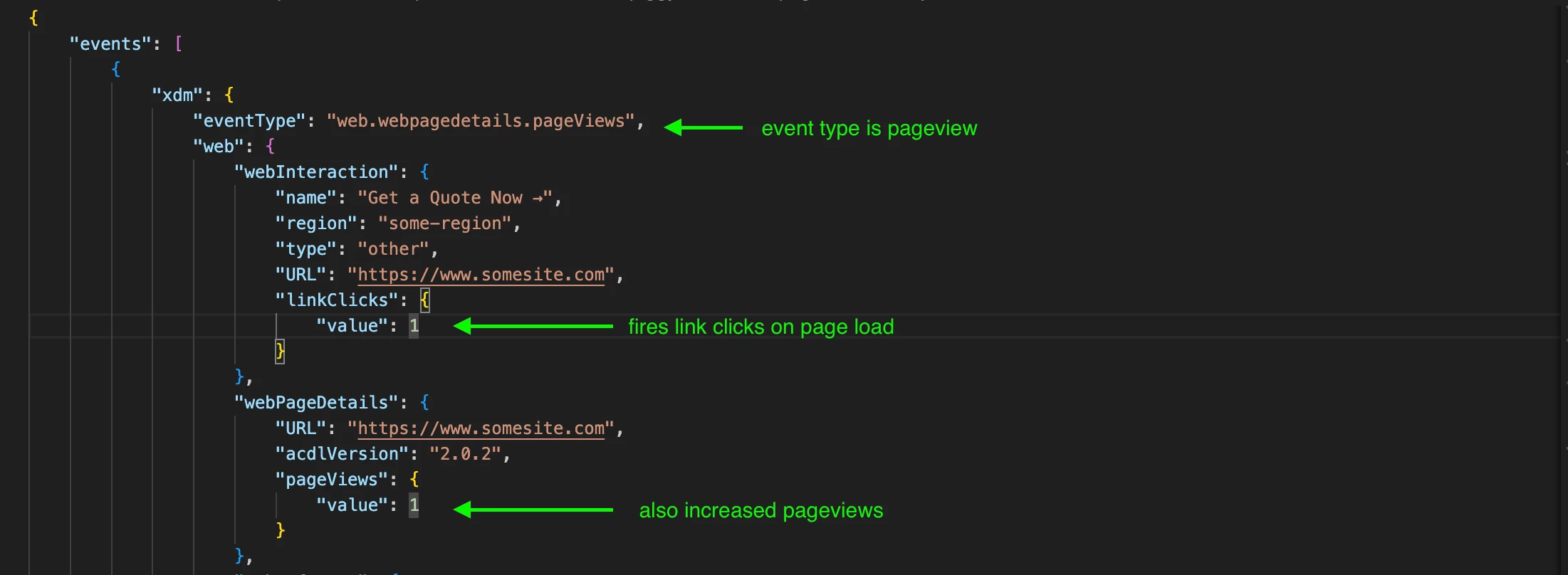
Clicks to CTAs aren't being sent on its own server call linkClicks eventType but on the pageview that loads after the CTA was clicked so there is no separate call for link click, just one containing both on an eventType pageViews on page load.

Wondering if this could cause any issues and if its better or cleaner to fire each separately.

Screenshot below.

From what I see is acting the same way as ActivityMap which would be easier to implement and an overlap as ActivityMap is OOTB.

Thanks,

R


Best answer by Jennifer_Dungan

Ok, 


Just an FYI, the "Order" setting can be a little misleading... basically this is a stack rank of when to start the execution of a code block relative to other blocks in the same context... but they all technically run simultaneously.


So if you have 5 rules that are set to run at 10, 20, 30, 40, and 50, but let's assume that some scripts are slower than others. So, the rules in the same order by execution time (I am going to use unrealistically high values in seconds to make it easier): 5 seconds, 2 seconds, 3 seconds, 1 second, 1 second.


The first rule will fire, then a few milliseconds after that, the second rule will fire, etc...


The difference in time between the start of the rule is negligible, essentially, the rules will complete in the following order: Rule 4, Rule 5, Rule 2, Rule 3 then Rule 1. This is part of the asynchronous behaviour.


If there is only one rule being triggered, the "Order of 50" shouldn't make any difference at all, it just gives an easy way to start another script marginally faster if needed.


However, Click Tracking can be at risk of being lost because the page unloads as you said; and you might be right, I think the WebSDK might be able to defer some of that tracking til the next page (unlike AppMeasurement).


This piggyback onto the page view shouldn't cause any issues then... 


In my implementation, I always try to collect Page View data along with Overlay, Promo Banner and Wall impressions (to reduce the number of server calls).... I don't want to send 5 server calls, when I can send one. This sounds like it's performing a similar cost savings, by deferring the click data to the next page... however, correlating that click tracking to the correct page might get tricky.


It you want to see what URL, or Page that click was made on, you might not be able to (since the tracking call has the current URL being passed)


Also, enabling Activity Map (in conjunction with your click tracking) shouldn't hurt anything either, in fact, it would probably help by providing additional context about what page, region and link that was clicked (all data from the previous page)... 


I am not sure if automatic link tracking is related more to Activity Map, or actual additional server calls... It sort of looks like it might just be enabling "Activity Map" data.... but AA just isn't taking it into consideration....it sounds like you are collecting that data with WebSDK, but not sending it through to AA. 
3 replies

Level 3
May 6, 2025

wondering if this is an AEP related question....

leocwlau
Community Advisor and Adobe Champion
May 7, 2025

It also has an issue reading the final report that the linkClick seems to be happening on the destination page, and there is no simple way to understand on which page the linkClick happened.

Understood the attempt to bundle the tracking on "action" and "response" into one single server call to save cost. You may try to use some custom eVar to capture the link information as well as the page where the link happened, instead of using the default dimension. It is a common technique for previous page tracking and is applicable with linkClick tracking as well.

Level 3
May 7, 2025

Thanks @leocwlau, you mean what Jenn mentions in min ~19?

https://www.youtube.com/watch?v=NYsdbqL9Dx0

I know she uses ActivityMap.

Jennifer_Dungan
Community Advisor and Adobe Champion
May 6, 2025

Yeah, that definitely doesn't look right...


Activity Map is part of the Page View, because it doesn't trigger a "click event"... it just carries forward the information about what link was used to drive the traffic to the current page....


An actual "link click" tracking should be separate from a page view, as this is triggered immediately on the click... 


This looks like its trying to do both? Pass information on the Page View, but also trigger a click event for some reason?


Keep in mind that I am not using WebSDK at the moment... but the information is still going into Adobe Analytics, and having a "click" event on the same calls as a "page view" doesn't actually make sense from a logical perspective... it's either a click (or an interaction), or it's a page view... not both.

Level 3
May 12, 2025

Hello @jennifer_dungan & thanks.


I got feedback that link clicks are firing on pageview eventType because on linkClick event values were not sent on time before the data layer got deleted or so.


In the link click rules, the event 'data pushed' has order of 50.


The action, has document unload checked. In advanced options wait to run next action is checked and timeout in milliseconds of 2000.


Sharing other click event related wondering if any conflict may occur between the auto tracked and custom tracked:


In Adobe Experience Platform Web SDK extension, collect internal link clicks is checked.


ActivityMap is not enabled in AA.


Also link click is present in the data collection section of Adobe Experience Platform Web SDK extension, custom code area, js:


if (content.xdm.web.webInteraction !== undefined) {
if (content.xdm.web.webInteraction.linkClicks !== undefined) {
if (content.xdm.web.webInteraction.linkClicks.value !== undefined) {
content.xdm._experience ??= {};
content.xdm._experience.analytics ??= {};
content.xdm._experience.analytics.event1to100 ??= {};
content.xdm._experience.analytics.event1to100.event10 ??= {};
content.xdm._experience.analytics.event1to100.event10.value = content.xdm.web.webInteraction.linkClicks.value;
}
}
}
Jennifer_Dungan
Community Advisor and Adobe Champion
Jennifer_DunganCommunity Advisor and Adobe ChampionAccepted solution
Community Advisor and Adobe Champion
May 13, 2025

Ok, 


Just an FYI, the "Order" setting can be a little misleading... basically this is a stack rank of when to start the execution of a code block relative to other blocks in the same context... but they all technically run simultaneously.


So if you have 5 rules that are set to run at 10, 20, 30, 40, and 50, but let's assume that some scripts are slower than others. So, the rules in the same order by execution time (I am going to use unrealistically high values in seconds to make it easier): 5 seconds, 2 seconds, 3 seconds, 1 second, 1 second.


The first rule will fire, then a few milliseconds after that, the second rule will fire, etc...


The difference in time between the start of the rule is negligible, essentially, the rules will complete in the following order: Rule 4, Rule 5, Rule 2, Rule 3 then Rule 1. This is part of the asynchronous behaviour.


If there is only one rule being triggered, the "Order of 50" shouldn't make any difference at all, it just gives an easy way to start another script marginally faster if needed.


However, Click Tracking can be at risk of being lost because the page unloads as you said; and you might be right, I think the WebSDK might be able to defer some of that tracking til the next page (unlike AppMeasurement).


This piggyback onto the page view shouldn't cause any issues then... 


In my implementation, I always try to collect Page View data along with Overlay, Promo Banner and Wall impressions (to reduce the number of server calls).... I don't want to send 5 server calls, when I can send one. This sounds like it's performing a similar cost savings, by deferring the click data to the next page... however, correlating that click tracking to the correct page might get tricky.


It you want to see what URL, or Page that click was made on, you might not be able to (since the tracking call has the current URL being passed)


Also, enabling Activity Map (in conjunction with your click tracking) shouldn't hurt anything either, in fact, it would probably help by providing additional context about what page, region and link that was clicked (all data from the previous page)... 


I am not sure if automatic link tracking is related more to Activity Map, or actual additional server calls... It sort of looks like it might just be enabling "Activity Map" data.... but AA just isn't taking it into consideration....it sounds like you are collecting that data with WebSDK, but not sending it through to AA. 

gautham_madala
Level 5
May 13, 2025

You would want to post the trigger and action set. 
Its hard to understand based on what conditions this is sending data within both the interaction and page details blocks. 

Level 3
May 13, 2025

thanks @gautham_madala I'll check.

Level 3
May 14, 2025

Hello @gautham_madala,


Trigger details:

ACLD extension

Event type = data push

Event / key to register for: click_somethign

Looks like the event is no longer being pushed into the dataLayer since obviously was causing trouble and the reason the link click interaction is being piggybacked into the pageview eventType.


AEP WebSDK Extension

Action = Send event

Action Type Web Interaction Link Clicks

XDM Object, looks like a template starting with // Modify content.xdm or content.data as necessary. There is no need to wrap the......

Relevant line

content.xdm._experience.analytics.event1to100.event22.value = content.xdm.web.webInteraction.linkClicks.value;


Thanks!