Journey time | Community
Skip to main content
September 5, 2023
Solved

Journey time

  • September 5, 2023
  • 2 replies
  • 1337 views

Hi all, 


Our client wants to get the time of specific journey. We tried to get it using visit level time however

Visit level might be possible user performed 1 or more journeys or task. I want to calculate the time spent on single task or journey not all journeys in his/her visit. Can you please suggest how is possible in adobe. We have to calculate time on three

Level

1 Total journey time (User who started journey and  completed ) 

2 ideal journey time (user who have followed the step by step pages and completed their journey) 

3 Deviation time ( user who did here and fourth but completed their journey means let's say in 4 page journey user travel from page 1 to 2 then 3 and agin came back to page 2 then 3 and 4 page.) 

Please suggest how can I do this in adobe. 
This post is no longer active and is closed to new replies. Need help? Start a new post to ask your question.
Best answer by Andrew_Wathen_

There are a couple of approaches I can think of in workspace...

  1. Used the "average time on site" metric to get an average time for the process. This metric can be segmented at a hit level to get the average time for specific pages.  So to get the average time for a process create a segment that segments all of the process steps together.  e.g. for a three step process the segment would have 2 containers.
    • Visit level container "step 1" AND "step 2" AND "step 3" (to ensure the user has seen all steps)
    • Hit level container "step 1" OR "step 2" OR "step 3" (to restrict the metric to only those pages)
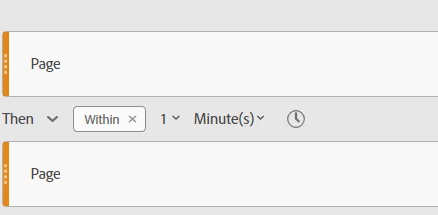
  2. Use sequential segmentation.  Within sequential segmentation you apply time limits, so you can build up a view of how long it is taking to complete a process.

For example, to build up a view of how long it takes you could create multiple segments like this:

  • "first page of process" then within 1 minute "last page of process"
  • "first page of process" then within 2 minute "last page of process"
  • "first page of process" then within 3 minute "last page of process"
  • etc.

Another option would be to make changes to your implementation to actually time each process using JavaScript [EDIT: See @jennifer_dungan's reply for suggestions on how to do this using Adobe supplied plugins].


Hopefully some of the clever people on here might have some other ideas too - I'm really interested to see if there is a better way to do time based stuff 🙂

2 replies

Andrew_Wathen_
Community Advisor
Andrew_Wathen_Community AdvisorAccepted solution
Community Advisor
September 5, 2023

There are a couple of approaches I can think of in workspace...

  1. Used the "average time on site" metric to get an average time for the process. This metric can be segmented at a hit level to get the average time for specific pages.  So to get the average time for a process create a segment that segments all of the process steps together.  e.g. for a three step process the segment would have 2 containers.
    • Visit level container "step 1" AND "step 2" AND "step 3" (to ensure the user has seen all steps)
    • Hit level container "step 1" OR "step 2" OR "step 3" (to restrict the metric to only those pages)
  2. Use sequential segmentation.  Within sequential segmentation you apply time limits, so you can build up a view of how long it is taking to complete a process.

For example, to build up a view of how long it takes you could create multiple segments like this:

  • "first page of process" then within 1 minute "last page of process"
  • "first page of process" then within 2 minute "last page of process"
  • "first page of process" then within 3 minute "last page of process"
  • etc.

Another option would be to make changes to your implementation to actually time each process using JavaScript [EDIT: See @jennifer_dungan's reply for suggestions on how to do this using Adobe supplied plugins].


Hopefully some of the clever people on here might have some other ideas too - I'm really interested to see if there is a better way to do time based stuff 🙂

September 5, 2023

Thanks Andrew, let me try this. 


However, if I'm not wrong your approach will give us total time for 3 step process including both who have followed the standard process like 1 to 2 then 3 step and thous who did here and fourth like 1 to 2 then 2 to 1 then 1 to 2 the 3step.

Like was I have to calculate the time Separately for those who have followed standard process and who did here and fourth and completed their journey. 

Anyone has better suggestion..would be highly appreciated. 


Jennifer_Dungan
Community Advisor and Adobe Champion
September 5, 2023