Issues with Data Not Populating in eVars After Setting Processing Rules in Mobile SDK Implementation | Community
Skip to main content
February 26, 2025
Solved

Issues with Data Not Populating in eVars After Setting Processing Rules in Mobile SDK Implementation

  • February 26, 2025
  • 1 reply
  • 674 views

Hello, I’m working on implementing the Adobe Mobile SDK and sending data to Adobe Analytics. However, after setting up processing rules, the data is not populating in my eVars as expected.

I have set the processing rules as shown in the image below:
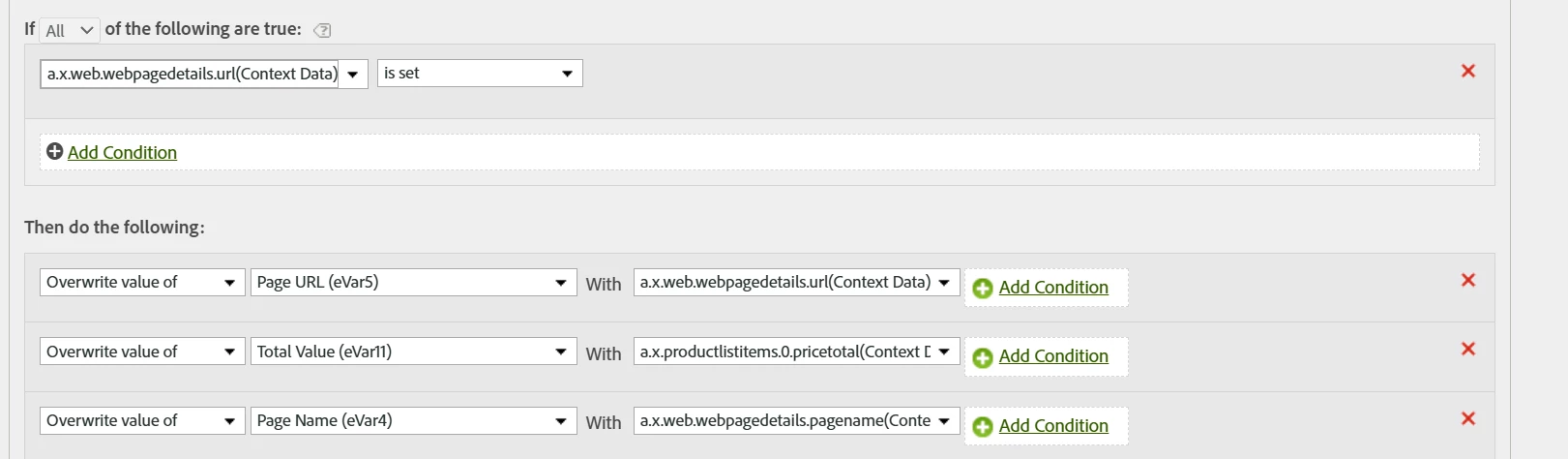


eVar5 = a.x.web.webpagedetails.url(Context Data)

eVar4 = a.x.web.webpagedetails.pagename(Context Data)


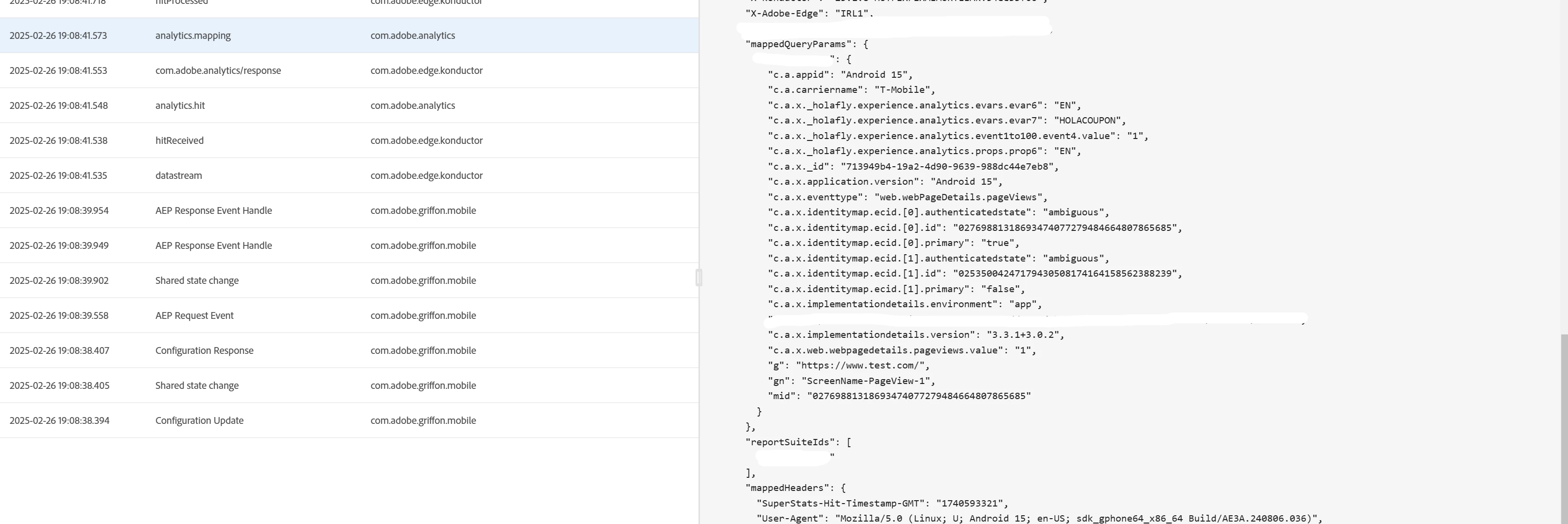
Also, my Analytics mapping looks like this:
 

Best answer by Jennifer_Dungan

Yes, I was thinking the same thing... I believe the missing a.x.web.webpagedetails.url(Context Data) is the likely cuprit.


@josh__stephens I don't think you need the "c" in this. C stands for "Context Data", which Adobe already has identified with the "(Context Data)" at the end of the name...  While I am not using the Edge Network yet (soon), the old implementation my context valuables are nested inside the c object, but none of my rules need the "c." to be a part of the notation, I would expect that to be the same here.

1 reply

Josh__Stephens
Community Advisor
Community Advisor
February 26, 2025

I don't see the dimension a.x.web.webpagedetails.url(Context Data) in your payload.  Is that property set?  Your processing rules will only fire when it exists.

It's been a while since I worked with AA processing rules, but I also noticed that your dimensions in the processing rules have "a.x." prefix.  But I see "c.a.x." in your payload.  I'd double check those are correct.


Jennifer_Dungan
Community Advisor and Adobe Champion
Jennifer_DunganCommunity Advisor and Adobe ChampionAccepted solution
Community Advisor and Adobe Champion
February 27, 2025

Yes, I was thinking the same thing... I believe the missing a.x.web.webpagedetails.url(Context Data) is the likely cuprit.


@josh__stephens I don't think you need the "c" in this. C stands for "Context Data", which Adobe already has identified with the "(Context Data)" at the end of the name...  While I am not using the Edge Network yet (soon), the old implementation my context valuables are nested inside the c object, but none of my rules need the "c." to be a part of the notation, I would expect that to be the same here.

February 28, 2025

Hello,

Thank you for your response. I’m sending the following XDM data to Edge:


"web": { "webPageDetails": { "pageViews": {"value": 1}, "URL": "https://www.test.com/", "name": "ScreenName-Home", }, },


According to the documentation, this should auto-populate the Page and Page URL dimensions in Adobe Analytics (this is working correctly). However, I thought that a.x.web.webpagedetails.url (Context Data) is what I see in my payload as:


          "g": "https://www.test.com/",
          "gn": "ScreenName-Home",


For now, I managed to solve it by sending new data to the XDM, but I still have a doubt.


"analytics": { "eVars": { "eVar4": "ScreenName-Home", "eVar5": "https://www.test.com/", "eVar6": "EN", },