Issues with data collection in eVars | Community
Skip to main content
Level 4
November 18, 2021
Solved

Issues with data collection in eVars

  • November 18, 2021
  • 3 replies
  • 3066 views

I recently created a new rule in Adobe Launch with new Data Element to retrieve data from eVars.

My data elements retrieve the required data. I was able to test their content directly in the console (see screenshot below).
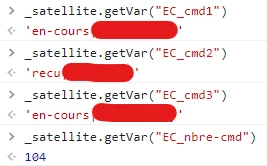
 

I was also able to check that my rule is well triggered thanks to the debug mode.

However, I don't receive any data in the concerned eVars...

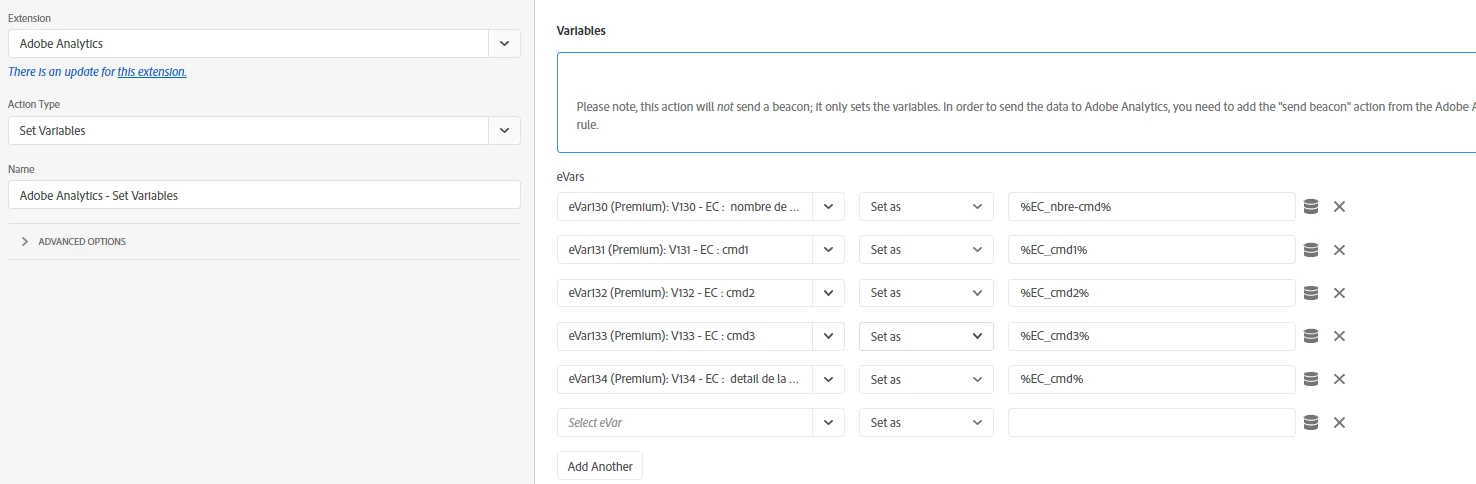
You can find below the configuration of my rule.

Below is the setup of the Set Variables action:
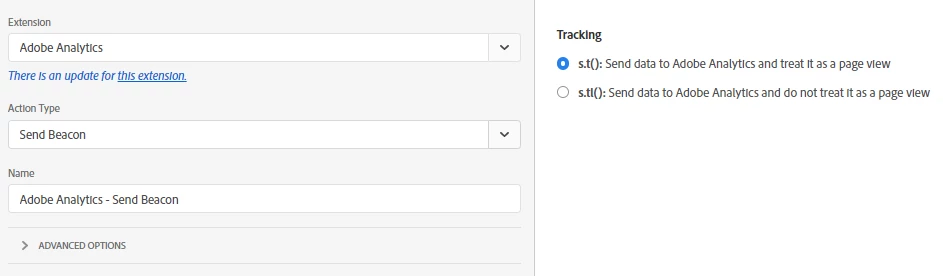
Below is the Send Beacon action
I already double checked that my eVar are enabled in the report suites I tested.

Do you have any suggestion to investigate this and troobleshoot this ?

Thanks a lot. 

This post is no longer active and is closed to new replies. Need help? Start a new post to ask your question.
Best answer by Swanan_

Hello @vanibhemarasetty@pablo_childe@andrey_osadchuk,

Thanks again for your advices here. I finally found a solution thanks to this post. In fact it was "just" a timing issue.


My rule was processing to soon and so my data elements weren't able to get the data when the rule was processed.

I just had to change the trigger from "Page Bottom" to "Window Loaded". It's now working. 


Thanks anyway for your help!

3 replies

Andrey_Osadchuk
Level 10
November 18, 2021

@swanan_ , check the request (beacon) that is sent to AA in the Network tab, does it have the eVars set?

  • If not, the Data Elements may return empty values at the time the rule fires.
  • If yes, the data is either does not come to the data collection server (a wrong server name, a wrong RSID) or the beacon is filtered off by one of the following:
    • IP filters
    • bot filters
    • processing rules
    • report suite privacy settings
    • vista rules
    • opt-out cookie (if s_vi is used instead of ECID)


Swanan_Author
Level 4
November 23, 2021

Hi @andrey_osadchuk 

Thanks for your help here. 

I just checked the points you mentioned. 

I have some doubts regarding the following points :

  • IP filters
  • opt-out cookie (if s_vi is used instead of ECID).

In my tab Admin > All Admin > Exclude by IP

I'm seeing that there is a line in the Exclude By Cookie > Exclusion by computer

Info mentioned are the following:

Cname : metrics.MyCompany.com

Opt-Out Link : https://metrics.MyCompany.com/optout.html?locale=en_US&popup=true


Can this cause any issue there ?

Pablo_Childe
Community Advisor
Community Advisor
November 18, 2021

Also check on page in console tab.

See if you have and content policy script blocking, or warning that may be conflicting with the adobe code.

As Andrey mentioned you can go into Network tab on page.


Filter /b/ss/ to see network beacon.

Look at header parameters to see all props evars present or not present.


GLTU

VaniBhemarasetty
Adobe Employee
Adobe Employee
November 20, 2021

Adding to previous replies make sure the evar is enabled, also check if they are enabled for "merchandising" or they are merchandising evars, if that is the case, they can be used only in product string, and if they are not used in product string , there are high chances they can get excluded from reporting and you will not see them in reporting , even if you see them in server calls


You can read about it here 


https://experienceleague.adobe.com/docs/analytics/components/dimensions/evar-merchandising.html?lang=en


Hope this helps

Swanan_Author
Level 4
November 23, 2021

Hi @vanibhemarasetty , I check this point but it seems that there is no issue on this point. 

Thank you for your help !

Swanan_AuthorAccepted solution
Level 4
November 23, 2021

Hello @vanibhemarasetty@pablo_childe@andrey_osadchuk,

Thanks again for your advices here. I finally found a solution thanks to this post. In fact it was "just" a timing issue.


My rule was processing to soon and so my data elements weren't able to get the data when the rule was processed.

I just had to change the trigger from "Page Bottom" to "Window Loaded". It's now working. 


Thanks anyway for your help!