Issue exporting Avg. Time On Site into a spreadsheet
When I export a .cvs from Adobe Analytics, the Average Time On Site columns have a strange number in those cells instead of an actual time reference from the online project. Should I be able to export actual time references for Average Time On Site? Is there a reason why this is happening? Is there a way to translate the strange exported numbers into a valid time format?
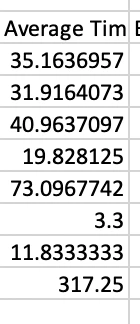
So far, my only work-around is to delete these numbers and manually type them in from looking at the Adobe Analytics project (because also I cannot copy and paste figures from Adobe Analytics either).
I also took screenshots of each section and used Apple Photos or Preview to copy the text for each column I needed to add the figures for.
There has to be a better way. I searched and found nothing online about this. I searched the forum here and found nothing. I'm really hoping that I'm just missing something here cause my eyes are bleeding from doing this last night.