Is This a Case for Merchandising Evars? | Community
Skip to main content
Level 3
November 29, 2023
Solved

Is This a Case for Merchandising Evars?

  • November 29, 2023
  • 2 replies
  • 2421 views

using appMeasurement here and I have a challenge on a page where I need to correlate two varied dimensions to an event

Let's say for example that we have a list on the page with multi-selection boxes (add) as in the table below. Here we have four items selected and being added at once (one button to submit all adds)


CategoryIDAction
Apples123Add
Banana000 
Apples456Add
Oranges456Add
Apples012Add


I could put both the Category and ID into two ListVars, but upon breaking down in reporting, I don't think they would end up being correlated, that ID 456 has one "add" each for Apples & Oranges

Should this be solved by putting Category into a product string with the ID as a merchandising Evar ?

This post is no longer active and is closed to new replies. Need help? Start a new post to ask your question.
Best answer by Jennifer_Dungan

ok, let me play with this a bit... I will need to use a demo site to pass some duplicates (not of my lists in production do)


Sorry for getting back to this so late... 


Like you, I was unable to get a proper count for duplicated items in the list... so the only way I know how to deal with tracking this is to use your s.products to pass the values. However, I would pair this with a numeric merchandising event.


So for example, the product list notation is:

category;product;quantity;price;merch events;merch eVars


If you are using s.products for other items, I would even considering using the "category" here, not to identify "apples" or "bananas", but rather to denote this use from others (we use our products list for about 20 different things, I use the category to specify each "use", then use the products or merchandiing eVars as the actual data)


Let's assume s.products is being used already, so we will make use of the category to denote the usage (i.e. "fruit")


We'll use the product id for the actual fruit id.


We'll set up a merchandising eVar as the "category" (apple, banana, etc)


We'll set up a second merchandising eVar as the "type" (soda, pie, etc)


And we'll configure a numeric event (not a counter)
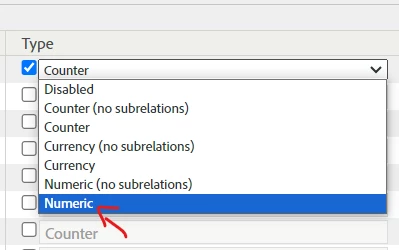


When you track your data


1|apple|pie, 2|orange|soda, 2|orange|soda,


It will look like this:


s.events = "event1"; s.products = "fruit;1;;;event1=1;eVar1=apple|eVar2=pie,fruit;2;;;event1=2;eVar1=orange|eVar2=soda"


So you will increment "1|apple|pie" once, and "2|orange|soda" twice

There are no quantity/price values here, since this isn't a purchase event.... and it's weird, but you need to also set the event into your s.events (just not numerically incremented) for the events to count.


Now, you can use event1 (or whatever your actual event is), with your eVars to see 1 or 2, etc for the usage.


*** Updated Dec 22, 2023 - fixed the mixed up order of items in Products List as pointed out by @iceboats  (apologies for that)

2 replies

abhinavbalooni
Community Advisor
Community Advisor
November 29, 2023

Hey @iceboats 


Your understanding is correct. To have a corelation so to speak, you can try out merch eVar as you mentioned. The challenge with the list variable is also something you've articulated.


Cheers,

Abhinav

Jennifer_Dungan
Community Advisor and Adobe Champion
November 29, 2023

I use the Product String and merchandising eVars in our implementation (what I would give for multiple dimensions like this one)... as it stands, I use Product List for about 20 different uses... 


However, depending on your complexity, you could use a single list var, using a notation that allows you to pass category and id as pairs, then use classification to split them out.


so something like:

"Apples|123,Bananas|000,Apples|456"


The list would use comma as the delimiter, resulting in rows like this:

  • Apples|123
  • Bananas|000
  • Apples|456


Then you could use regex on your list to extract the Category and the Id into their own classifications.

Now you could pull out Category, and break down by ID:

  • Apples
    • 123
    • 456
  • Bananas
    • 000


In your case, you probably don't need merchandising eVars and events (unless your description was simplified)... and this should achieve what you need...

abhinavbalooni
Community Advisor
Community Advisor
November 29, 2023

@jennifer_dungan That was so well detailed out ! Only limitation might be listvars being 3 ? 

Jennifer_Dungan
Community Advisor and Adobe Champion
November 29, 2023

True.. not everyone is in this situation, but I am starting to use one "generic list" adding in a classification prefix so that I can use one list for multiple purposes...


So in the example above, I would add additional info like:

"sb|Apples|123,sb|Bananas|000,sb|Apples|456"


Where "sb" is "selection box" or something like that... so then I only process items starting with "sb" into Category and ID.... 


I don't need "sb" to be classified, it's only used by my regex rules to identify which classifications should occur.

Then I may have other items in the same list like:

"ou|value1|something|third-value,ou|value2|something2|third-value2"


Where "ou" in this case is "Other Use", and "ou" actually has three values being passed and parsed... 


This does require a re-design of lists, if all three lists are currently in use.... but if there is a free list var, this can be started and build it into a future "multiple" usage design.