Is there a way to suppress the Adobe beacon from firing on a certain page? | Community
Skip to main content
curtis_pond
Level 3
November 28, 2022
Solved

Is there a way to suppress the Adobe beacon from firing on a certain page?

  • November 28, 2022
  • 1 reply
  • 1363 views

Hi,

We have a login screen that users sign into to access our website. I want to suppress the Adobe beacon from firing on this login screen and only count page views after a user has signed in.

I cannot remove the Adobe script from the page because our Cookie Consent Trust Arc rules are loaded via Launch.

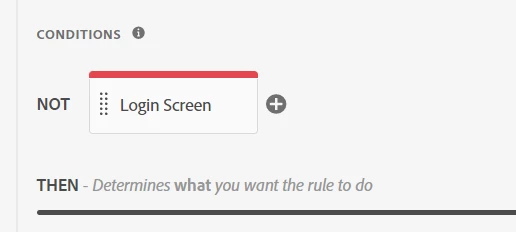
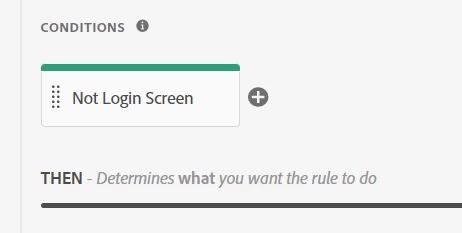
Is there a way (or what's the best way) to tell Adobe not to fire a beacon for this page? I looked at adding an exclusion to the Send Beacon rule, but it doesn't seem to work as I expected.

Thanks for any help or guidance!

-Curtis
This post is no longer active and is closed to new replies. Need help? Start a new post to ask your question.
Best answer by Jennifer_Dungan

In your Adobe Launch Rule, you can create a condition.... only trigger tracking when returned value is true or false (if you are using an exception rule)


Without knowing your site, I don't know if it will be as simple as selecting one of the pre-defined conditions and adding in some values, or if you will need to write some custom script to identify the condition.


If you end up writing custom scripting, basically you can just create an If statement.


If you are using a regular condition, you want to pass true on ALL pages but the one you want tracking on... 


Example:

if (!pageX){
     return true;
}


If you are using an exclude type rule, then check for the page:

if (pageX){
     return true;
}


Make sure you test this thoroughly to make sure you aren't preventing tracking on other unexpected pages.


If your conditions are created correctly, the condition should prevent the Actions from triggering under your desired scenario.


1 reply

Jennifer_Dungan
Community Advisor and Adobe Champion
Jennifer_DunganCommunity Advisor and Adobe ChampionAccepted solution
Community Advisor and Adobe Champion
November 29, 2022

In your Adobe Launch Rule, you can create a condition.... only trigger tracking when returned value is true or false (if you are using an exception rule)


Without knowing your site, I don't know if it will be as simple as selecting one of the pre-defined conditions and adding in some values, or if you will need to write some custom script to identify the condition.


If you end up writing custom scripting, basically you can just create an If statement.


If you are using a regular condition, you want to pass true on ALL pages but the one you want tracking on... 


Example:

if (!pageX){
     return true;
}


If you are using an exclude type rule, then check for the page:

if (pageX){
     return true;
}


Make sure you test this thoroughly to make sure you aren't preventing tracking on other unexpected pages.


If your conditions are created correctly, the condition should prevent the Actions from triggering under your desired scenario.


curtis_pond
Level 3
November 29, 2022

Hi @jennifer_dungan ,

Thanks for the detailed suggestion! I will give it a try to tomorrow and let you know. Based on your explanation, I'm hopeful this will work.

Curtis