Is there a 'Does not equal' symbol we can use in names on Adobe Workspace? | Community
Skip to main content
Level 2
April 28, 2023
Solved

Is there a 'Does not equal' symbol we can use in names on Adobe Workspace?

  • April 28, 2023
  • 4 replies
  • 3137 views
No text available
This post is no longer active and is closed to new replies. Need help? Start a new post to ask your question.
Best answer by Jennifer_Dungan

Are you asking how to create a segment where the "entry page doesn't equal value", or literally how to show that in the name of the segment / panel, etc?
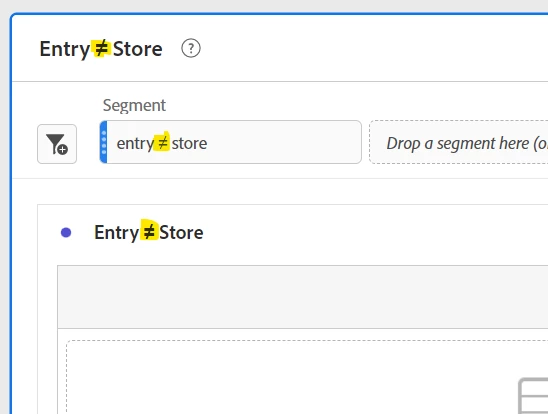


You can use lots of different characters... I normally just look up the character I want (i.e. "crossed out equals sign"), or pull up the character in Word, copy and paste it in.


sign ≠


I am partial to using ▲▼ when I am doing percent change  🙂


4 replies

Krishna_Musku
Community Advisor
Community Advisor
April 28, 2023

Yes, in the Workspace Panel

  1. Select search in the visualizations
  2. Select show advanced
  3. In the criteria drop down you will see 'Does not equal'

I posted some pictures for reference:

Level 2
April 28, 2023

Thanks for the reply but I was interested in an = with / through it that I can use in the name of a panel. For example Entry Page /= Store  Page.  

Krishna_Musku
Community Advisor
Community Advisor
April 28, 2023

Oh, I didn't understood your question. Glad you got the answer.

Level 2
April 28, 2023

or the same of a segment. 

Jennifer_Dungan
Community Advisor and Adobe Champion
Jennifer_DunganCommunity Advisor and Adobe ChampionAccepted solution
Community Advisor and Adobe Champion
April 28, 2023

Are you asking how to create a segment where the "entry page doesn't equal value", or literally how to show that in the name of the segment / panel, etc?


You can use lots of different characters... I normally just look up the character I want (i.e. "crossed out equals sign"), or pull up the character in Word, copy and paste it in.


sign ≠


I am partial to using ▲▼ when I am doing percent change  🙂