Interpreting page scroll depth data | Community
Skip to main content
New Member
November 17, 2020
Solved

Interpreting page scroll depth data

  • November 17, 2020
  • 1 reply
  • 2989 views

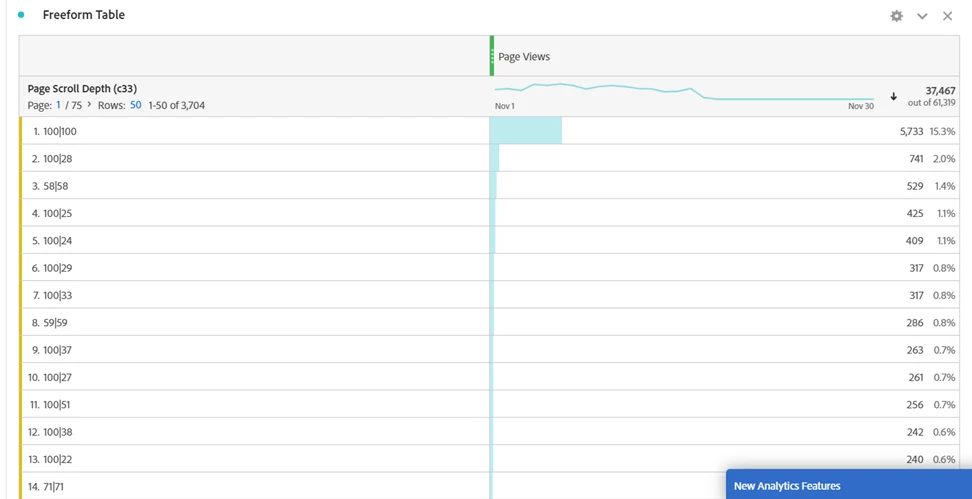
Hello, Could some one help me understanding page scroll depth data that i see. I understand that it is collected through a plug-in but i am not sure how to read the data, i see. what does 100/100 vs 100/58 vs 100/150 means for example? Thank you for your help in advance.
 

This post is no longer active and is closed to new replies. Need help? Start a new post to ask your question.
Best answer by Brian_Johnson_

@surabhisi1 If you're using the s.getPercentPageViewed() plugin, the two values likely reflect the maximum percent of the page viewed and the percent of the page that was visible when the page initially loaded. For example:

  • 100|50 - 100% of the page was viewed, while 50% of the page was visible when the page loaded. (The visitor had to scroll to see the remaining 50%.)
  • 58|58 - 58% of the page was initially visible, and the visitor never scrolled to see anything lower, so the maximum percent of the page viewed was also 58%.

1 reply

Brian_Johnson_
Brian_Johnson_Accepted solution
November 17, 2020

@surabhisi1 If you're using the s.getPercentPageViewed() plugin, the two values likely reflect the maximum percent of the page viewed and the percent of the page that was visible when the page initially loaded. For example:

  • 100|50 - 100% of the page was viewed, while 50% of the page was visible when the page loaded. (The visitor had to scroll to see the remaining 50%.)
  • 58|58 - 58% of the page was initially visible, and the visitor never scrolled to see anything lower, so the maximum percent of the page viewed was also 58%.
New Member
November 18, 2020
Thank you so much. I would do some QA to see what might be going on behind that ratio. Really appreciate your time in answering my questions.