Increase in ::unspecified:: values in Report Builder | Community
Skip to main content
Level 5
July 8, 2019
Solved

Increase in ::unspecified:: values in Report Builder

  • July 8, 2019
  • 3 replies
  • 4381 views

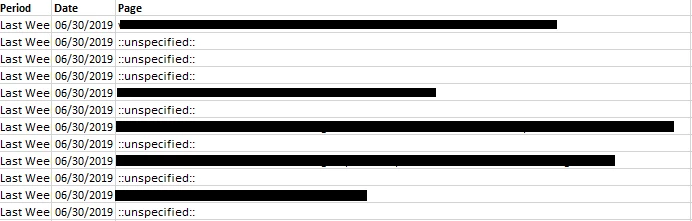
Has anyone else experienced a sudden increase in ::unspecified:: values in Report Builder? I recreated the Report Builder file in both Ad Hoc and Analysis Workspace and didn't have the same issue. I was running Report Builder version 5.6.29.0 when I first discovered the issue, but am still experiencing the same issue after updating to
This post is no longer active and is closed to new replies. Need help? Start a new post to ask your question.
Best answer by brentrad

The report is not using classifications of the variable in question, and the debugger shows that the value is being set correctly in the call. Because we're not seeing a similar issue in Ad Hoc or Analysis Workspace, this seems to be something that is specific to Report Builder.

The issue started over the holiday break, and we had not updated Report Builder since 5.6.29.0. The issue persists after we updated to 5.6.35.0. No changes were made to the Report Builder settings either.

Sounds like I need to contact customer support.

3 replies

Andrew_Chepurny
Adobe Employee
Adobe Employee
July 8, 2019

Hello Brent,

I feel obligated to first link this here: None, Unspecified, Unknown, and Other in reporting in Adobe Analytics

That said, did you recently update report builder?

brentradAuthorAccepted solution
Level 5
July 8, 2019

The report is not using classifications of the variable in question, and the debugger shows that the value is being set correctly in the call. Because we're not seeing a similar issue in Ad Hoc or Analysis Workspace, this seems to be something that is specific to Report Builder.

The issue started over the holiday break, and we had not updated Report Builder since 5.6.29.0. The issue persists after we updated to 5.6.35.0. No changes were made to the Report Builder settings either.

Sounds like I need to contact customer support.

Andrew_Chepurny
Adobe Employee
Adobe Employee
July 8, 2019

Correct.  In this case, please file a ticket to make sure the values are getting classified correctly.