In Workspace, can I change default settings for freeform tables? | Community
Skip to main content
Level 2
September 14, 2022
Question

In Workspace, can I change default settings for freeform tables?

  • September 14, 2022
  • 4 replies
  • 2649 views

I waste a lot of time changing settings in my freeform tables in Workspace. Ideally, I want to change the default settings.


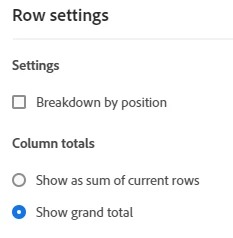
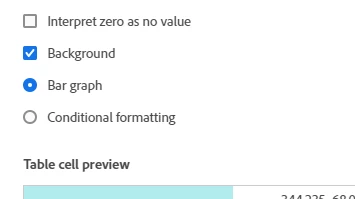
For example, I almost always want row settings to "show grand total" but this is not default and I have to change it for each drill-down, which can be 20 times per table. Other options would be great such as unchecking background. This will save a ton of time for me and my team. Please help! Thank you.


This post is no longer active and is closed to new replies. Need help? Start a new post to ask your question.

4 replies

Jennifer_Dungan
Community Advisor and Adobe Champion
September 14, 2022

There are a few default settings, but I don't believe that is one of them....


To get to the Project Preferences, use the Main "Components Menu" and choose Preferences.


Inside this, choose "Project" tab.


But mostly this just allows you to set the Display and Color Palette; and some basic settings:


Perhaps you should post these additional setting options as an idea, so that the developers will consider those changes in an upcoming release

TampaToddAuthor
Level 2
September 14, 2022

Thank you for the reply, but this doesn't have what I need. I thought someone at Summit said this was an option. I remember my teammate and I getting excited about it.


Jennifer_Dungan
Community Advisor and Adobe Champion
September 14, 2022

Yeah, these are the settings they showed at Summit... We can do basic stuff like colors and turning on/off annotations, anomalies, etc.. but it's still pretty limited... being able to have deeper control would be awesome.


I wish I had a better answer for you... I would love that feature too.

jeff_bloomer
Community Advisor and Adobe Champion
September 14, 2022

I'm in the same boat.  I'd love to just set things so I could default to REMOVE the checkmarks from Show Grand Total and Percent from my table to begin with.

It makes the data table a LOT cleaner.  In fact, I can't tell you the last time I actually kept Show Grand Total in my report.  It's either redundant or irrelevant to me.

TampaToddAuthor
Level 2
September 16, 2022

Interesting. I almost always want show grand totals and percent checked and background removed. I usually drill down by many segments to see what share of total each has and my charts are almost always % of total. Those three are my standard, but at least these options exist so we can pick and choose.

yuhuisg
Community Advisor
Community Advisor
September 15, 2022

A hacky way would be to create a freeform table with your desired settings. Then duplicate it for your other needs.

jeff_bloomer
Community Advisor and Adobe Champion
September 15, 2022

So true!  I actually have a Workspace called New Report that I've used in the past to start out a report with the settings I wanted.  This was before Adobe provided the preferences tab allowing you to adjust the color palette and view density.  You could always have a workspace like that open in order to copy the freeform table component and paste it into your current workspace.  You could even try saving that blank workspace as a template and start from that each time as well.

jeff_bloomer
Community Advisor and Adobe Champion
April 19, 2024

@tampatodd @jlatin 

It's been a while since this post was updated, but I'm glad to see #Adobe addressed it.  NOW, you can go to Edit Preferences:

Select the section for Freeform Table, and then select the items you want or don't want to be defaulted in your Freeform Tables from the start.  It's made things a LOT easier and less frustrating for me, for sure!

Hope this helps!