In web SDK implementation - Product string's issue with merchandising evar and events | Community
Skip to main content
Level 3
May 26, 2023
Solved

In web SDK implementation - Product string's issue with merchandising evar and events

  • May 26, 2023
  • 1 reply
  • 4802 views

eVars and events in product variable are proceeded by 1&2 respectively.

we are passing eVar17,19.

but in product string in debugger it's capturing as eVar117,119.


similarly for events, we are passing as event52

but in product string in debugger it's capturing as event252


@jennifer_dungan @yuhuisg @andrey_osadchuk @akt0m3r 


This post is no longer active and is closed to new replies. Need help? Start a new post to ask your question.
Best answer by Jennifer_Dungan

Yes, Adobe is confusing that way.. but this is actually expected....


The "Name" that you see when tracking eVars and events (i.e. eVar17, eVar19, event52) are different than the raw data identifiers in the database.


You get to know this really quickly when you work with the Raw Data Feeds (well at least for events... I actually had to contact support for the eVar mappings to support post_product parsing).


Remember that there are standard reserved events like "Purchase", "Product View", "instance of eVarX", etc... all of those show up in processed data....


So if you look at the event.tsv file that comes with Raw Data Feed, it will map them out:

Purchase is event ID

Instance of eVar1 - Instance of eVar100 are actually IDs 100-199  (these are standard account eVars)

Then when Prime and Ultimate packages came along, Instance of eVar 101-250  are actually IDs 10000-10149


You custom events (event1, event2, through to event100) are actually IDs 200-299 (again standard package)

Premium package events (event101-1000)  are actually IDs 20100-20998


Most of the mobile instance of events are in the 5xx, AMO in the 6xx, Mobile App Lifecycle in the 7xx; etc... 


Likewise, eVars have mapping to Adobe's DB... 

101-175 | eVars 1-75
275-299 | eVars 76-100
1200-1349 | eVars 101-250


Since you are looking at "Post Processed" Data, you will see things appear like this, but it's expected.
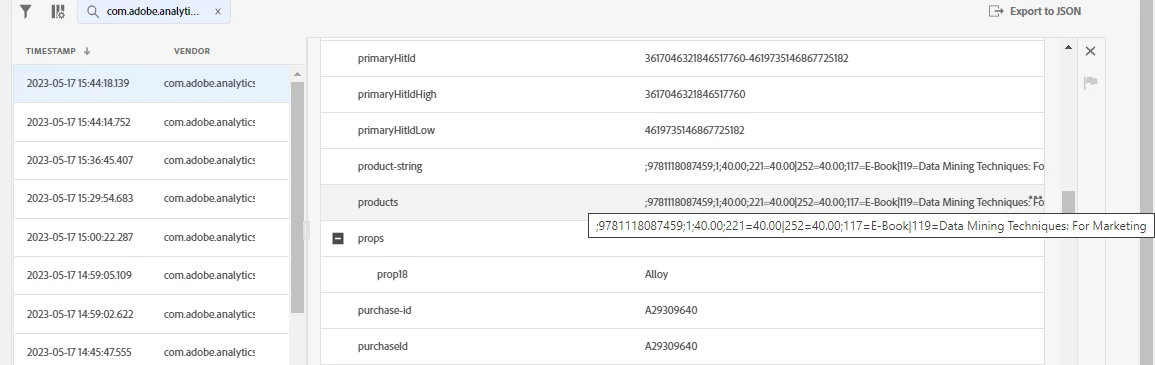
1 reply

Jennifer_Dungan
Community Advisor and Adobe Champion
Jennifer_DunganCommunity Advisor and Adobe ChampionAccepted solution
Community Advisor and Adobe Champion
May 26, 2023

Yes, Adobe is confusing that way.. but this is actually expected....


The "Name" that you see when tracking eVars and events (i.e. eVar17, eVar19, event52) are different than the raw data identifiers in the database.


You get to know this really quickly when you work with the Raw Data Feeds (well at least for events... I actually had to contact support for the eVar mappings to support post_product parsing).


Remember that there are standard reserved events like "Purchase", "Product View", "instance of eVarX", etc... all of those show up in processed data....


So if you look at the event.tsv file that comes with Raw Data Feed, it will map them out:

Purchase is event ID

Instance of eVar1 - Instance of eVar100 are actually IDs 100-199  (these are standard account eVars)

Then when Prime and Ultimate packages came along, Instance of eVar 101-250  are actually IDs 10000-10149


You custom events (event1, event2, through to event100) are actually IDs 200-299 (again standard package)

Premium package events (event101-1000)  are actually IDs 20100-20998


Most of the mobile instance of events are in the 5xx, AMO in the 6xx, Mobile App Lifecycle in the 7xx; etc... 


Likewise, eVars have mapping to Adobe's DB... 

101-175 | eVars 1-75
275-299 | eVars 76-100
1200-1349 | eVars 101-250


Since you are looking at "Post Processed" Data, you will see things appear like this, but it's expected.

Level 2
May 27, 2023

Just wanted to add that all the variable/event number lookup file are sent inside the ZIP file with Data Feed files. You should find the file "lookup.tsv" after extracting the Data Feed ZIP file. So no need to contact the support for these look up files.

Cheers!

Jennifer_Dungan
Community Advisor and Adobe Champion
May 27, 2023

Well if I could get the Data Team (the recipients of the files), who always asks for my help on how to process the data to send me those files... that would be a big help 🙂 (They sent me the events.tsv after about 4 years of asking so that I could properly support them, I might get the lookup.tsv sooner than that if I ask now). Or maybe I will just do a sample feed and get my own copy....


To be fair though, when I took over the analytics after the two branches of the company merged, they probably weren't sure if I knew my stuff (the previous people on their side probably couldn't help them much)... I've more than proven that I'm actually a good resource and we work together well. And when I took over.. they first told me they didn't even have the events.tsv...  I don't think their job processes it, and no one looked in the actual S3 bucket  😛