how to prevent/block s_sc and s_sq cookies | Community
Skip to main content
floriane3493069
Level 2
June 4, 2019
Solved

how to prevent/block s_sc and s_sq cookies

  • June 4, 2019
  • 10 replies
  • 12928 views

Hi there,

I just implemented a cookie banner on my website and managed to enbable users to block adobe analytics cookies. However two kind of adobe analyics cookies are still bein set (s_sc and s_sq). Is there any possibility to block these two cookies? Apparently s_sq is related to to ClickMap/Activity map. Can I deactivate Click map in general. This is someting I am not using.

Thank you
This post is no longer active and is closed to new replies. Need help? Start a new post to ask your question.
Best answer by Asheesh_Pandey

Here is what you need to do in DTM -

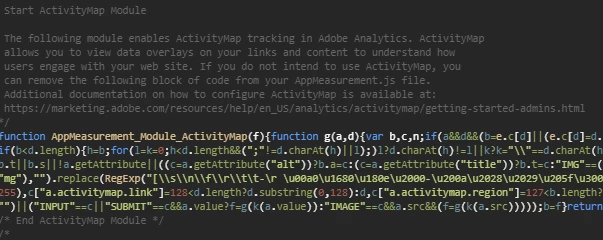
1. Remove the activity map module from DTM.

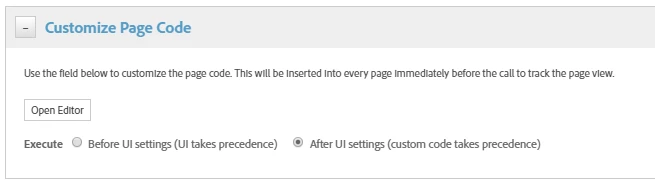
2. Add s.trackInlineStats=false and following custom code in DTM custom page code section > open editor > paste following code > Save

if (typeof s.ActivityMap === 'object') {

  s.ActivityMap.link = function() {

  return false;

  };

}

s.trackInlineStats=false;

Thanks,

Asheesh

10 replies

Adobe Employee
June 4, 2019

Try removing Activity Map module from the Analytics code in the implementation?

floriane3493069
Level 2
June 4, 2019

Hi ishans9314858

thank you for your feedback. Unfortunatelly I have implemented Adobe Analytics via DTM and I do not think that I have ever activated activity map.

Any other ideas?

Adobe Employee
June 4, 2019

Thanks floriane34930698​.

Is Adobe managing DTM library in the web property? If that's the case, it automatically includes the Activity Map module. With "Custom" option (in the Library Management in the tool settings), the Activity Map module can be manually removed from the code.

Asheesh_Pandey
Community Advisor
Community Advisor
June 4, 2019

Hi Floriane,

Try using Stopping Activity Map Link Tracking in case if it doesn't work use following code in the custom code section of the analytics tool to stop activity map.

if (typeof s.ActivityMap === 'object') {

  s.ActivityMap.link = function() {

  return false;

  };

}

Thanks,

Asheesh

floriane3493069
Level 2
June 5, 2019

Hi asheeshp,

thank you for your suggestions. I added the code to the custom code section of the analytics tool but s_sq is still being dropped. How can I set s.trackInLineStat to true as described in your link? s.trackInlineStats=true

I was looking in the custom section of the library management but could not find anything...

Thanks

floriane3493069
Level 2
June 5, 2019

Hi ishans9314858

I removed the activity map module manually but the s_sq cookie is still being dropped. :-/

Asheesh_Pandey
Community Advisor
Community Advisor
June 5, 2019

FYI! If trackInlineStats is 'true,' data about the page and link clicked are stored in a cookie called s_sq. If 'false,' s_sq will have a value of "[[B]]," which is considered null.

A question before I suggest it - Are you using DTM or Launch?

floriane3493069
Level 2
June 6, 2019

Hi,

I am using DTM. Thank you

Asheesh_Pandey
Community Advisor
Asheesh_PandeyCommunity AdvisorAccepted solution
Community Advisor
June 6, 2019

Here is what you need to do in DTM -

1. Remove the activity map module from DTM.

2. Add s.trackInlineStats=false and following custom code in DTM custom page code section > open editor > paste following code > Save

if (typeof s.ActivityMap === 'object') {

  s.ActivityMap.link = function() {

  return false;

  };

}

s.trackInlineStats=false;

Thanks,

Asheesh

floriane3493069
Level 2
June 7, 2019

Great,

s_sq cookie is not being dropped anymore.

Thank you