How to Measure Attribution with Multi-Channel Conversion Path in Adobe Analytics | Community
Skip to main content
Level 2
April 17, 2018
Solved

How to Measure Attribution with Multi-Channel Conversion Path in Adobe Analytics

  • April 17, 2018
  • 7 replies
  • 6050 views

Hello,

Is there a way to measure attribution with multi-channel conversion path?

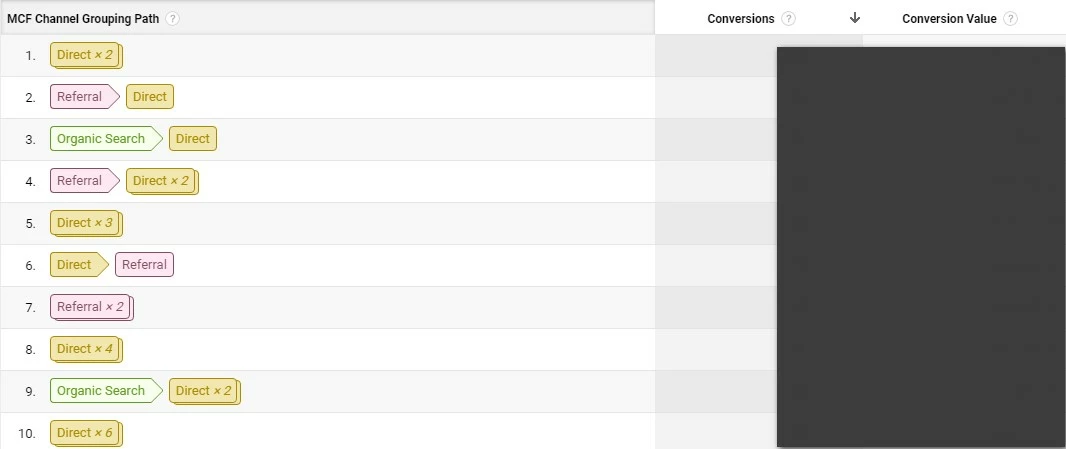
In GA,I can know this conversion path as below.

How could I do something to fulfill this report in Adobe Analytics?
This post is no longer active and is closed to new replies. Need help? Start a new post to ask your question.
Best answer by nickhomer

Edison,

Following Gigazelle's advice, open up a flow visualization and start with your "thank you" page. Then drop in your last touch channel dimension on the left. Then you could also drop in your first touch channel dimension to the left of that to get a clean flow of visitors that flow from one entry campaign to another closing campaign.

7 replies

Gigazelle
Adobe Employee
Adobe Employee
April 24, 2018

Marketing Channels would be the closest way to get that data, however that specific visualization is currently not available within the tool. It also only does first/last touch, instead of all channels.

Level 2
April 25, 2018

Hi Gigazelle,

Thanks for the reply.

So It is possible multi-channel attribution involved in Adobe Analytics?

Or Is there a way to measure attribution with all channels?

If it work in Adobe Analytics,I think it will be fantastic for paid media performance attribution.

Issao_Shoji
Level 2
April 25, 2018

Hello Edson,

I Guess you want the data, not the function exactly. In analytics it isn't automatic, you'll gotta need download a base from ad hoc or warehouse.

You can use this template:

1. Dimension: Customer Id or Marketing Cloud Id

     1.1 Breakdown by hour or minute

          1.1.1 Breakdown by channel

2. Metrics: visits and whatever others that are you website objetive.

That you can study this base and know how much channels your customers take before the conversion.

Gigazelle
Adobe Employee
Adobe Employee
May 4, 2018

You could create a flow visualization in workspace, then drag the last touch channel dimension.

Note that there is currently no report that list attribution paths in a list.

Level 2
May 7, 2018

Hi Gigazelle,

Thank you for the reply.

I can see the last touch channel path.

But I need to know the last touch channel path for those ordered visits.

nickhomerAccepted solution
Level 4
May 7, 2018

Edison,

Following Gigazelle's advice, open up a flow visualization and start with your "thank you" page. Then drop in your last touch channel dimension on the left. Then you could also drop in your first touch channel dimension to the left of that to get a clean flow of visitors that flow from one entry campaign to another closing campaign.

Gigazelle
Adobe Employee
Adobe Employee
May 8, 2018

You can also create a segment using visits where orders exist.