How to make adobe analytics segment available in adobe target? | Community
Skip to main content
cathyw49544988
Level 5
May 14, 2018
Solved

How to make adobe analytics segment available in adobe target?

  • May 14, 2018
  • 4 replies
  • 3137 views

I already had the A4T setup. I expect the segments I created in adobe analytics can be available in adobe target. But somehow, I can not see all the segments in target. Anyone know what else I may need to setup?

Thanks

This post is no longer active and is closed to new replies. Need help? Start a new post to ask your question.
Best answer by PratheepArunRaj

Dear Cathy,

I don't think A4T integration alone will help to see the Analytics Segments in Target. Base A4T integration will help you to choose Analytics Metrics and Dimension as success events for target.

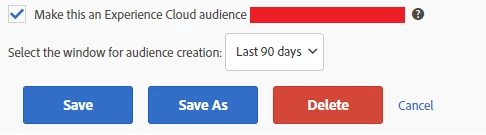
For segment sharing, you should share the segments to Marketing Cloud Experience Cloud : Below the snap from Segment Builder.

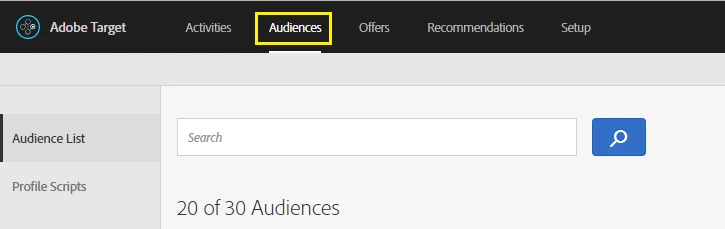
Once you share the segment, you can see the same in Audiences Tab of Target.
If you are unable to see 'Make this an Experience Cloud Audience' in Segment Builder make sure that you have enabled Marketing Cloud ID Service and reach Customer Care at CustomerCare@adobe.com

Thank You

Arun

4 replies

PratheepArunRaj
Community Advisor and Adobe Champion
PratheepArunRajCommunity Advisor and Adobe ChampionAccepted solution
Community Advisor and Adobe Champion
May 15, 2018

Dear Cathy,

I don't think A4T integration alone will help to see the Analytics Segments in Target. Base A4T integration will help you to choose Analytics Metrics and Dimension as success events for target.

For segment sharing, you should share the segments to Marketing Cloud Experience Cloud : Below the snap from Segment Builder.

Once you share the segment, you can see the same in Audiences Tab of Target.

If you are unable to see 'Make this an Experience Cloud Audience' in Segment Builder make sure that you have enabled Marketing Cloud ID Service and reach Customer Care at CustomerCare@adobe.com

Thank You

Arun

Thank You, Pratheep Arun Raj B (Arun) | Xerago | Terryn Winter Analytics
cathyw49544988
Level 5
June 1, 2018

Arun,

Somehow, I don't have the Selection in the segment builder as you showed before( make this an experience cloud audience. I readi some document, it mentioned that "This check box in the Segment Builder appears only if the report suite that you are saving this segment to is enabled for the Experience Cloud."  I don't know how to enable the report suite for Experience cloud? Can I enable physical report suite or virtual report suite?

Thanks,

-Cathy

PratheepArunRaj
Community Advisor and Adobe Champion
June 6, 2018

Dear Cathy,

No need to enable anything in Report Suite.

I barely remember that i have contacted Adobe Customer Care & submitted some Form to enable. Unable to recollect.

If you have Marketing Cloud ID implemented and if you still unable to see the Sharing Option, kindly reach Customer Care.

Thank You

Arun

Thank You, Pratheep Arun Raj B (Arun) | Xerago | Terryn Winter Analytics
Gigazelle
Adobe Employee
Adobe Employee
June 15, 2018

You'll want to make sure you're logging in from marketing.adobe.com and not my.omniture.com in order to guarantee having the ability to make audiences like that.