How to implement JS tracking via Adobe Launch | Community
Skip to main content
Level 2
November 5, 2020
Solved

How to implement JS tracking via Adobe Launch

  • November 5, 2020
  • 1 reply
  • 1807 views

Dear all,


I am trying to implement a code from Moosend (email marketing tool) to track the website, however the steps I took so far made the code visible on the website for the users to see. I am not sure what I am doing wrong, hope you can help me.


This is the description of my steps so far:


Creating a role as Library load (Page Top)


Then I didn't add any conditions, going straight to Actions and adding the JS code there
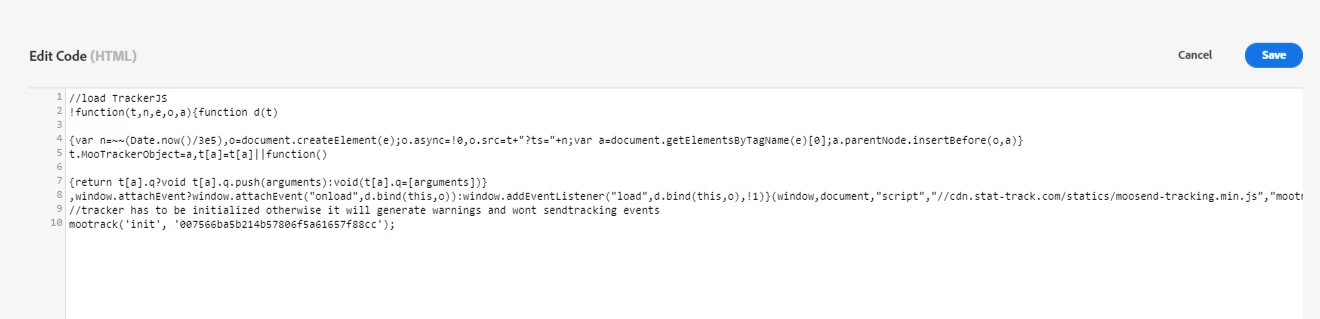
 

and then I published this in the library, then to production.


then after this, the tag appears there, visible on the website pages 



would you please help me? thank you!

This post is no longer active and is closed to new replies. Need help? Start a new post to ask your question.
Best answer by Andrey_Osadchuk

Hi Isabelle,

Could you explain what is meant by "visible on the website pages", where the 2nd screenshot comes from?


P.S.: please share the page URL if possible

 
Best wishes,
Andrey Osadchuk | Launch Inspector, Analytics Connector, Bookmarks

1 reply

Andrey_Osadchuk
Andrey_OsadchukAccepted solution
Level 10
November 5, 2020

Hi Isabelle,

Could you explain what is meant by "visible on the website pages", where the 2nd screenshot comes from?


P.S.: please share the page URL if possible

 
Best wishes,
Andrey Osadchuk | Launch Inspector, Analytics Connector, Bookmarks
Level 2
November 5, 2020
Hi Andrey, I mean it was visible on the actual page, like for the end users to see. I removed the tag because people were complaining.