How to delete custom report | Community
Skip to main content
October 23, 2018
Solved

How to delete custom report
  • October 23, 2018
  • 5 replies
  • 2690 views

This post is no longer active and is closed to new replies. Need help? Start a new post to ask your question.
Best answer by Gigazelle

So I approached our product manager over virtual report suites regarding this, and confirmed that they are stuck in there pretty good. This would be a prime example of a very old features (custom reports) interacting oddly with a new feature (virtual report suites). If you don't have reporting dependencies on the virtual report suite, you could delete/recreate it. You could also move to workspace, giving it an 'out-of-sight-out-of-mind' fix (custom reports are only in legacy R&A).

The ability to edit/rename custom reports in virtual report suites has been added to the product backlog though as a direct result of this forum thread. As virtual report suites are developed, it will be considered for implementation in the future.

5 replies

Pablo_Childe
Community Advisor
Community Advisor
October 23, 2018

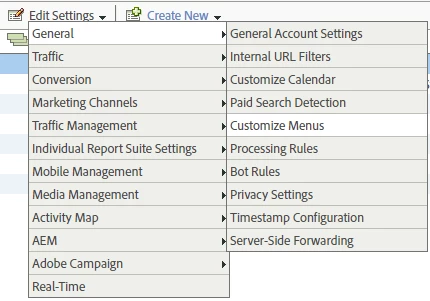
Go to Admin -> Select report suite it is under.

Then find

Menu Customization

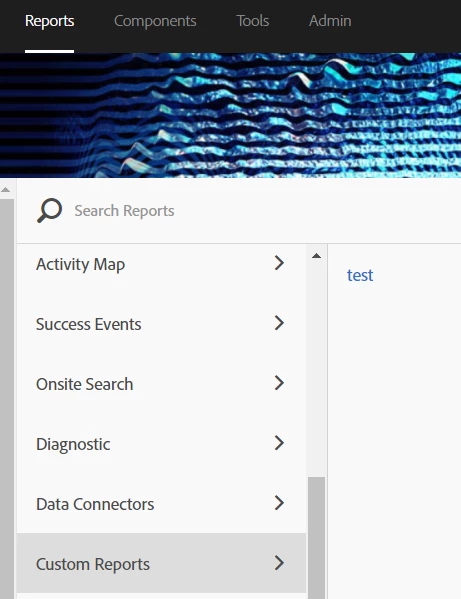
Navigate to Custom reports section -> select desired report to delete(highlights yellow) Use delete selected in menu. carful to select just one if more are present.

GLTU

ErikMaAuthor
October 24, 2018

This test custom report was created under virtual report suite.

I don't have Menu Customization menu item at Admin > Report Suite > Edit Settings

Level 2
October 25, 2018

It's quite hidden but I ultimately found it:

ErikMaAuthor
October 25, 2018

The problem is that this custom report was created within virtual report suite and under Admin > Report Suite menu only parent reports suites are listed, no virtual report suites are visible.

Gigazelle
Adobe Employee
GigazelleAdobe EmployeeAccepted solution
Adobe Employee
November 1, 2018

So I approached our product manager over virtual report suites regarding this, and confirmed that they are stuck in there pretty good. This would be a prime example of a very old features (custom reports) interacting oddly with a new feature (virtual report suites). If you don't have reporting dependencies on the virtual report suite, you could delete/recreate it. You could also move to workspace, giving it an 'out-of-sight-out-of-mind' fix (custom reports are only in legacy R&A).

The ability to edit/rename custom reports in virtual report suites has been added to the product backlog though as a direct result of this forum thread. As virtual report suites are developed, it will be considered for implementation in the future.