How to create a linear trend line (calculated metric?) | Community
Skip to main content
Level 4
May 11, 2018
Solved

How to create a linear trend line (calculated metric?)

  • May 11, 2018
  • 4 replies
  • 3340 views

I am having a question maybe someone can help me out on this.

I have created a line graph of couple weeks visits and see the behaviour. Now I would like to see a trend line in there. I have tried to caluclate this but somehow was not able to do so. Does anyone know a solution on this.

For example these are the visits of my week:

5

3

3

2

With this information I would like to create an own trend line to see how the behaviour is going. Does anyone know a solution on that?

The most important part is to get a trendline by using maybe a calculated metric

I would be more than thankful!
This post is no longer active and is closed to new replies. Need help? Start a new post to ask your question.
Best answer by laetizia_w

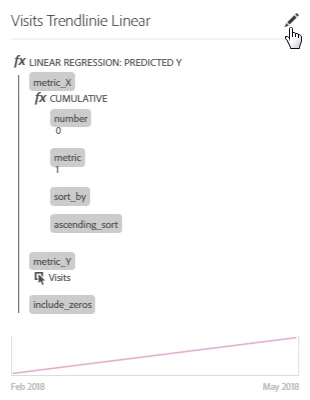
I found also another way:

I have tested also with our data and typical Excel trendlines and the values are correct.

4 replies

Gigazelle
Adobe Employee
Adobe Employee
May 22, 2018

If you shift+click the numbers you want to trend, then right click > trend selection, you should get exactly what you're looking for.

Level 4
May 23, 2018

No this is not what I want. I would like to have a regular line with visits for example and trend line. Just like this:

Level 2
May 24, 2018

I would think there would be a method to use the "Cumulative Average" function, but I wasn't able to get it to work.

Does the attached get you close enough?  This would be a rolling average trend line.

laetizia_wAuthorAccepted solution
Level 4
May 25, 2018

I found also another way:

I have tested also with our data and typical Excel trendlines and the values are correct.