How to configure datastream id dynamicaly | Community
Skip to main content
Level 2
December 23, 2024
Solved

How to configure datastream id dynamicaly

  • December 23, 2024
  • 1 reply
  • 985 views

Hu Team,

I wanted to configure datastream id dynamicaly based on environment using custom code.


Thanks in advance 🙂

This post is no longer active and is closed to new replies. Need help? Start a new post to ask your question.
Best answer by Amruthesh_AG

@yashre1  You need to create datastreams based on your requirement (Ex: Dev, Production).

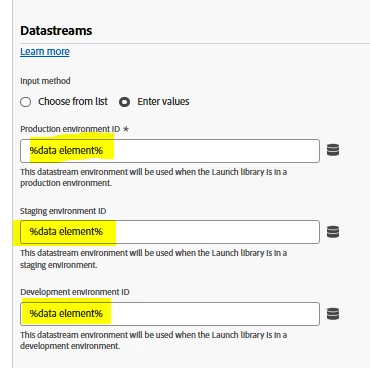
and then you need to pass the data element in Adobe Experience Platform Web SDK extension configuration. not in the datastreams creation.
 

1 reply

Amruthesh_AG
Community Advisor
Community Advisor
December 23, 2024

@yashre1  You can create data element and add below custom code to set dynamically based on environment type.


var libEnv= _satellite.environment.stage;
if (libEnv == "staging")
{rsid= "Enter staging data steam id";}
if (libEnv == "development") {
rsid="Enter development data steam id";}
if (libEnv == "production"){
rsid="Enter production data steam id";}
return rsid;

YashRe1Author
Level 2
December 23, 2024

@amruthesh_ag  I have created data element and added the code but I was not getting option to select the data element in datastream. How to achieve this?

I am new to websdk migration.

Amruthesh_AG
Community Advisor
Amruthesh_AGCommunity AdvisorAccepted solution
Community Advisor
December 23, 2024

@yashre1  You need to create datastreams based on your requirement (Ex: Dev, Production).

and then you need to pass the data element in Adobe Experience Platform Web SDK extension configuration. not in the datastreams creation.