How to check the only previous page | Community
Skip to main content
Level 2
August 2, 2021
Solved

How to check the only previous page

  • August 2, 2021
  • 1 reply
  • 1202 views

Hi 


I'd like to check the only previous page from a page but I can't.

Normally, I think we can we check Report> previous page> The page we want check.

However when I check on this way, the list which includes another data(without previous page)


▼Now

1.I want check the previous page from page X but, when I check Report> previous page> The page we want check, the data below appear.


Example)

Page A→B→C→X

Page B→A→X

Page C→A→B→D→X


▼I want check only the data below.

Page A→ X

Page B→ X

Page C→ X


If you have any ideas, I'd like to check..!


Esuefu
This post is no longer active and is closed to new replies. Need help? Start a new post to ask your question.
Best answer by isinha

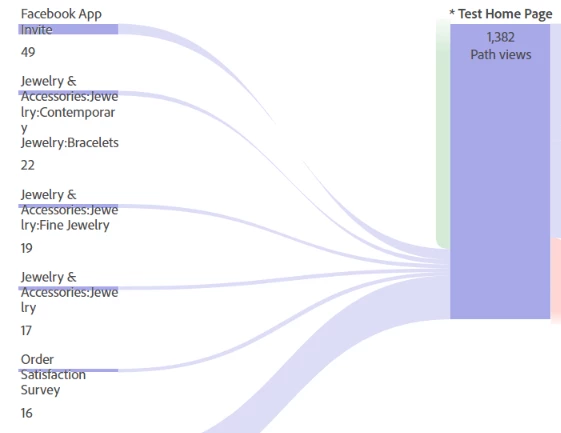
@esuefu I don't think it's possible in Reports & Analytics as there is no option to restrict the branches in previous page flow report. But there's a way in Analysis Workspace: you can try fetching a Flow visualization report and that can give just the previous page to the given page. Example below:


1 reply

isinhaAdobe EmployeeAccepted solution
Adobe Employee
August 2, 2021

@esuefu I don't think it's possible in Reports & Analytics as there is no option to restrict the branches in previous page flow report. But there's a way in Analysis Workspace: you can try fetching a Flow visualization report and that can give just the previous page to the given page. Example below:


EsuefuAuthor
Level 2
August 3, 2021

@isinha

Thank you for your comments!

I understand that how to check the previous page.


Before I asked the similar question below and I'd like to check all data from the first without clicking a lot.


※How to create the report from entry page to next page flow

https://experienceleaguecommunities.adobe.com/t5/adobe-analytics-questions/how-to-create-the-report-from-entry-page-to-next-page-flow/qaq-p/414964/comment-id/23754#M23754


>I could check the 1.Project > Download CSV . and I'll also check the URL you write down!!


>Plus, I could download CSV which displayed on the flow visualization but 

>I couldn't download hidden data.(Usually we can see Top.5 Data and click "more" and see more data.)

>→From the beginning, I'd like to download all data in flow visualization without clicking "more" a lot.


I'm afraid that do you have any ideas to solve it ?


Esuefu