Hi, I just want to clarify your use case...
You say "after every session" but then you also give a clear trigger event of "userUpdate
and user is logged in". I am unsure how "after every session" comes into play, unless you just mean, you need to restrict eventx to once per session (not really deferring it to the end of the users session which is sort of implied by the wording above).
If this is really just a "restrict eventx to once per session", there are two ways to go about this.
The first, is using Max Frequency as you mentioned above... if you create a trigger for "userUpdate", you can add two conditions to the rule:
1. Check if the User is Logged In
2. Max Frequency "Return true no more than once every 1 sessions"
This should only trigger the rule once per session, on the "userUpdate" action when the User is Logged In. If the first userUpdate doesn't have the user logged in, this won't count against the Max Frequency.... all conditions should need to pass for the Max Freq to apply.
However, if you have an implementation that might cross sites / use multiple Launch Properties across your sites... the Max Frequency will only apply to the implementation for that one Launch Property.
But long before Launch was around, Adobe had a very easy way to limit events.... Right in the configuration of your events, you can set up Event Recording Behaviour:
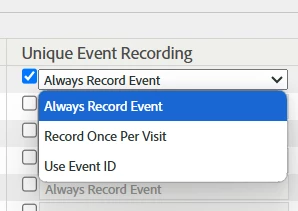
- The default is "Always Record Event", which means the event will always trigger.
- The item you might want to look into is "Record Once Per Visit"... this means you can send eventx on every "UserUpdate" (where the user is logged in), but only the first eventx of the user's visit will be allowed in your data... all subsequent eventx in the same visit will be ignored... you will see eventx in your tracking calls, but they will be excluded during post-processing.
This is a lot easier to implement technically.. you don't have to do as many rule conditions in Launch and test them for various scenarios. And if you already have other tracking on UserUpdate (where the user is logged in), you can simply add eventx on that existing tracking call.
- The last option is serializing your event... you can actually pass a unique id (that applies for life - or at least for as long as your data is retained...) that means the event will only count once against a particular ID... this can be good for tracking things like User Account Creation, passing the User's UUID as a unique identifier...
Example:
s.events = "event1:12345"
Adobe will only track the first ever instance of "12345".. whether it's part of the same session, or a year from now. The only problem is that event serialization only accepts 20 digits... which is not enough for most implementations today (a lot of UUIDs are 32-36 character GUIDs).
Now, I see that in Bjoern's response and your replies, you seem to be specifically looking for the "end of the session"... I really don't think that is possible.. and I cannot really understand a use case that would require such a specific "end of session" trigger after a particular action...
As for your second question
impact of expiring data elements on a session
Data Element expiries are just a way of trying to minimize processing of getting a value into your Data Element... So there is:
- "None" (which means the value will process each time it's called... this is also pretty much required for page level values in SPAs, since there is no "pageview" to force a clear in SPAs)
- "PageView" which means the value will be processed only once per page (the page loads, the value is pulled, all subsequent uses of that Data Element will use the initially pulled value)
- "Session" which means the value will be processed only once per session (the first time this value is set in the session, this is the value that will be used every time the Data Element is called)
- "Visitor" which means the value will be processed once per visitor, maintaining the value across sessions.
I use "Session" sparingly, as many values can change over the course of a session... and I never use Visitor... I know some people like to use "Visitor" duration for things like User IDs... but we treat people that sign out as an explicit "clearing of data"... as they could be using a shared machine... we don't want to continue tracking them beyond their explicit log in session.



