How do I create a metric counting Distinct values in Data View? for attribution | Community
Skip to main content
Level 2
October 28, 2025
Question

How do I create a metric counting Distinct values in Data View? for attribution

  • October 28, 2025
  • 1 reply
  • 281 views

Hi,


I'm looking to use a custom metric and apply attribution settings to it, but the non-default attribution settings only work on metrics within the Data View.


How do I create a metric within Data View that is counting distinct dimension values, so that I can apply non-default attribution settings within workspace? 

Right now, it seems like I can only count metrics at the event level (row count with the value) or Session or People. But for cases like application IDs where we want to attribute each instance of an app ID to an upstream touchpoint, I would need a distinct count metric.


Thanks
1 reply

Level 3
October 31, 2025

HI @janiceak ,


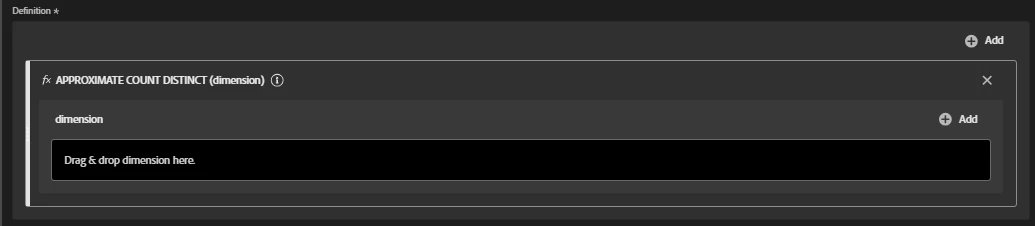
In Customer Journey Analytics, you can create a calculated metric using the Approximate Count Distinct function. This function expects a dimension, which I believe addresses your need.


If I understood correctly, here are the steps:

1. In CJA, navigate to Components > Calculated Metrics.

2. Select the desired dataview in the top-right dataview selector

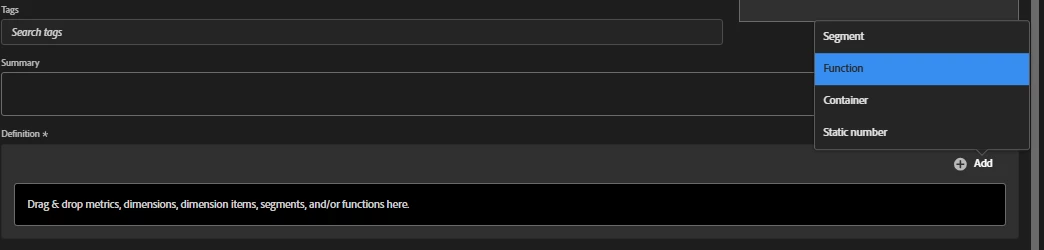
3.In the definition box, click on +Add and select function


 4. Select the Approximate Count Distinct function


5. Drag the deisred dimension to the definion

6. Save your changes.


Additionally, I’d like to share a few valuable resources about functions in CJA

-Learn from your peers | Adobe Analytics Putting the FUN in FUNctions webinar. Recording available here  

-You can download the playbook here 


Hope this helps!


Best Regards,

Filipe C. Freitas

JaniceAkAuthor
Level 2
October 31, 2025

Hi,


I am actually asking about creating a distinct count metric within the Data View--not as a calculated metric within workspace-- so that I am able to apply non-default attribution settings to the Metric within a Workspace.


In CJA, non-default attribution settings are only available on metrics that are created within the Data View.


Thanks

Janice

Level 3
October 31, 2025

HI @janiceak,


My apologies for my misunderstanding and thank you for further clarification.


In this case, I would suggest you to try creating a derived field using the summarize function and apply the Count Distinct summarize method. This will make the field available in the data view.


Reference documentation: https://experienceleague.adobe.com/en/docs/analytics-platform/using/cja-dataviews/derived-fields#summarize


Best Regards,

Filipe