How can I generate a list of report suites and Page URL details | Community
Skip to main content
January 11, 2019
Solved

How can I generate a list of report suites and Page URL details

  • January 11, 2019
  • 5 replies
  • 2620 views

Hi Team,

We have a need to generate the list of existing Report suites with following columns.

*         Report Suite Id

*         Site Title

*         Base URL

*         Default Page

How to generate this?

Thanks,

Abhisarika
This post is no longer active and is closed to new replies. Need help? Start a new post to ask your question.
Best answer by Hyder_Ziaee

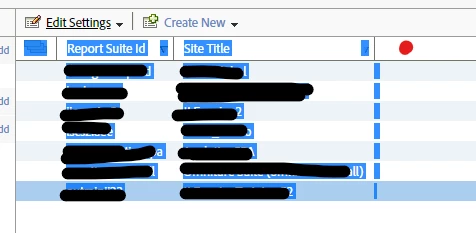
Drag your mouse from the red dot I have indicated to the end of the list and it should select the data

5 replies

Urs_Boller
Community Advisor
Community Advisor
January 11, 2019

I don't know how to do it in the interface directly without opening the settings of each report suite.

if you have access to API 1.4 you can use the following requests:

1) get RS list with analytics-1.4-apis/r_GetReportSuites.md at master · AdobeDocs/analytics-1.4-apis · GitHub

   this will return a list of all RS

2) get RS details either by using one of the single functions or analytics-1.4-apis/r_GetSettings.md at master · AdobeDocs/analytics-1.4-apis · GitHub

   with getSettings you receive a bunch of information about a single RS, you can even request data for all RS together (one request for settings of all RS)

then just extract the desired data in the JSON response from 2)

Hyder_Ziaee
Adobe Employee
Adobe Employee
January 11, 2019

If you want to do this in the report suite manager (Admin > Report Suites), you can do the following:

1. Click on Customize Columns:

2. Add the columns you need:

Note, if the list of report suites is long, the system limits the amount of columns you can add.

January 11, 2019

Thank you for the response.

I have followed the same steps and clicked at the upper left corner where the 'select all report suites' 3 overlapping boxes are there.

But unable to copy that content. Is there any way to copy  that content or download that.

January 11, 2019

Thanks for the details. But i don't have access to Web API

Hyder_Ziaee
Adobe Employee
Hyder_ZiaeeAdobe EmployeeAccepted solution
Adobe Employee
January 11, 2019

Drag your mouse from the red dot I have indicated to the end of the list and it should select the data