How can I dynamically Count Number of Days Selected in Calender | Community
Skip to main content
Level 2
August 28, 2019
Solved

How can I dynamically Count Number of Days Selected in Calender

  • August 28, 2019
  • 8 replies
  • 8188 views

Hi,

In a business case, I am calculating a metric and in that, I need to divide a dimension by "Number of Days an analytics user selected in the calendar" while fetching a report. Please note it is very different from Function (Approximate Distinct Count(Dimension (Days)).

Any suggestion to achieve this?

Regards

Lalit
This post is no longer active and is closed to new replies. Need help? Start a new post to ask your question.
Best answer by David_Jerome

Ok - this makes sense and wow this takes me back to when I first started using analytics and seeing products disappear from reports if there are no product views.

I have however got it working:

And on my results:

8 replies

David_Jerome
Level 6
August 28, 2019

Hi Lalit,

Can you explain what you are trying to do as my go to answer is what you are saying not to use. :-)

Thanks

Dave

Urs_Boller
Community Advisor
Community Advisor
August 28, 2019

I would go with the "approx count distinct" but wonder why you can't take it? in similar cases that's my prefered (only?) solution...

ltapariaAuthor
Level 2
August 29, 2019

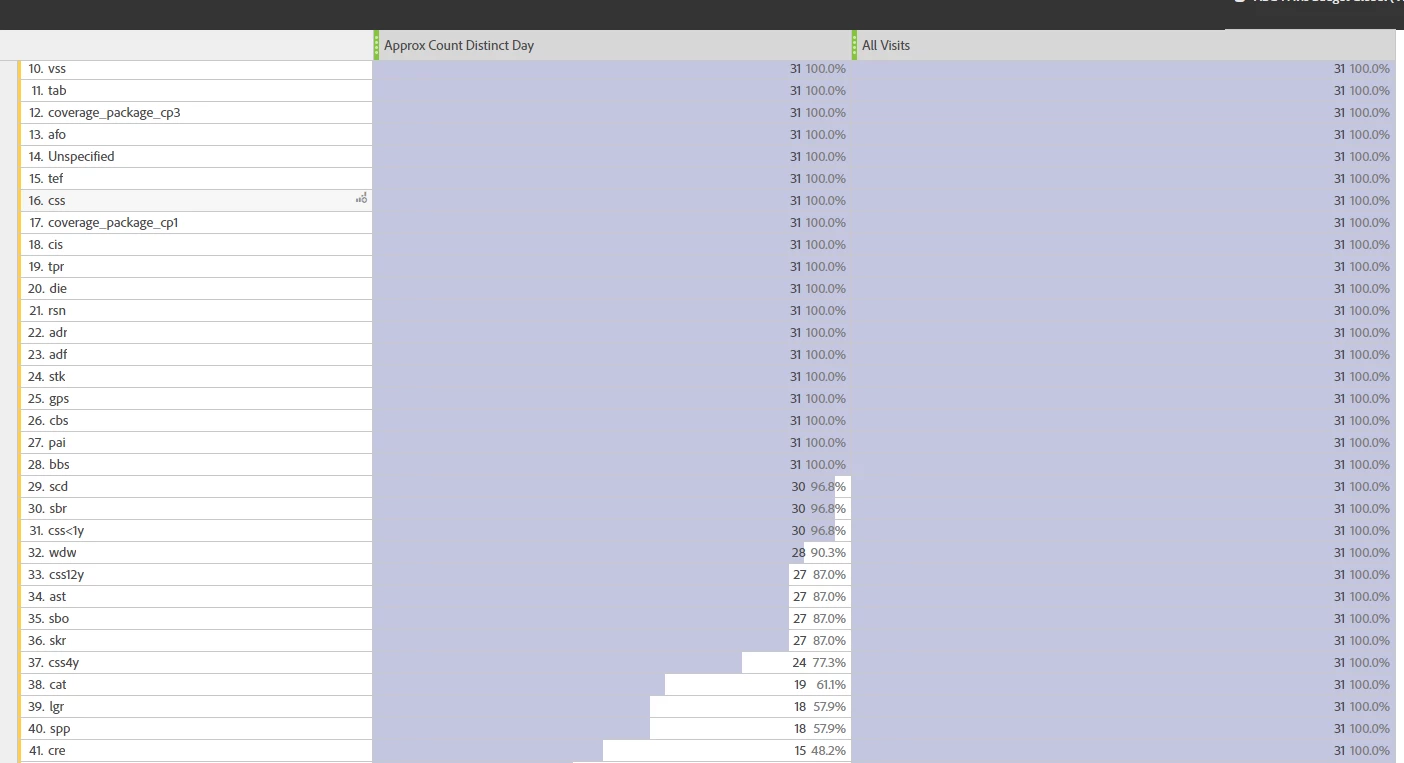
Hi ursboller​, Earlier I thought to use the formula for “approximate distinct count” and get the number of days that I had in my timeframe but when I use it against Product dimension, it completely shatters meaning of "approx". Please check below screen. That is why it is not at all reliable.

Also please check below thread: How to Group SKUs based on Number of Orders and to make requirement dynamic, I need day count in the time frame to be right.

davidj85759080​, It is for the same thread, we were discussing. Because of your advice, I used a static number in the denominator(30)  and that is giving correct bucketing :-) Thanks, but still, I am greedy to make denominator dynamic. :-P

Thanks for the time davidj85759080​ & ursboller

David_Jerome
David_JeromeAccepted solution
Level 6
August 29, 2019

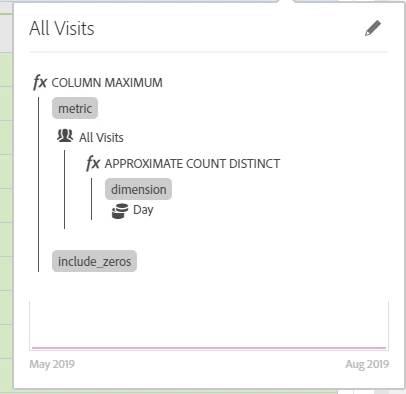
Ok - this makes sense and wow this takes me back to when I first started using analytics and seeing products disappear from reports if there are no product views.

I have however got it working:

And on my results:

David_Jerome
Level 6
August 29, 2019

I added the segment "All Visits" as more of a background check.

This said - if you have no visitors to your website on a given day, the logic will not work.

ltapariaAuthor
Level 2
August 29, 2019

Thanks, davidj85759080​! Appreciate your help!

Urs_Boller
Community Advisor
Community Advisor
August 29, 2019

sorry to disappoint you... as soon as you have a time range with at least one day where no product has been viewed, the metric doesn't work anymore. no matter if you include the "all visits segment" or not does not change the result...

so using the proposed segment might work, just be aware that there are situations where it might fool you ...

ltapariaAuthor
Level 2
August 30, 2019

Thanks, Will keep this in mind!