Hit in Visit segment | Community
Skip to main content
March 15, 2024
Solved

Hit in Visit segment

  • March 15, 2024
  • 3 replies
  • 2763 views

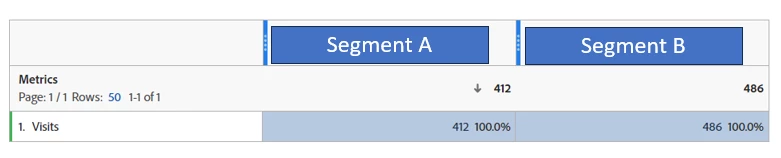
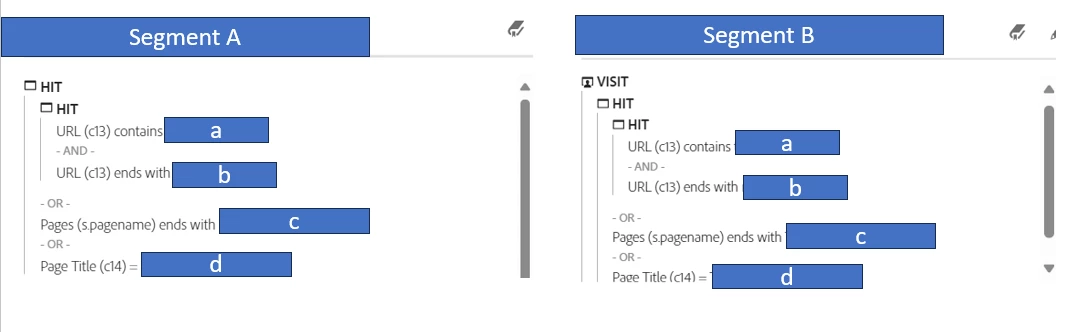
I am creating 2 segments and expect these 2 segments yield the same number of visit, but I found segment B has higher visit. Why? 


@andrew_wathen_  I read some your posts, and you seem like an expert for segmentation. Any chance you know why?

This post is no longer active and is closed to new replies. Need help? Start a new post to ask your question.
Best answer by pradnya_balvir

Hi @lydiali , 


Your segment B is created on "Visit" level. Its calculating the visits data in that entire session. 

Hence segment B has higher visits than segment A.

3 replies

Josh__Stephens
Community Advisor
Community Advisor
March 15, 2024

Based on what I can see in your screenshots, and assuming the logic matches exactly, I'd expect the number of visits to be the same.  However, it appears there's some info cropped off at the bottom of the screenshots.  In your visit-based segment, is everything inside the hit container?  Is the logic within the hit container exactly the same as in the segment on the left?

LydiaLiAuthor
March 18, 2024

Yes, the logic between these 2 containers are the same. The scroll button didn't go to the end but actually nothing is below it. 

Andrew_Wathen_
Community Advisor
Community Advisor
March 18, 2024

Hmmm... I've got one thought, but I'm not convinced it's the answer...


End/start of date range overlap

I think you might see a small amount of different due to overlap at the end of the selected date range e.g. some extra sessions creeping where you have the visit container because of sessions that:

  • starts before you date range and end in your date range
  • starts in your date range and end after your date range

but you seem to have quite a high percentage different between the numbers, so I'm not convinced that's the explanation.


I think you may need to log a ticket with Adobe unfortunately.


One final random thought... do the numbers change when you refresh the same report? - I once had an issue that caused reports to change between queries/refreshes when it was based on today's data and used a classification
LydiaLiAuthor
March 20, 2024

Yes, the numbers changed when I refreshed the report. 


I also changed the date to a single date to minimize the overlapping situation but that seemed not help. (To confirm, to have a visit qualified in a segment, either the visit start date or end date should be in the data range, right?) 

Andrew_Wathen_
Community Advisor
Community Advisor
March 20, 2024

OK so the numbers for the same report change between refreshes? - not really going to be the overlap issue then.


Can you confirm if any of the segment definition is based on a classification of a variable?

pradnya_balvir
Community Advisor
pradnya_balvirCommunity AdvisorAccepted solution
Community Advisor
March 19, 2024

Hi @lydiali , 


Your segment B is created on "Visit" level. Its calculating the visits data in that entire session. 

Hence segment B has higher visits than segment A.