Hide trend line for future dates | Community
Skip to main content
lalitc72210912
January 26, 2021
Solved

Hide trend line for future dates

  • January 26, 2021
  • 1 reply
  • 1379 views

Hello Community, in a trend view where in we compare stats from previous year with current year a window of 12 months is compared against each other. With respect to trend shown for future dates the line stays at the bottom of chart and is visible which is bit annoying for client. Client has requested if the trend line can end until todays date and rest be blank, as from business perspective the line falls to zero for future dates and thats not acceptable. Is there any configuration that allows us to hide the line beyond today/yesterday? Client is aware that data for future dates is not captured hence its bottomed but they have an opinion if there is no data nothing should be shown why zero?

This post is no longer active and is closed to new replies. Need help? Start a new post to ask your question.
Best answer by JacobTo1

Hi @lalitc72210912 

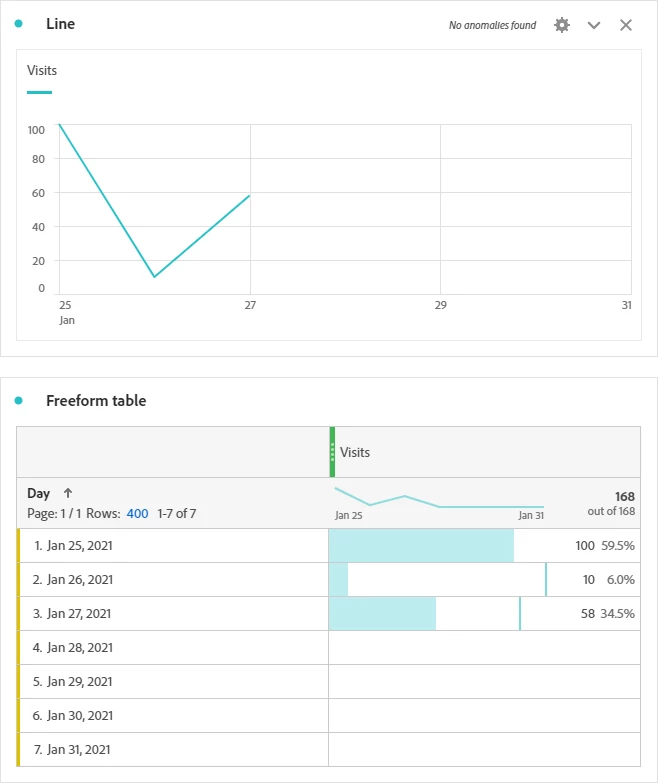
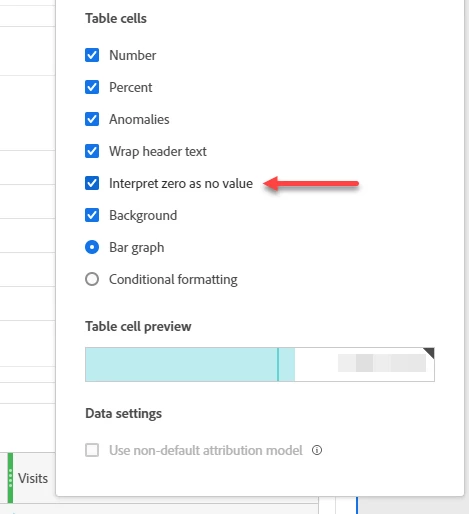
You can achieve this result by changing your metric settings to "Interpret zeros as no value", which will hide the line visualization if you want to have a date range that goes into the future.

However, some things to consider:

  • Data for current day will change each time a user views the workspace, you could fix this with either a segment or calculated metric if this wasn't acceptable (i.e. exclude current day).
  • If any data points in the historical data were zero, this would also mean the line visualization would not display (e.g. same as dates in the future).


Example

1 reply

JacobTo1Accepted solution
January 27, 2021

Hi @lalitc72210912 

You can achieve this result by changing your metric settings to "Interpret zeros as no value", which will hide the line visualization if you want to have a date range that goes into the future.

However, some things to consider:

  • Data for current day will change each time a user views the workspace, you could fix this with either a segment or calculated metric if this wasn't acceptable (i.e. exclude current day).
  • If any data points in the historical data were zero, this would also mean the line visualization would not display (e.g. same as dates in the future).


Example