Group visitors by number of times they visit a specific page | Community
Skip to main content
Level 4
November 15, 2018
Solved

Group visitors by number of times they visit a specific page

  • November 15, 2018
  • 7 replies
  • 6783 views

Hello

I am trying to create a segment which groups visitors by the number of times they visit a specific page. For example this group of visitors have seen our homepage on 3 separate visits.

I have created the below segment but i worry that this is just saying they have seen the homepage at least once and have visited our site once or twice, those visits are not specifically tied to that page.
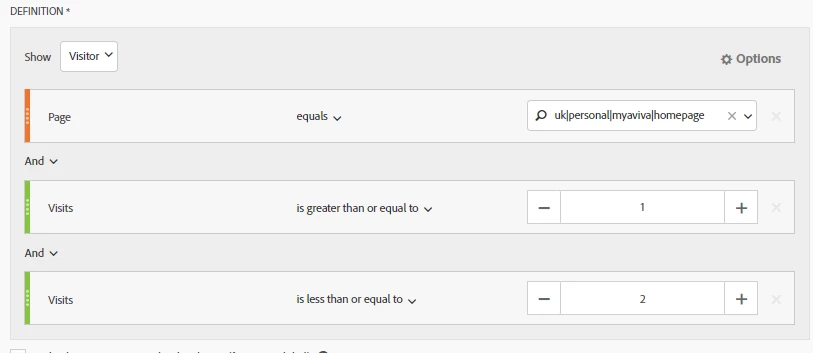
Any suggestion on how i could build that segment?

Regards

Joe
This post is no longer active and is closed to new replies. Need help? Start a new post to ask your question.
Best answer by Urs_Boller

Hi JoeBlackwell

this could be solved by a

visitor segment

{"visit-container page=homepage" then "visit-container page=homepage" then "visit-container page=homepage"}

here is another solution: create a calculated metric with a visits-segment on the desired page, add visits as metric. follow those steps:

1) create new segment: visits where page=honepage

2) create new metric: segment 1) and metric visit

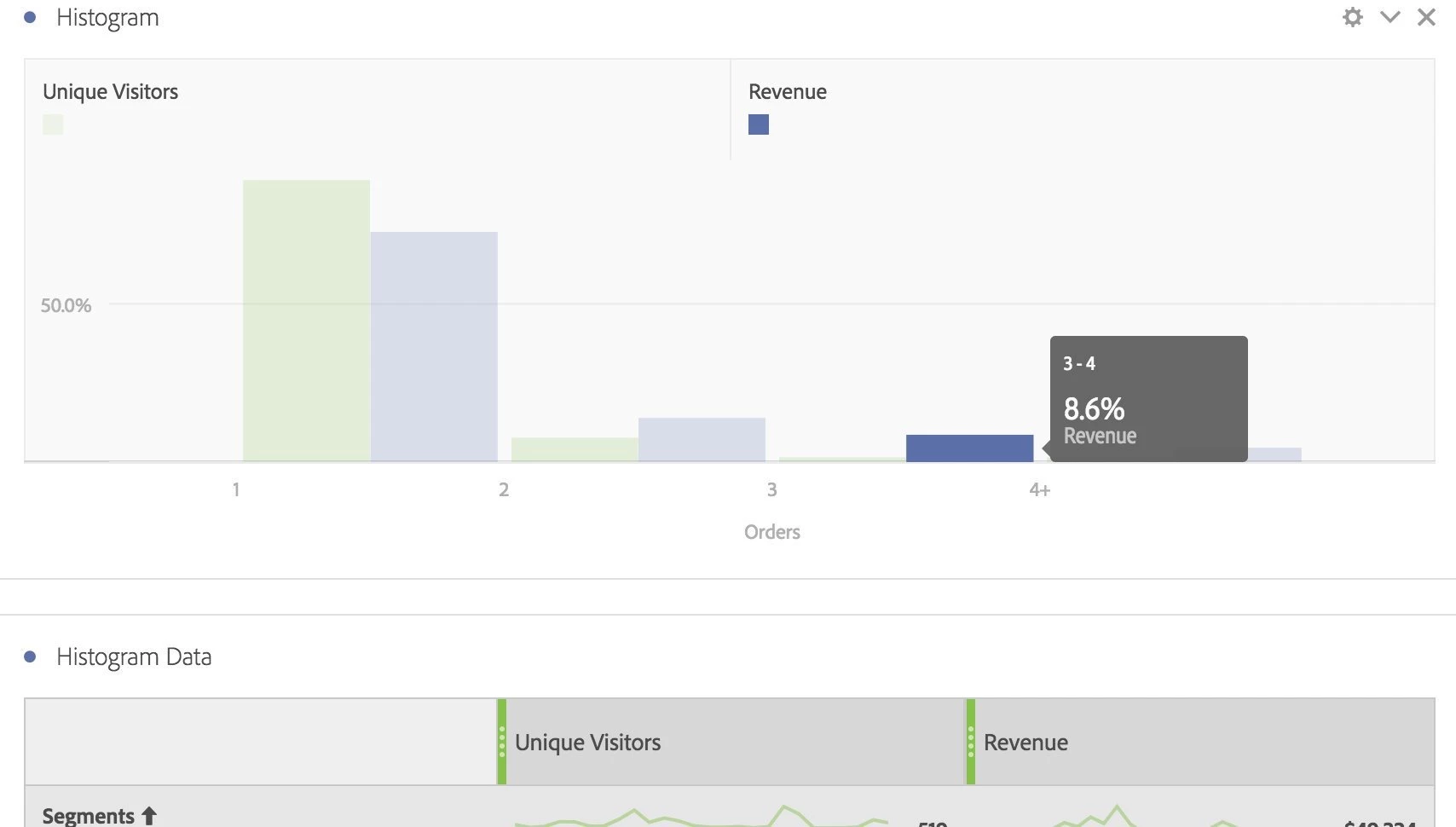
now create histogramm add visitor level with the new metric. the result should look something like this:

after creating the histogramm, click on the top-left icon of the chart and "show data".

this will make the table of the histogramm visible, all different segments created for you!

and futhermore, you csn change the setting of the histogramm (top-right) for changing buckets and the segments are updated immediately!

hope that helps!

btw: hug thanks to JimKultgen who once twittered this tip

7 replies

Urs_Boller
Community Advisor
Urs_BollerCommunity AdvisorAccepted solution
Community Advisor
November 15, 2018

Hi JoeBlackwell

this could be solved by a

visitor segment

{"visit-container page=homepage" then "visit-container page=homepage" then "visit-container page=homepage"}

here is another solution: create a calculated metric with a visits-segment on the desired page, add visits as metric. follow those steps:

1) create new segment: visits where page=honepage

2) create new metric: segment 1) and metric visit

now create histogramm add visitor level with the new metric. the result should look something like this:

after creating the histogramm, click on the top-left icon of the chart and "show data".

this will make the table of the histogramm visible, all different segments created for you!

and futhermore, you csn change the setting of the histogramm (top-right) for changing buckets and the segments are updated immediately!

hope that helps!

btw: hug thanks to JimKultgen who once twittered this tip

JoeBl2Author
Level 4
November 19, 2018

Hi Urs

Thanks for taking the time to reply. Your first suggestion is good for the minimum number of visits i.e. with the below logic it will give me visitors who have visited that page at least 3 times. However what it doesn't do is cap the visits. They may have visited another 10 times.

{"visit-container page=homepage" then "visit-container page=homepage" then "visit-container page=homepage"}

Can you think of a way that applies a max i.e. they visited a min 3 times and no more than 4.

On your second idea i don't know if i am missing something but I can't use calculated metrics in a Histogram in workspace, only out the box metrics like visits. How are you using calculated metrics in a histogram?

Many thanks

Joe

Urs_Boller
Community Advisor
Community Advisor
November 19, 2018

Hi JoeBlackwell

1) don't know any easy way to limit max visits...

2) can you use the segment in the histogramm (instead of the calc. metric)?

Pablo_Childe
Community Advisor
Community Advisor
November 19, 2018


You almost had it how I would have done it this way...

Hit limits data to given page. Visit number allows with rule adjustment to narrow in on range desired.

Also a more generic report of visitor frequency may be used as well.

Can I ask what business strategy is visit level trying to target?

regards

JoeBl2Author
Level 4
November 19, 2018

No unfortunately you can only use an out the box metric in a histogram.

JoeBl2Author
Level 4
November 19, 2018

Thanks Pablo but the segment you suggest won't give me what i want. In your example it could have been the 5th visit to the site but the first hit on the specified page.

Essentially i want to group customers by how frequently they login in a time period i.e. this segment covers any visitor who has logged in (seen the homepage) between 3 & 4 times.

Pablo_Childe
Community Advisor
Community Advisor
November 19, 2018

ok i see.  I also would then consider capturing a login event so you can then measure users by frequency tiers of truly logging in vs visiting a page.