Google Data Studio/Adobe Analytics Supermetrics Integration | Community
Skip to main content
March 22, 2021
Solved

Google Data Studio/Adobe Analytics Supermetrics Integration

  • March 22, 2021
  • 1 reply
  • 2395 views

I'm new to Adobe Analytics and I can't find any guides on the integration from Supermetrics to Google Data Studio. 
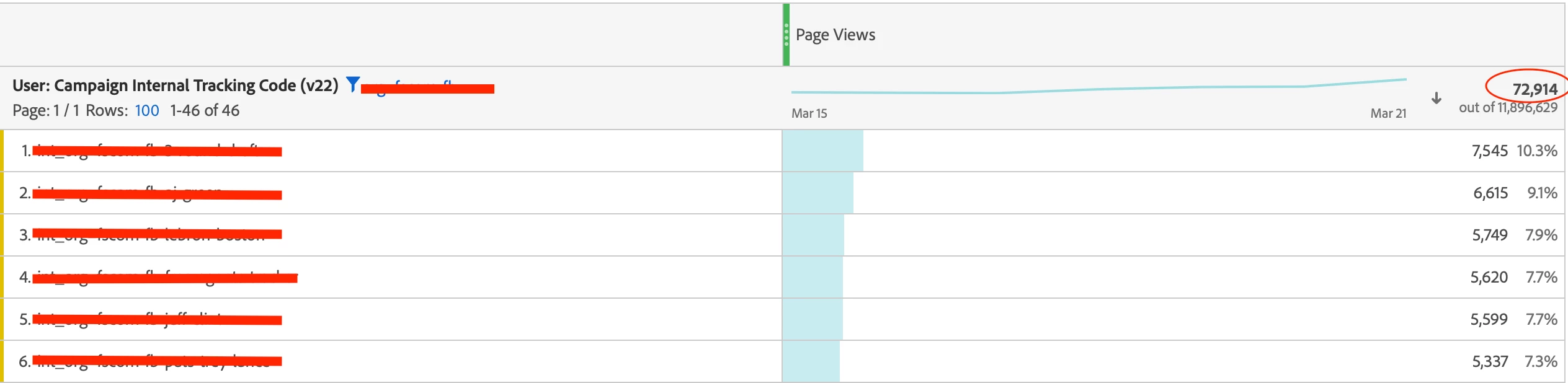


We're using Adobe Analytics to track website views via specific links (links omitted for company privacy). Upon trying to link to Google Data Studio, I selected the option for "Total Page Views" but instead of getting the number circled at the top right (72,914), I'm given the number below it (11,896,629). I know the number below is the grand total, but I'm not sure how to omit that from data studio. 


I already have a filter set in data studio that matches the filter here, but that doesn't seem to make a difference either. 


Does anyone have insight on this specific integration? 

 

This post is no longer active and is closed to new replies. Need help? Start a new post to ask your question.
Best answer by khurshid

If you are referring to Workspace for removing the grand total, you can d so by clicking on the gear icon in the metrics header.

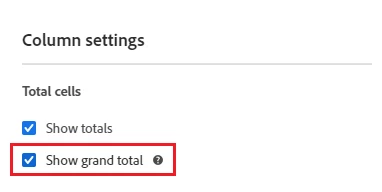
And then uncheck "Show grand total".


1 reply

khurshid
Adobe Employee
khurshidAdobe EmployeeAccepted solution
Adobe Employee
March 23, 2021

If you are referring to Workspace for removing the grand total, you can d so by clicking on the gear icon in the metrics header.

And then uncheck "Show grand total".


khurshid
Adobe Employee
Adobe Employee
April 5, 2021
Unfortunately, I will not be able to suggest anything related to Google Data studio. You might try posting it in GA Forums.