Global Report Suite including mobile app data | Community
Skip to main content
Level 5
December 12, 2022
Solved

Global Report Suite including mobile app data

  • December 12, 2022
  • 1 reply
  • 9006 views

Hi!

We have a global report suite set to get data from all our websites. However, it was not including our app (it can redirect to our sites also). So I went to the report suite, enabled the app data, went to the app data collection property, and also added the global report suite there.

When I go to our report on analytics and try to create a flow using report suit as an entry point, the app report suite does not show there. Is there something else I should do? For the sites, we also mapped out the report suite as an eVar. Would that be the issue? that we don't have a report suite eVar set for the app?
If it is the later, how can I set an eVar for mobile app now that we don't have mobile services anymore? is it through launch like a website (after creating the eVar) or via RS using processing rules?

thanks in advance

This post is no longer active and is closed to new replies. Need help? Start a new post to ask your question.
Best answer by Jennifer_Dungan

Thanks Jen!!


But a question, if the devs set the context as "nameofapp.ReportSuite", how it will send the value of my report suite name? this question sounds dumb/basic but I´m not a technical person.. 

because on workspace when we go to the report suite eVar, it shows each report suite by the name it was given..

Unfortunately, the second option won't work for us as we have a new app being developed now and in the future will prob have others. 

lastly, in terms of the processing rules, how can I set the rule up?

thank you sooo much for your patience Jen!


Ah, sorry, you would have your developers set the value. 


So I often have a mix of values that are set by page (stuff like the category, the asset id, the title, etc... stuff that will be driven by the data and what is currently loaded.


The I will have stuff which is basically set and reused which is specific to the app itself... which app is it (we have three), the code version of the app and the build number (we don't force upgrades, so we need to know which version users are on - and while yes this is also sent in some of the standard metrics, having these pieces allow me to have a little more control), etc.


In your case, the report suite won't change in the middle of using the app, so your developers can set the value once, then attach it to all calls (or as I said, you could use Adobe Launch to just append this - which might be easier....)


The code base of your app will change the syntax of how the value is set and attached to the calls, so you may want your developers to check https://developer.adobe.com/client-sdks/documentation/ or https://aep-sdks.gitbook.io/docs/ 


Basically you would use something like:


MobileCore.track(state: "state name", data: ["key": "value"])


Where "key" would be "myapp.ReportSuite" and "value" would be "reportsuitea" or "reportsuiteb", etc


OR you can append it in your Launch like so:
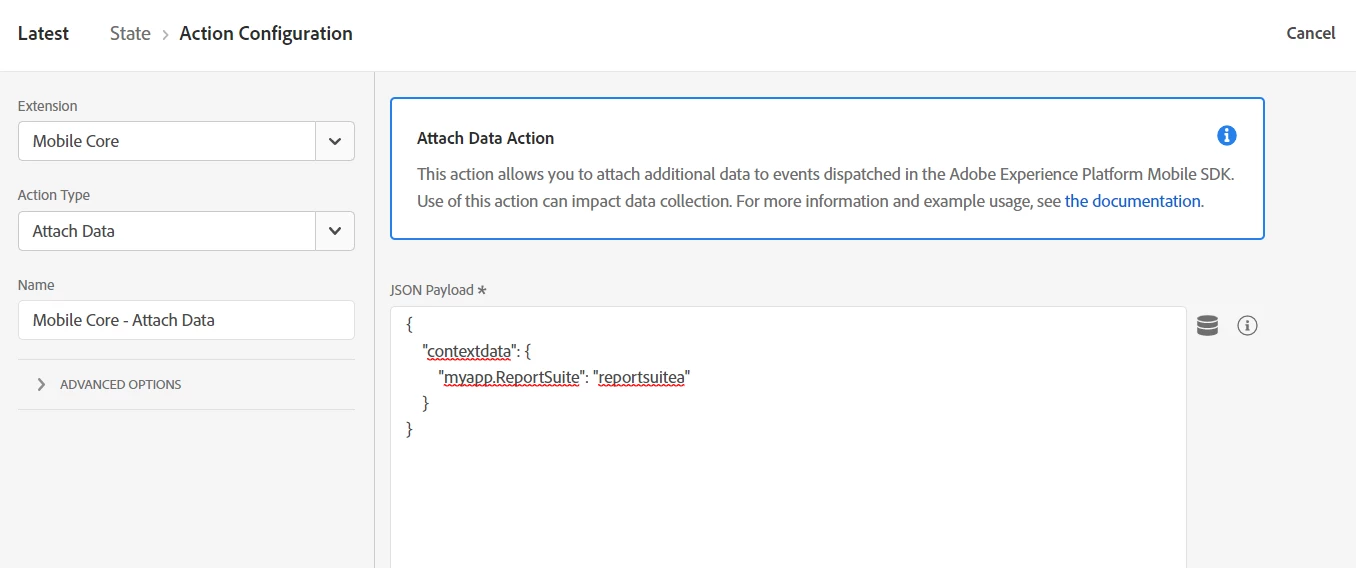
 

{
    "contextdata": {
        "myapp.ReportSuite": "reportsuitea"
    }
}


(set the context variable name "myapp.ReportSuite" to your naming convention, and the value "reportsuitea" to your report suite)


The rule trigger looks like:
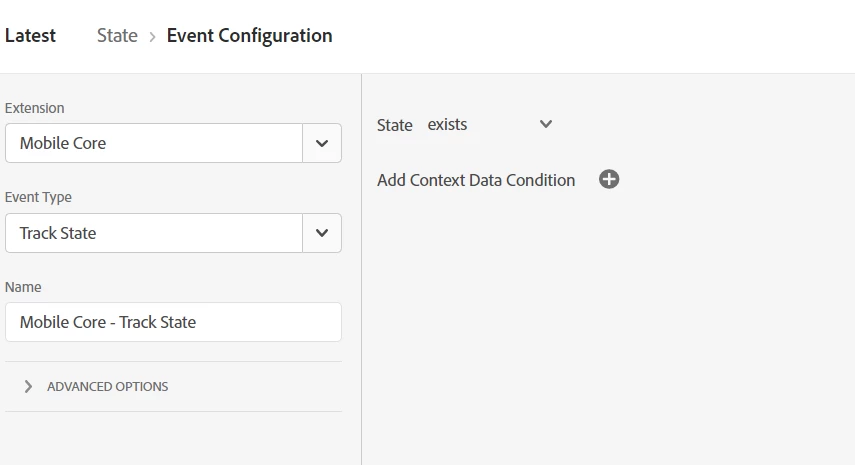


Make sure to create a similar rule for actions as well as states, and maybe even for "Launch" events.


This will append your context variable to your server calls, and since the value of the report suite shouldn't be changing (unless you are using one Launch property to drive multiple suites - then this won't work)


Next, no matter of using processing rule....


In your reportsuite admin, General > Processing Rules


I like to check for app id (to make sure I don't accidentally target web traffic in the suite), you can add multiple conditions, then I choose to "overwrite" eVar5 with my context variable like so:
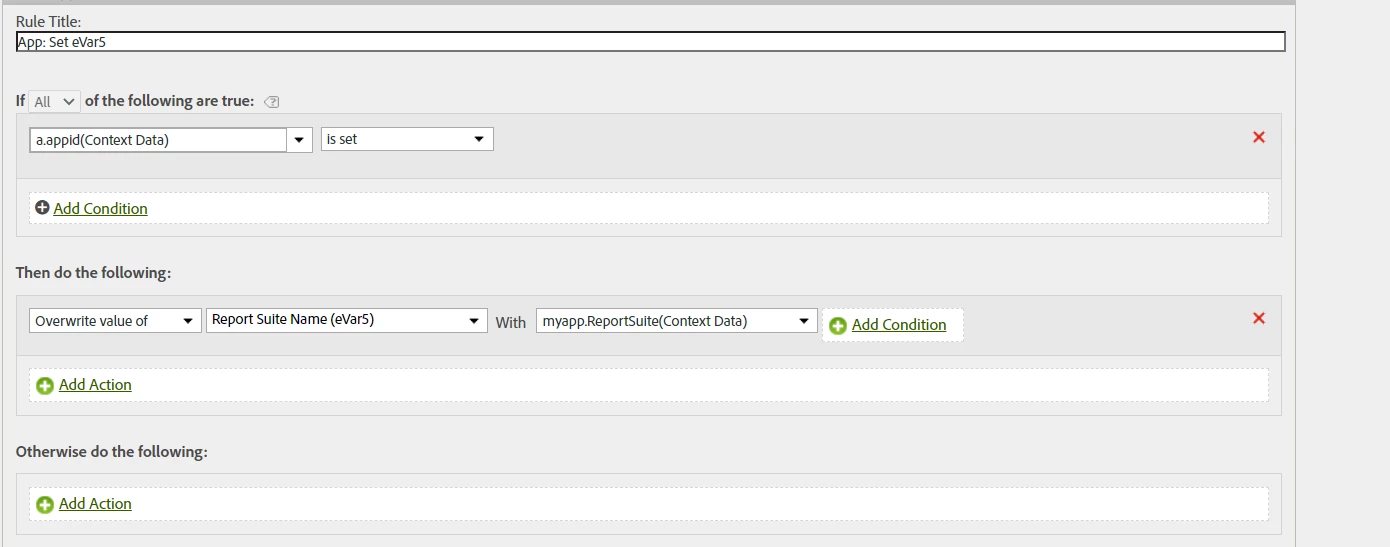
 

Make sure you test this first in a QA or Dev suite... processing rules will change the value of your dimensions, so you want to be sure the rules are working correctly before adding to prod... if something breaks there is no way to get the old values back.

1 reply

Jennifer_Dungan
Community Advisor and Adobe Champion
December 13, 2022

OK, so I have our websites and apps all loading into a global suite, so let's go through this one step at a time.


So I went to the report suite, enabled the app data, went to the app data collection property, and also added the global report suite there.

So if by this you mean, you went to Admin > Report Suites (chose the Suite), then Edit Settings > App Management > App Reporting (then enabled reporting for the SDK) - Good


And also, you added the suite into your Mobile SDK Launch Property, also Good


Next, I am not sure what you mean by

When I go to our report on analytics and try to create a flow using report suit as an entry point

What do you mean create a flow using "report suite" as an entry point.... all your data is in a single global report suite already... 


For the sites, we also mapped out the report suite as an eVar. 

Do you mean that you have an eVar called "report suite" which contains information such as "website1", "website2", "app1", etc - so that you can tell classify your traffic into segments?


If so, then you should have that, but as this is a custom eVar it shouldn't be required to see your app data... just for your segments to work... Unless you are specifically relying on a value to be set for your particular reporting (then potentially your flow may be impacted by having an "undefined" value - I have not seen your reporting, you would know better how your reports are built)


So, now we come to the details of mobile app tracking. In your mobile app, you don't set your eVars, props, etc directly, but rather you need to set context variables, then map those using Processing Rules (you can of course set a context variable like "evar5" and map the value 1 to 1 into your eVar5; or you can set more namespace type parts like "category" or "userId" or "searchTerm", etc, then map those (either alone or as concatenated values into your dimensions).


(Pro Tip, I like to have my developers create all context variables under a specific namespace "myapp.category" or "myapp.userId" - this way ALL the custom values are collected under one "myapp" namespace so that they are easier to distinguish from Adobe's own context variables)


So the first step to figuring out if your tracking is working is to test... Do you have Adobe Experience Platform Assurance (formerly Project Griffon) installed into your app?

https://developer.adobe.com/client-sdks/documentation/platform-assurance/

and here is a user group session on using this tool:

https://www.youtube.com/watch?v=9jgNm_cggLM


IF you don't have that installed, testing is a lot harder, you have to use a tool like Charles or Fiddler, connect your device through a proxy connection to your computer and watch the raw data requests to make sure they are sending to Adobe (you cannot see Post-Processed values here)


I would recommend first testing to make sure that your app data is actually sending... 


Then if you aren't using Assurance, you will need to make sure that ALL your processing rules are configured to properly collect your data.... the tricky part here is waiting an hour to see the data appear in a report... and right now, this already seems like having your data even arrive to the suite is in question....


how can I set an eVar for mobile app now that we don't have mobile services anymore? is it through launch like a website (after creating the eVar) or via RS using processing rules?

If the eVar is essentially a classification to identity your mobile app... if you only have 1 mobile app, you should be able to set up a simple processing rule like:


(Native apps set a standard context variable with the app id under "a.appid" - so a simple "is this a native app check may be enough"


Then in the "Then do the following" area, 

"Overwrite value of"  (select your eVar)  with "Custom Value" (value)


If you have multiple apps, you may need to do a check if this is a native app AND do a secondary check based on the value of a.appid contains, or maybe based on a custom context variable to properly identify multiple apps from one another.


Another recommendation, since you are using Processing Rules, I highly recommend that ALL app rules use the "a.appid" is set check (this will prevent any accidental changing of values coming from your website).  I name all app specific rules with the prefix "App: " to ensure I can tell which rules are which.


Hopefully this is a start for you, but I think before looking at your reports, you need to do direct testing of your app (using Assurance, or at the very least Charles/Fiddler) to make sure that the app is even sending data to Adobe, that there isn't an implementation issue right at the SDK/App level.

fern1Author
Level 5
December 13, 2022

Thanks for your help Jen!

So in regard to the Assurance, we included it in our sprint and should have it deployed soon. This way will be easier to tell. Right now I´ve been checking our data using the real-time option or testing in the development environment (we have a report suite only for that also). 


Next, I am not sure what you mean by

When I go to our report on analytics and try to create a flow using report suit as an entry point

What do you mean create a flow using "report suite" as an entry point.... all your data is in a single global report suite already... 


For the sites, we also mapped out the report suite as an eVar. 

Do you mean that you have an eVar called "report suite" which contains information such as "website1", "website2", "app1", etc - so that you can tell classify your traffic into segments?


And yes, we have an eVar called "Report Suite" set up for every one of our sites and on the global report we have a macro view of where our users go. and we would like to include the app also. 


I can now see that we are indeed getting data from the app as the actions/custom links are showing there. 
and I just checked and it does seem that we are getting the pages from the app also as when I break down some of them with URLs it shows this:

That also made me realize that we have to rename our app screen names as it's difficult to realize they are from the app and not web. (will have to create a proper structure for that).

Our app is not native, and for now, it is the only one but we have a second being developed (not native either). That is why I'm lost in how we (our devs) can create new context data! All the lifecycle Adobe ones are working fine. 


For appid we are getting all the versions of our app. 

If you have multiple apps, you may need to do a check if this is a native app AND do a secondary check based on the value of a.appid contains, or maybe based on a custom context variable to properly identify multiple apps from one another.

when you say the value of a.appid, can I add the exact version of the app there? but in this case, I would have to change it every time we have a new version coming, correct? I think setting a context variable would make more sense (If I learn how to do so for a non-native app and show it to the devs)

And thank you for your tip. I opened a request to rename all our track actions to include the prefix "app", and will be also requesting for page name. Will also change the rules. 

Jennifer_Dungan
Community Advisor and Adobe Champion
December 13, 2022

Oh... if the app is not Native - I assume its more like a native app wrapper around a website? Then  you can just use normal "web tracking" on the website that drives the app - we used to have apps like that.. you don't get app lifecycle events, but it makes things a lot easier 🙂  (well possibly)


In the past, before we had a Native App, our apps used a website (app.site.com) in a native app wrapper... we implemented all analytics through a normal web implementation (not the SDK)... it also meant that we could do most of our analytics testing but loading app.site.com directly in our browsers (no need for the proxy connection). However, if your developers are using the SDK to connect the wrapper (to get lifecycle metrics with the page content being loaded, you may still need to do all the proxy / SDK testing.


It might be worth sitting down with your developers and really understanding how the app is built and how they are sending you data.....


when you say the value of a.appid, can I add the exact version of the app there? but in this case, I would have to change it every time we have a new version coming, correct? I think setting a context variable would make more sense (If I learn how to do so for a non-native app and show it to the devs)

You can add the exact version, but I wouldn't... our App IDs actually look like "Site A 3.55.0 (23454364663)" - which is essentially a site identification,version number and build number (however, this is a Native App app id...  depending on your implementation, you may not have this... unless the native wrapper is setting it). So I can create a rule like "a.appid contains Site A" rather than look specifically a actual individual versions.... OR if your developers set a context variable to hold a direct "Site A" value, you could look for "a.appid is set" and custom context variable equals "Site A" for instance. OR maybe you just need to set a few context variables to identify something like "isApp = true" and "siteId = Site A" (then use "isApp equals true" as your processing rule to only trigger on your apps).  Again, understanding how your apps are working is going to be key to ensuring you have what you need to set up your rules 🙂


It's actually not renaming your trackActions...  you want to name the context variables that are attached to your trackState and trackActions. By default (and you can't change this) ALL trackActions will endup prefixed with "AMACTION:" anyway.... most people hate this, but Adobe hasn't changed it...


If I have an action "successful login", I want that value to be set on my website and my app (since I have a prop that identifies if the action is coming from my website or my app)... sadly, I get two variations in my custom links "successful login" and "AMACTION: successful login" (so if I want to look specifically at those actions, I always have to create a segment to pull the two variations together)