Getting "414 Request URI Too Large" in S.product | Community
Skip to main content
jayakrishnaap
Level 2
December 6, 2018
Solved

Getting "414 Request URI Too Large" in S.product

  • December 6, 2018
  • 2 replies
  • 3435 views

Team,

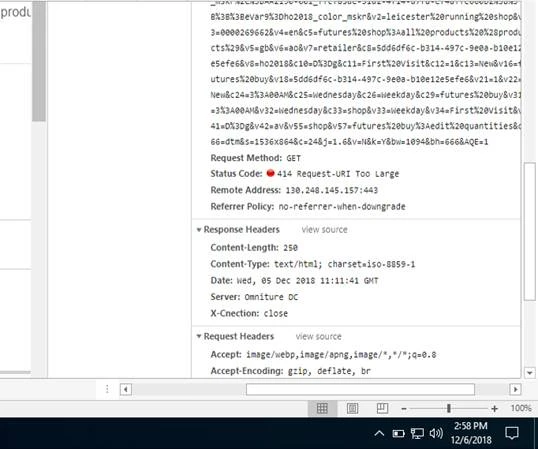
We have scenario in B2B retailer web sites where we can add more than 100 to 200 products to the cart at the same time to place the order. We are using s.product variable to capture the particular product ID, Quantity and price. Unfortunately, when we add more than 100 products to the cart then we are seeing the status as "414 Request URI Too Large" as shown on the attached screenshot. Could any one assist me to fix this issue and let me know for any other information.

Thank you,
Jay.

This post is no longer active and is closed to new replies. Need help? Start a new post to ask your question.
Best answer by Alexis_Cazes_

You request is send via GET it needs to be send via POST.

You need to use Visitor ID services and latest Appmeasurement.js and if the URI is nore than the limit 2048 char I think it will automatically send it via post

See this Difference Between POST vs. GET Request Methods

2 replies

Alexis_Cazes_
Alexis_Cazes_Accepted solution
Level 10
December 6, 2018

You request is send via GET it needs to be send via POST.

You need to use Visitor ID services and latest Appmeasurement.js and if the URI is nore than the limit 2048 char I think it will automatically send it via post

See this Difference Between POST vs. GET Request Methods

jayakrishnaap
Level 2
December 11, 2018

Thank you so much. We are checking as mentioned on the given link.