Getting 'None' Marketing Channel Data in Adobe Analytics | Community
Skip to main content
Level 2
August 30, 2023
Solved

Getting 'None' Marketing Channel Data in Adobe Analytics

  • August 30, 2023
  • 3 replies
  • 4802 views

Hi everyone,


I am observing a significant volume of data that is being labeled as "None" within the marketing channel category. After closely examining the data and its traffic sources, it becomes clear that a substantial portion of this data is either not specified or belongs to other active marketing channels. 


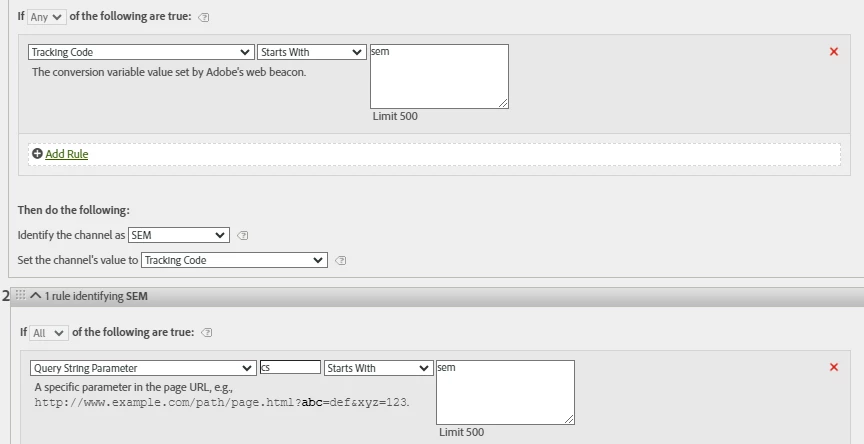
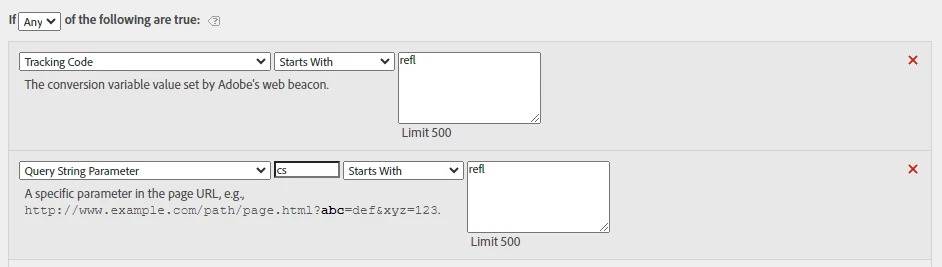
Are there any problems with our marketing channel rules that might be causing data to appear under the "None" marketing channel?


I have included a few screenshots of the marketing channel rules for your reference.


This post is no longer active and is closed to new replies. Need help? Start a new post to ask your question.
Best answer by Rajeshwari

Hello @roshang,


This processing rules can still be better. However, for now try adding one more rule.


The condition would be 'if query string exist' and pass that data to other campaigns.


guess it will cover all remaining query string which are not defined and those will bucketed as other campaigns.

3 replies

FarazHusain
Adobe Employee
Adobe Employee
August 30, 2023

If the "None" category appears, it usually indicates that the visit does not meet any of the specified rules. This could be due to a direct visit (without a referrer) or an internal visit. Can you re-check that all conditions and query string parameters are included and make sure you aren't missing out on any? This article offers some debugging options to assist with troubleshooting. You might have to troubleshoot and review the rules configured - https://experienceleague.adobe.com/docs/analytics/components/marketing-channels/c-faq.html?lang=en


RajeshwariCommunity AdvisorAccepted solution
Community Advisor
August 30, 2023

Hello @roshang,


This processing rules can still be better. However, for now try adding one more rule.


The condition would be 'if query string exist' and pass that data to other campaigns.


guess it will cover all remaining query string which are not defined and those will bucketed as other campaigns.

Data_Dude_Dolan
Level 2
August 31, 2023

You are most likely missing rules in the processing channels, you could try to readjust in the marketing channel processing rules admin section.

Level 3
January 24, 2025

Hi @data_dude_dolan , @roshang@farazhusain,  If I break down the marketing channel with marketing channel detail am getting the none value. can you please tell the why it was happening. 

FarazHusain
Adobe Employee
Adobe Employee
January 24, 2025

@padmajas Have you checked RAW data to see what values in Search Engine you had when the Last Touch Channel set/persisting with Display value?