Gatsby Data Element in Adobe Launch | Community
Skip to main content
warrensassoon
January 26, 2022
Question

Gatsby Data Element in Adobe Launch

  • January 26, 2022
  • 3 replies
  • 2035 views

I'm unable to set up Adobe Analytics to fire on all pages while navigating our micro-site, which is built on the Gatsby platform; it fires only on some pages, with no apparent logic to when it actually does fire


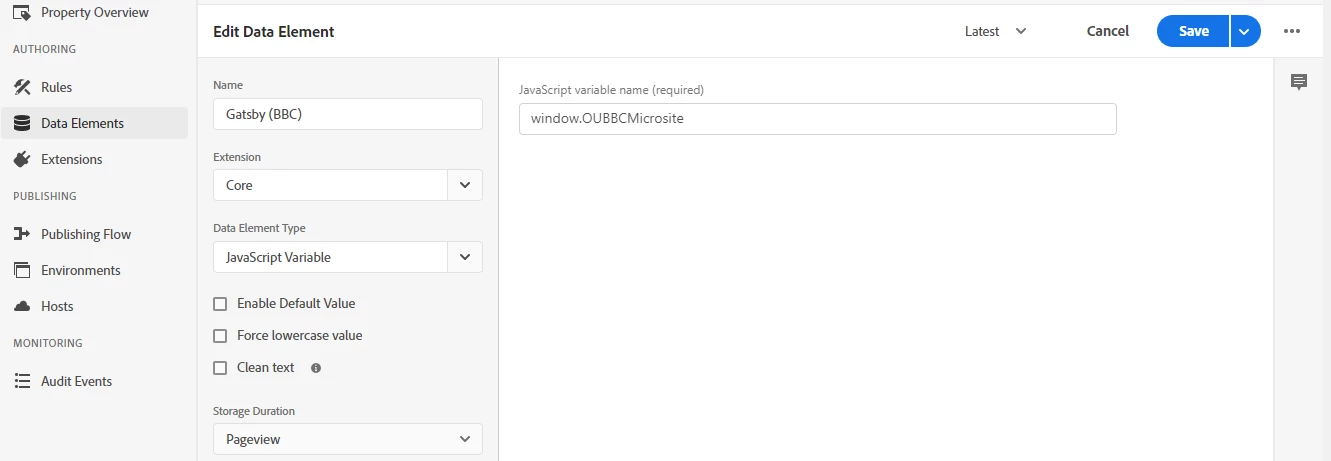
Below is the Gatsby data element set-up in Launch, and there's also (of course) a rule that uses this data element to generate a page name variable / fire an Adobe beacon upon a direct call, but I feel like the issue itself lies with the data element


Thoughts / advice welcome


This post is no longer active and is closed to new replies. Need help? Start a new post to ask your question.

3 replies

Pablo_Childe
Community Advisor
Community Advisor
January 26, 2022

I know nothing about gatsby so cant be a definitive guide here.


In a nutshell you need to check for each page(virtual page if its a Single page  App) that you get an adobe beacon. You may need to add logic such that on those pages where it doesn't fire as expected you do something like a direct call rule to fire your Adobe tag.


You can use network tab in browser. Filter to see parameters tab use filter of "/b/ss/ and check if beacon fires as expected.


warrensassoon
January 27, 2022

Yeah, it is a single-page app, and I already use a direct call rule, which is why it's odd that it still doesn't work on all pages

Gokul_Agiwal
Community Advisor
Community Advisor
January 26, 2022

Hey Hi @warrensassoon 

As you said it's not fire on all pages however it's fire on some pages do you see any differences between these two - I would suggest to check in console or network tab. 


other thing I noticed in screenshot as you selected storage duration as PageView - Do you want to hold this value in each case? 

You have below choices available so check which is suitable for your requirement 

The available choices are:

  • None
    • The value is not stored.
  • Page view
    • The value is held in a JavaScript variable until the page is refreshed or a new page is loaded.

    • Can be created and set in scripts using _satellite object syntax:

      _satellite.setVar('data_element_name')

  • Session
    • Values persist in the browser’s session storage until the browser tab is closed.
    • Available throughout the site visit.
  • Visitor
    • The value is stored indefinitely in the browser’s local storage.

Hope this helps

warrensassoon
January 27, 2022

I'll have another look at the console / network data, and yeah, I do want to store as page view

yuhuisg
Community Advisor
Community Advisor
January 27, 2022

While this data element might be a culprit, I think you also want to check the Rule(s) that send your AA beacon. It could be that they have conditions that no longer match how your website works, so that's why the beacons are not being sent to AA for some pages.

warrensassoon
January 27, 2022

It could be the rule that's the issue, but it matches this set-up guide exactly https://hashouttech.com/blog/Implementing-Adobe-analytics-for-Gatsby-site

warrensassoon
January 28, 2022

Could it be that with those untracked pages, _satellite.track("gatsbyRouteChange") is not being called?


It's possible, I'll check