Freeform Table - Grand Total is incorrect or not adding up correctly | Community
Skip to main content
Kshg7030
Level 2
September 18, 2025
Solved

Freeform Table - Grand Total is incorrect or not adding up correctly

  • September 18, 2025
  • 2 replies
  • 1190 views

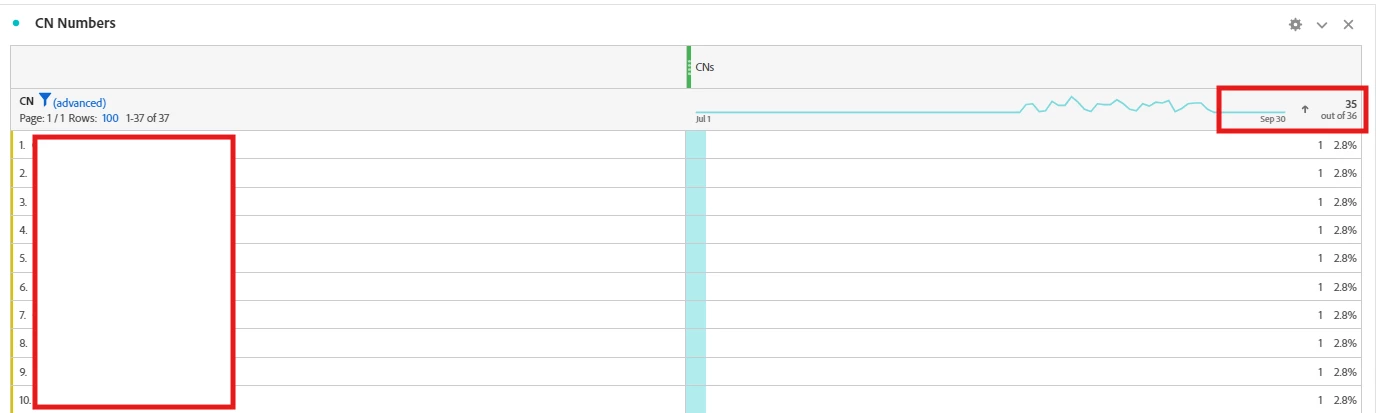
I am having a data element which records dimension values for a specific event. To get the total count of the values received for that dimension, I have created a calculated metric (Approx distinct count ( dimension_name )). Although, I can see that I am getting 37 Unique values ( Number of rows in the freeform table) for this dimension, the grand total header row for the freeform table shows that there are only 36 values ( 35 excluding NA values).


Best answer by Jennifer_Dungan

Hi,

Thanks for your suggestion. I don't think this is due to the data issue from Adobe. I validated other date ranges and I am still seeing the same issue. 


If we consider that the "Approximate Distinct Count" is miscalculating, how can it me corrected? or is there any other to calculate the "Number of Unique Values" for a dimension?


I was just playing with a dimension on our side...


Based on the "breakdown" column, I should have approximately 479K rows, but the Approx. Count Distinct was only showing 475K.. so I was 4K short...


So, I tried to make my own calculated metric.


First I started with an IF statement:


IF [

    logical_test [

        (Dimension X exists)

        Occurrences

   ]

   value_if_true [

       static number = 1

   ]

   value_if_false [

       static number = 0

   ]

]


This returned 1 on every row of my dimension (including the total), which is what I wanted...


Then, I edited the metric again, wrapping the above IF statement inside a COLUMN SUM function.


This now returns a match to my number of rows, i.e. 479K. Note, this will show on ALL rows, it won't be like the Approx Count Distinct where each row will show 1 and the total will show a total... every row is the column sum.

2 replies

MandyGeorge
Community Advisor and Adobe Champion
September 18, 2025

It looks like the metric you're using there is custom built. If you're able to share how that metric is built that could help give an answer.


But from what I can see in your screenshot, my best guess is that multiple CNs existed in the same visit or hit, and the way you've built out the metric is it's counting instances of at least one CN, so having multiple, it would be deduplicating it.

Kshg7030
Kshg7030Author
Level 2
September 19, 2025

Yeah sure. The CN metric counts unique CN value received.


Jennifer_Dungan
Community Advisor and Adobe Champion
September 18, 2025

You have an advanced filter on your data... the "grand total" is showing the unfiltered total.


Let's say I have the following data:


  • value 1
  • value 2
  • value 3
  • value 4


My total and grand total at this time is "4"


Now, if I filter my data to be "contains 2", I will see


  • value 2


My total will be 1, my grand total will still be "4"

Kshg7030
Kshg7030Author
Level 2
September 19, 2025

so advanced filter is filtering out the "NA" values which I dont need anyways. Apart from that I have a total count of 37 CN values which I can confirm by seeing the Number of rows for CN column. But still the total is giving me a total of 35 ( missing 2 values).


The metric I have built is a  calculated metric which counts the unique appearances of CN hit. 

Jennifer_Dungan
Community Advisor and Adobe Champion
September 19, 2025

So there could be two things at play here... the calculated metric I see is "Approximate Count Distinct" which might miscount...


But also, there was a data issue on Adobe from Sept 17 8am MDT to Sept 18 5am MDT, and that could be causing some issues with your data...


The issue is still open and we're waiting on the remediation plan.... what happens if you look at the data last month? Or prior to Sept 17