Flow reports from clickstream data | Community
Skip to main content
January 21, 2019
Solved

Flow reports from clickstream data

  • January 21, 2019
  • 2 replies
  • 2439 views

Hi,

How can I utilize adobe data feeds(clickstream data) to create flow reports (pathing) on an external tool like Tableau or R?

This post is no longer active and is closed to new replies. Need help? Start a new post to ask your question.
Best answer by seburke1

Hello,

It would be difficult to do, but not impossible.  You would need to construct the visit, a query to say something like concat post_visid_high/low then visit_num and order by the visit_page_num. The visit_page_num is the order of the hits.  You could then query the variable and see how it changes via the visit_page_num values which would be the path or flow.

I hope that helps,

Seth

2 replies

seburke1Adobe EmployeeAccepted solution
Adobe Employee
January 30, 2019

Hello,

It would be difficult to do, but not impossible.  You would need to construct the visit, a query to say something like concat post_visid_high/low then visit_num and order by the visit_page_num. The visit_page_num is the order of the hits.  You could then query the variable and see how it changes via the visit_page_num values which would be the path or flow.

I hope that helps,

Seth

April 21, 2021

@reportingl49465 @seburke1 

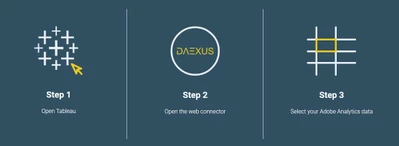
If you need to import Adobe analytics data in Tableau, Daexus built a free web data connector.

  • no sign-up required
  • no download 
  • ultra secure as data doesn't go through external server - from Adobe Analytics straight to your computer.

To access it, paste the link in Tableau and start brining your data.

The paid version enables date expressions and automated data imports.

Access the link on their website