Flow in Workspace: what does it mean of the chart? | Community
Skip to main content
Level 7
April 26, 2019
Solved

Flow in Workspace: what does it mean of the chart?

  • April 26, 2019
  • 2 replies
  • 2680 views

Hi experts,

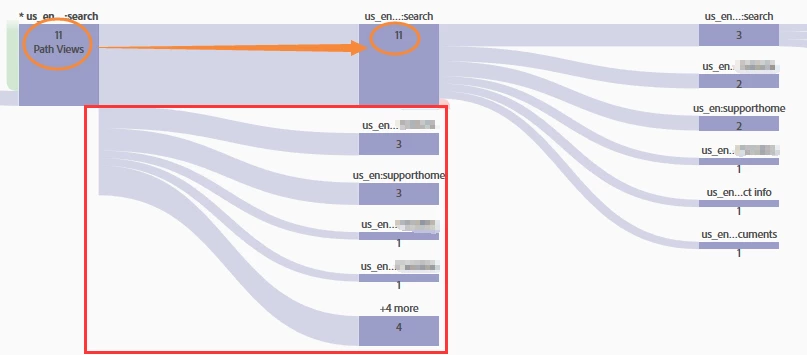
May I know what's the mean of data/path in the red box?

A segment is applied, I can see 11 pathviews then 11 in the next path, then open-up.

But, in the red box, from the chart, it's not from the 11 pathviews? why they are showing and what does it mean?

May you please help to clarify?
Thank you.

H

This post is no longer active and is closed to new replies. Need help? Start a new post to ask your question.
Best answer by karandeeps51149

Hi,

Analysis Workspace counts reloads. There are instances when receive the same image request twice. Flow diagram in workspace shows it as two instance and represent it as Page Flow.

I believe you are checking in test environment that's why the number is quiet low and same. However, normally you might can see same name but not the same number.

Regards

Karandeep Singh

2 replies

karandeeps51149Adobe EmployeeAccepted solution
Adobe Employee
April 26, 2019

Hi,

Analysis Workspace counts reloads. There are instances when receive the same image request twice. Flow diagram in workspace shows it as two instance and represent it as Page Flow.

I believe you are checking in test environment that's why the number is quiet low and same. However, normally you might can see same name but not the same number.

Regards

Karandeep Singh

H_LAuthor
Level 7
April 28, 2019

Hi Karandeep Singh,

Thank you for the reply.

I applied a segment above the flow, limited traffic must from: Internal Search Page to 1 specific document ID.

That's why the counts a small.

Now I understand those are the "reloads", your reply is very helpful.

Best,

H