Flow diagram issue | Community
Skip to main content
Level 2
November 8, 2017
Solved

Flow diagram issue

  • November 8, 2017
  • 6 replies
  • 1728 views

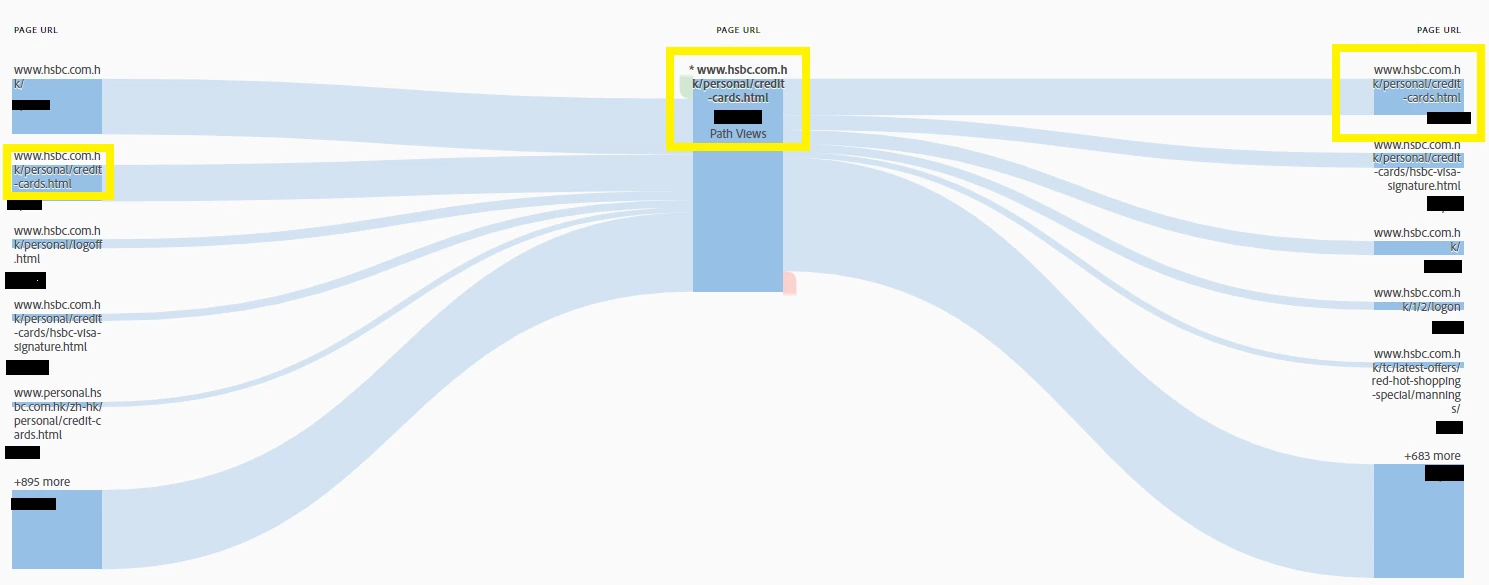
When I use the flow diagram, I tried putting page name and the url in the middle checkpoint and study the flow. However, the highest visit of the next page AND previous page are usually the exact same page that I put in the middle check point.

It usually has more than 30% of the traffic. I don't think people "reload" the page that often. Does anyone have any idea?

Thank you very much

This post is no longer active and is closed to new replies. Need help? Start a new post to ask your question.
Best answer by PratheepArunRaj

Hello,

Also, kindly check the 'Reloads' metric for the page. If the 'Reloads' are more, it is due to the following cases:

1. Links pointing to the same page.

2. More than 1 Server Call/Duplication.

3. Any server logic to reload the page within specified time period (Usually for the cases in Post Login Environment).

4. Some JavaScript action on the page firing Page Views rather than Custom Links (Check the implementation).

Thank You!

Arun

6 replies

Adobe Employee
November 9, 2017

Hi Oscar,

Could you please share a screenshot of the report. It'd help better understand the data you are looking at.

Thanks.

Level 2
November 9, 2017


Sorry that I have to remove all numbers in the image. But you can see the highlighted page (in yellow) are the same pages. The in and out traffic occupies exactly 18.1% I don't think there are same amount of users refresh the page twice. May I know what may cause this?

thank you very much.

Adobe Employee
November 10, 2017

Thank you.

This type of data indicates that more than 1 server call is being triggered for this page for some reason. It could be related to implementation or some sort of re-direct.

Please audit the page and it's implementation from this perspective.

PratheepArunRaj
Community Advisor and Adobe Champion
PratheepArunRajCommunity Advisor and Adobe ChampionAccepted solution
Community Advisor and Adobe Champion
November 10, 2017

Hello,

Also, kindly check the 'Reloads' metric for the page. If the 'Reloads' are more, it is due to the following cases:

1. Links pointing to the same page.

2. More than 1 Server Call/Duplication.

3. Any server logic to reload the page within specified time period (Usually for the cases in Post Login Environment).

4. Some JavaScript action on the page firing Page Views rather than Custom Links (Check the implementation).

Thank You!

Arun

Thank You, Pratheep Arun Raj B (Arun) | Xerago | Terryn Winter Analytics
Level 2
November 10, 2017

Thank you very much AbhijeetKMishra

Level 2
November 10, 2017

Thank you very much PratheepArunRaj. Ya. Will definitely check that.