Flow Diagram across different pages | Adobe Higher Education
Skip to main content
Level 2
November 9, 2017
Resuelto

Flow Diagram across different pages
  • November 9, 2017
  • 1 respuesta
  • 731 visualizaciones

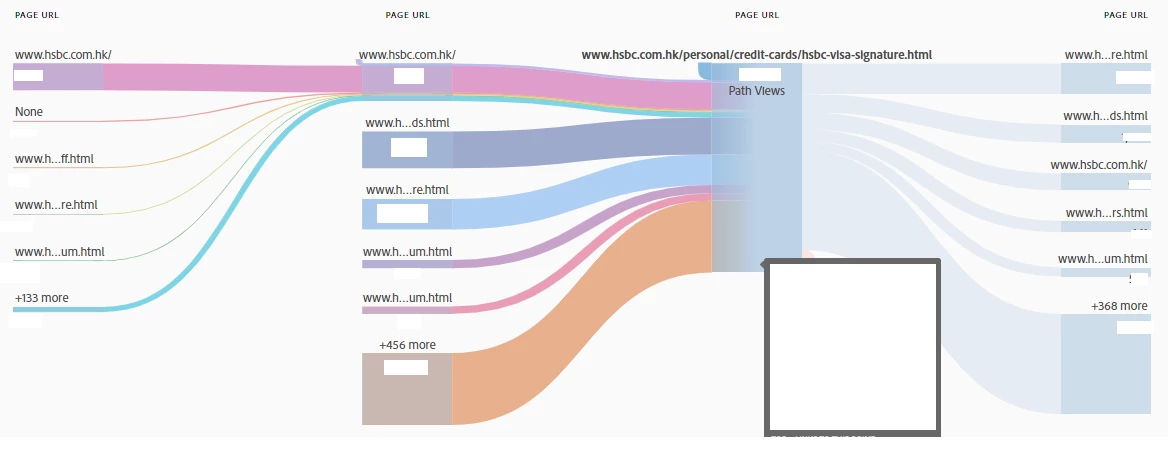
It is very clear to see how users flow with the color indicated. However, it seems that the color cut off when it cross the middle check point. Can we also compare how those traffic goes from one end to the other end across the middle check point?

Este tema ha sido cerrado para respuestas.
Mejor respuesta de Gigazelle

The colors wouldn't exactly make sense going both before and after the current page. For example, with your pink path leading up to the current page, those 'pink visitors' travel across all of the different future pages, so it would not make sense to make them all pink too.

You can create flow reports in such a way that highlights the next pages, which will colorize those next pages accordingly. You can also hover your mouse over next pages to get a temporary coloring, but that 'blues out' the pages going in the other direction.

1 respuesta

Gigazelle
Adobe Employee
GigazelleAdobe EmployeeRespuesta
Adobe Employee
December 1, 2017

The colors wouldn't exactly make sense going both before and after the current page. For example, with your pink path leading up to the current page, those 'pink visitors' travel across all of the different future pages, so it would not make sense to make them all pink too.

You can create flow reports in such a way that highlights the next pages, which will colorize those next pages accordingly. You can also hover your mouse over next pages to get a temporary coloring, but that 'blues out' the pages going in the other direction.