Facebook page view pixel not firing | Community
Skip to main content
Level 2
February 1, 2023
Solved

Facebook page view pixel not firing

  • February 1, 2023
  • 4 replies
  • 3073 views

Hi Everyone,

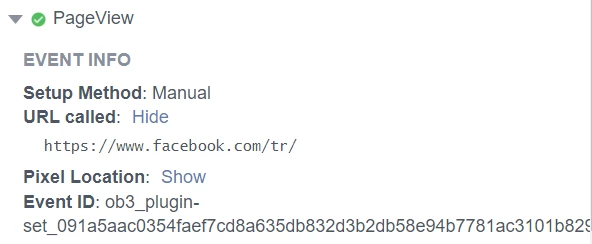
We have implemented facebook pixels for our website and it was working fine earlier. When we check today, all custom pixels and standard (addtocart, view content etc.,) fired perfectly fine except facebook pageview. We couldn't see the pageview pixel in network tab and omnibug. In facebook pixel helper extension, it was showing as in below screenshot. URL called is just "https://www.facebook.com/tr/" without event and id information.
Has anyone faced the same issue? Wanted to know if there is anything that needs to be corrected to make it fire properly. Please advise.


This post is no longer active and is closed to new replies. Need help? Start a new post to ask your question.
Best answer by kamlesh-maddheshiya

Hi @kanmani ,

Just for testing, can you change the order of rule like for pageview (49), viewContent (51) and then check, might be all fired same time. 🙂

4 replies

kamlesh-maddheshiya
Community Advisor
kamlesh-maddheshiyaCommunity AdvisorAccepted solution
Community Advisor
February 1, 2023

Hi @kanmani ,

Just for testing, can you change the order of rule like for pageview (49), viewContent (51) and then check, might be all fired same time. 🙂

kanmaniAuthor
Level 2
February 1, 2023

Hi @kamlesh-maddheshiya ,

Thank you for your answer. I tried your suggestion but it didn't help. 

February 1, 2023

Adobe Analytics lets you mix, match, and analyze data from any digital point in the customer journey. With in-depth analysis, versatile reporting, and predictive intelligence, you get the insightful foundation you need to build better customer experiences.

yuhuisg
Community Advisor
Community Advisor
February 2, 2023

How is your Facebook pixel being fired for page views? Please describe the process, otherwise no one here will know how to help you.

kanmaniAuthor
Level 2
February 3, 2023

Hey yuhuisg,
Thank you for the reply. We have implemented facebook page view pixel to fire on window loaded and for all pages (no restriction in pathname). It is just the basis pageview pixel which worked since last 3 years but now we couldn't see the pixel in network tab, with "ev=PageView".

Hope this helps.

yuhuisg
Community Advisor
Community Advisor
February 3, 2023

Double-check for the Facebook pixel in your browser's Network console. When you load a page, search for network requests to "facebook.com/tr". Do you see any requests? You should see at least one that corresponds with the one shown in Facebook Pixel helper extension. Now click that network request to inspect it further. Do you see a "Payload" tab? If so, click it, then inspect the payload manually to see if the parameters there correspond with what you expect for a Facebook page view.

If the above steps work for you, then it most likely means that your Facebook page view had been tracked with a "POST" request that the helper extension can't pick up.

February 7, 2023

You see blunders that assert the occasion setup device cannot hit upon a Meta Pixel for your website. This can be because: Your pixel is in an inline frame (iframe), or the UI button you are seeking to install is in an iframe. Instead of using the occasion setup device, you may find installation occasions manually using code.