Exclude vs not match in Visitor and visit container | Community
Skip to main content
Level 2
November 15, 2018
Solved

Exclude vs not match in Visitor and visit container

  • November 15, 2018
  • 8 replies
  • 5217 views

Hello

I have been studying adobe analytics.

But I can't figure out the difference between Exclude and not match even though I read some thread and answer like .

"Exclude" and "Does not contain" in segment

Now I have made document to confirm if my understanding is correct or not.

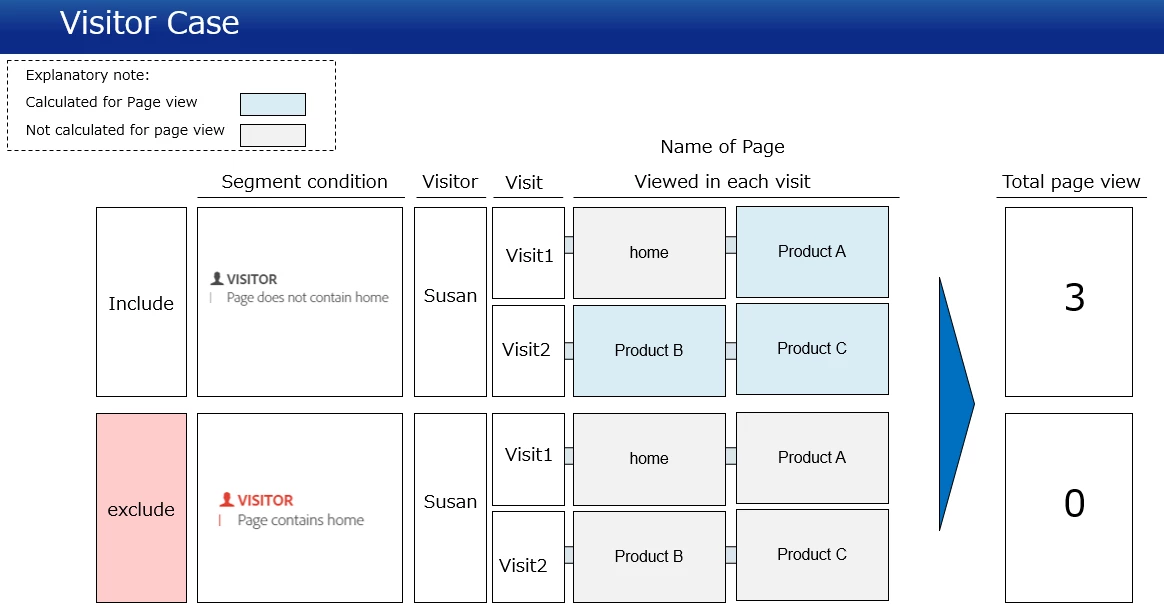
The documents show how total page view will be calculated when implementing each segmentation to visit.

I appreciate it if you let me know if my understanding is correct.

Thank you
Best answer by Hyder_Ziaee

the action is not to pick hits where the condition matches, but the entire visit (container level)

Since the container is visit, the action taken is to include the visits (and the the entire hits within) when a single hit matches the condition.

Here the condition is 'page does not equal home'. So if a visit contains even a single page that is not home, it will include the visit (all the hits) to which the hit matching the condition belongs (including the pages which have home).

Now once the data set is present, you are simply calculating the page views.

8 replies

Hyder_Ziaee
Adobe Employee
Adobe Employee
November 15, 2018

Your confusion seems around the condition match and the segmented data set.

Example.

Container: Include Visit

Condition: Page does not contain 'home'

Visit #Hit #Page NameCondition Action
11HomeFalseNo Action
12Product ATrueInclude Visit 1
21Product BTrueInclude Visit 2
22Product CTrueInclude Visit 2

So the final data set contains the entire Visit1 and Visit2

If you calculate, the total page views in this data set equals 4 (2 from Visit1 + 2 from Visit2)

Similarly the container with include Visitor would include the entire visitor data set when the condition is fulfilled. Thus the total page views is again 4

Level 2
November 16, 2018

Thank you

But Sorry I can not still understand.

Visit #

Hit #

Page Name

Condition

Action

11HomeFalseNo Action
12Product ATrueInclude Visit 1
21Product BTrueInclude Visit 2
22Product CTrueInclude Visit 2

Example.

Container: Include Visit

Condition: Page does not contain 'home'

In this above case,

Why the total page views in this data set equals 4 (2 from Visit1 + 2 from Visit2) ?,even though visit#1 hit #1 will be no action.

I think the total page views in this data set equals 3 (1 from Visit1 + 2 from Visit2).

And I appreciate it if there is a case of using excluding visit.

Thank you

Urs_Boller
Community Advisor
Community Advisor
November 16, 2018

read this forum thread: Does not exist vs Exists (exclude)

your question/confusion is almost the same except another condition.

Level 2
November 16, 2018

Thank you.

Actually I read that thread. But I can't still grasp all idea of this.

So which part of following visualization is wring after all?

Hyder_Ziaee
Adobe Employee
Hyder_ZiaeeAdobe EmployeeAccepted solution
Adobe Employee
November 16, 2018

the action is not to pick hits where the condition matches, but the entire visit (container level)

Since the container is visit, the action taken is to include the visits (and the the entire hits within) when a single hit matches the condition.

Here the condition is 'page does not equal home'. So if a visit contains even a single page that is not home, it will include the visit (all the hits) to which the hit matching the condition belongs (including the pages which have home).

Now once the data set is present, you are simply calculating the page views.

Level 2
November 16, 2018

Thank you

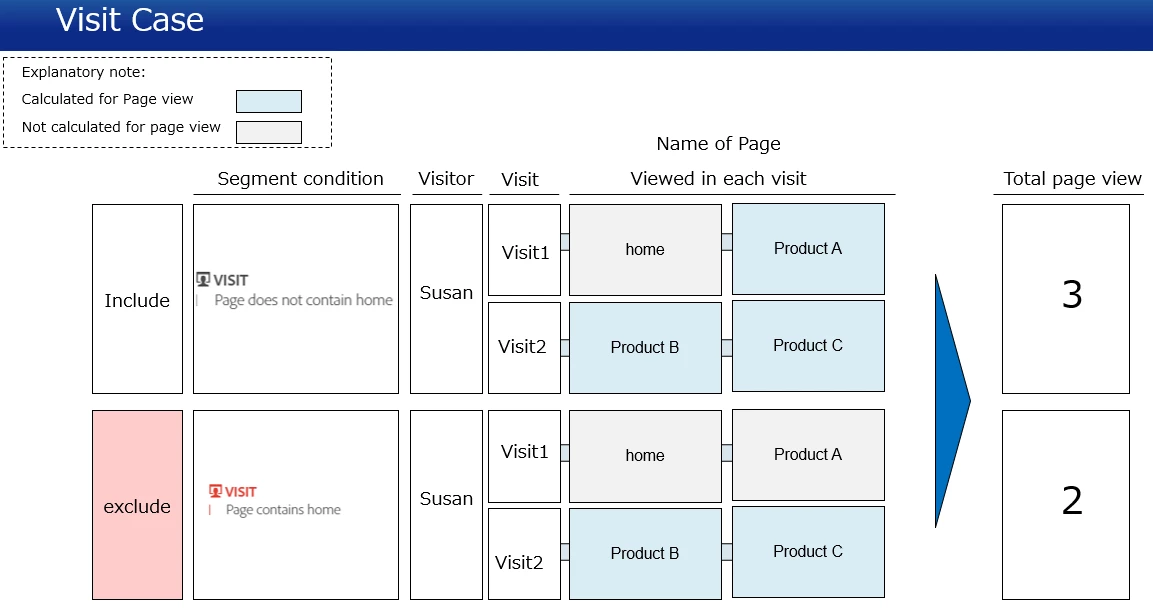
Based on your answer,I modified visualization.

Is this correct?

Hyder_Ziaee
Adobe Employee
Adobe Employee
November 16, 2018

Yes, this is correct.

Level 2
November 16, 2018

Thank you.

Now I understand!