Events were fired by multiple times | Community
Skip to main content
November 30, 2022
Solved

Events were fired by multiple times

  • November 30, 2022
  • 4 replies
  • 1735 views

Hello,


We have two events to track the PDF Download, event 43 is tools, and event 13 is PDF Brochure. 

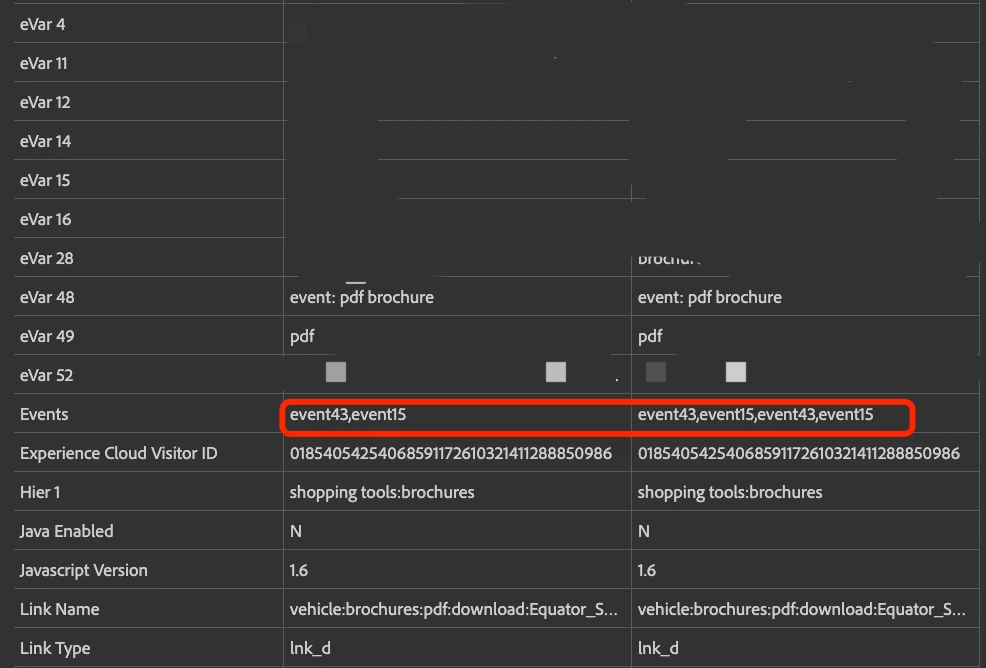
However, when the user does not refresh the page and clicks the button multiple times, the two events will be fired repeatedly. 

I tried to add clear variables to the rule. But it didn't solve the problem. 

So,  I have no idea how to fix this issue. Any advice is appreciated.
 

Thanks again!

This post is no longer active and is closed to new replies. Need help? Start a new post to ask your question.
Best answer by Jennifer_Dungan

I don't have this issue, but I also don't use the set events area of "set variables". I actually use custom JS in the custom code area (long story as to why I do this, but this might be a solution for you).

Seeing this behaviour, I suspect that the built-in feature must "append" events/linkTrackEvents... which isn't what you want....

While this sounds a little strange, if you removed the events from here:

Then in custom code area do the following:

s.events="event43";
s.linkTrackEvents = s.events;

or

s.events="event15";
s.linkTrackEvents = s.events;

This should explicitly set your events, and your linkTrackEvents to pass only the events you want.....

Give that a try and see if it works for you

4 replies

jeff_bloomer
Community Advisor and Adobe Champion
November 30, 2022
Jennifer_Dungan
Community Advisor and Adobe Champion
Jennifer_DunganCommunity Advisor and Adobe ChampionAccepted solution
Community Advisor and Adobe Champion
November 30, 2022

I don't have this issue, but I also don't use the set events area of "set variables". I actually use custom JS in the custom code area (long story as to why I do this, but this might be a solution for you).

Seeing this behaviour, I suspect that the built-in feature must "append" events/linkTrackEvents... which isn't what you want....

While this sounds a little strange, if you removed the events from here:

Then in custom code area do the following:

s.events="event43";
s.linkTrackEvents = s.events;

or

s.events="event15";
s.linkTrackEvents = s.events;

This should explicitly set your events, and your linkTrackEvents to pass only the events you want.....

Give that a try and see if it works for you

WillN_NAuthor
January 18, 2023

We have used your suggestion and it works very well, thank you so much!!

Jennifer_Dungan
Community Advisor and Adobe Champion
January 18, 2023

Yay! So glad that worked for you. 

yuhuisg
Community Advisor
Community Advisor
December 1, 2022

It looks like your implementation simply appends event15 and event43 to the s.events string, regardless of what is in that string already, e.g.

s.events = (s.events ? ',' : '') + 'event15,event43';

A better option is to use the "apl" plugin. Reference: https://experienceleague.adobe.com/docs/analytics/implementation/vars/plugins/apl.html?lang=en This plugin prevents such repetition from happening.

s.events = s.apl(s.events,'event15,event43');

Sujeet_Kharote
December 2, 2022

@willn_n just to confirm, if you are using the append plugin in your do-plugin? Might be it is appending the existing events hit level, I might be working, but I suscept you should review your do-plugin in custom code